

WordPress
AI Engine 3.9.4 for WordPress: MCP Tools, BYOK Pricing & Security Review
Meow Apps' AI Engine (v3.9.4, November 12, 2026) now powers 90,000+ WordPress sites with a built-in MCP server, vector embeddings, and zero-markup BYOK API keys. Here is the verified November 2026 breakdown of its Free vs. Pro pricing, MCP Undo controls, Patchstack security patches, and database footprint.
8 min read
AI Engine 3.9.4 for WordPress: MCP Tools, BYOK Pricing & Security Review
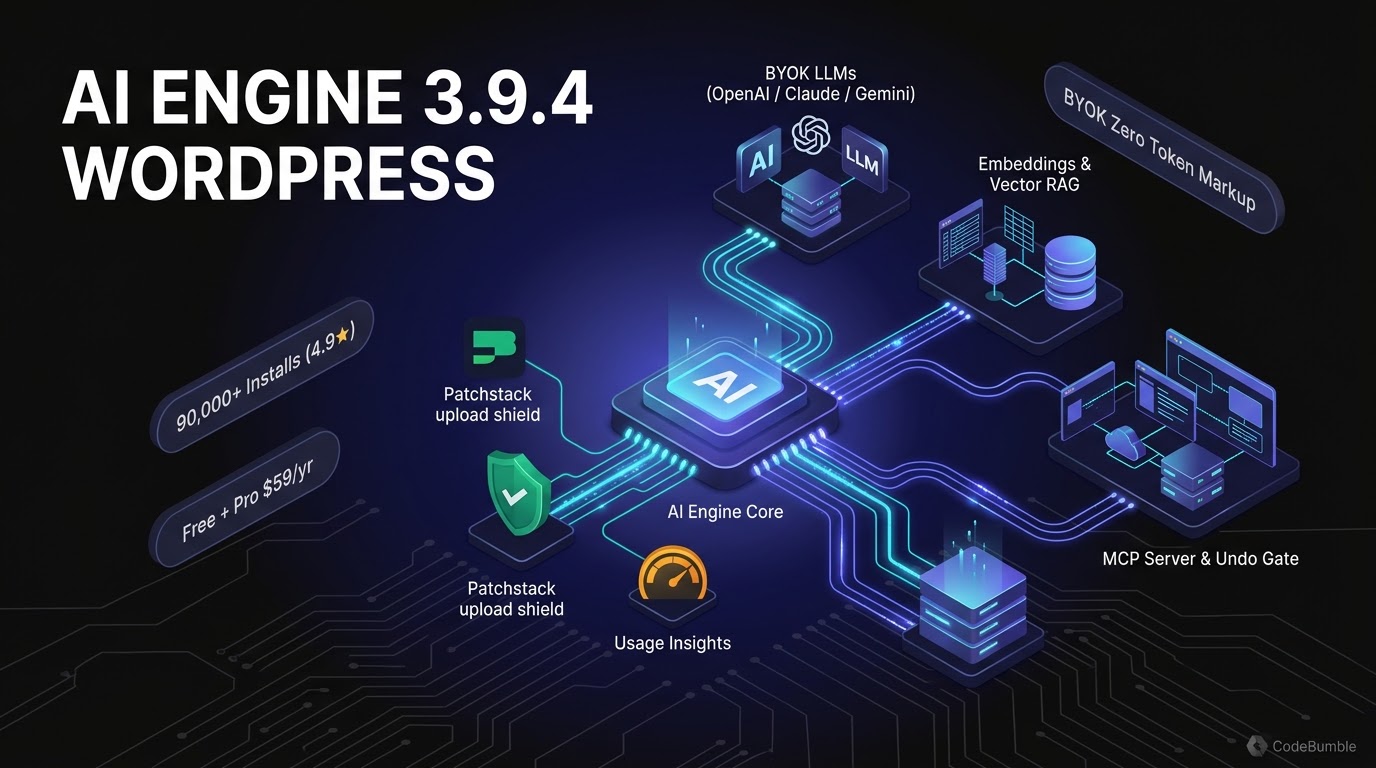
Executive Summary
With 90,000+ active installations and a 4.9 / 5 star rating across 880 WordPress.org reviews, Jordy Meow's AI Engine has grown into one of the largest general-purpose AI and Model Context Protocol (MCP) plugins in the WordPress ecosystem. Its latest release, v3.9.4 (published November 12, 2026 per the AI Engine Pro changelog), adds wp_list_plugins metadata for MCP agents, retires deprecated o3 and GPT Image 2 models in favor of GPT Image 2.6 Flare, and patches a Patchstack-reported file upload security issue.
Pricing and install stats verified as of November 21, 2026: AI Engine uses a Free core + Bring-Your-Own-Key (BYOK) model with zero vendor token markups. The free plugin includes site chatbots, editor copilot, Workspace (plus free iOS and Android apps), and a free unmetered MCP server for Claude and ChatGPT. AI Engine Pro starts at $59/year (1 website), $79/year (5 websites, $15.80/site), or $149/year (20 websites, $7.45/site), with one-time Lifetime licenses starting at $299 (1–5 websites) and the Neko Pass bundle covering all 12 Meow Apps Pro plugins at $199/year. You pay OpenAI, Anthropic, Google, Mistral, Perplexity, or OpenRouter directly for API usage—though its MCP server requires no API key at all when driven from your existing Claude or ChatGPT plan.
Growth Signals & WordPress.org Telemetry
AI Engine's release cadence and adoption metrics reflect sustained engineering rather than a sudden wrapper launch:
- Active Installations & Rating: 90,000+ active installs and 4.9 / 5 average rating across 880 reviews on WordPress.org, as reported on the official AI Engine product page (verified November 21, 2026).
- Release Velocity: First written on December 20, 2022, and published to WordPress.org a week later, AI Engine has shipped more than 500 versions—roughly one release every three days.
- Early MCP Adoption: AI Engine added its built-in MCP server in April 2025 (version 2.7.7), roughly two months before the WordPress Core AI team began its own MCP Adapter.
- Recent November 2026 Cadence: Between November 2 and November 12, 2026, Meow Apps shipped five point releases (
3.9.0through3.9.4), introducing MCP Undo (3.9.0), WooCommerce Subscriptions MCP tools (3.9.1), content-validated uploads (3.9.2), self-managing MCP tools for AI Engine chatbots/knowledge plus database inspection (3.9.3), andGPT Image 2.6/ Patchstack upload hardening (3.9.4). - System Requirements: Requires WordPress 6.0+ and PHP 8.1+, plus an API key from your chosen AI provider (or a local model) for chatbot/editor inference.
flowchart LR
    U[Visitor or Admin] --> CB[AI Engine Chatbot / AI Forms / Editor Copilot]
    CB -->|BYOK API Keys - Zero Markup| LLM[OpenAI / Claude / Gemini / Mistral / OpenRouter]
    CB -->|Pro RAG| VDB[Embeddings & Knowledge Vector Store]
    EXT[Claude / ChatGPT / Coding Agent] -->|Direct MCP or Meow Relay| MCP[AI Engine MCP Server]
    MCP -->|Ask Before + MCP Undo Gate| WP[WordPress Core, Gutenberg, WooCommerce, SEO & DB Tools]
AI Architecture, Pricing Breakdown & Verification Timestamp
How AI Engine Hooks Into WordPress
- Free Core (Chatbots, Workspace, Copilot & MCP): Embeds popup, inline, or full-screen chatbots via shortcodes, adds an in-editor AI copilot (press space in the Gutenberg block editor to write, rewrite, or generate images), and exposes a Workspace chat app inside
wp-adminpaired with free iOS and Android apps (connected via QR code, storing conversations on your WordPress site rather than on Meow Apps' servers). Its MCP server lets Claude and ChatGPT edit Gutenberg posts block-by-block, convert Markdown into WordPress blocks, and manage pages and media. - Pro Architecture (Embeddings, AI Forms & Advanced MCP): Adds vector Embeddings & Knowledge sync (so chatbots answer from your posts and PDFs), AI Forms with file/image/audio inputs and conditional logic, Function Calling for custom WordPress or WooCommerce PHP hooks, Realtime Audio voice chatbots, Usage Insights & Cost Limits per user/guest, and Advanced MCP Tools covering plugins, themes, database table inspection, WooCommerce (including Subscriptions), Elementor, Beaver Builder, Divi, Avada, WPBakery, Polylang, WPML, ACF, and major SEO plugins (Yoast SEO, Rank Math, AIOSEO, SEOPress, The SEO Framework, Slim SEO, and SEO Engine).
- Model Lifecycle & Models API (
v3.9.4): Pro also exposes a Models API so external coding agents and OpenAI-compatible apps can route through your site's configured models using a single key, alongside Cross-Site Chatbots for embedding your WordPress-hosted chatbot on external domains. Inv3.9.4(November 12, 2026), Meow Apps markedo3andGPT Image 2as deprecated following OpenAI's retirement schedule, switched new-site image defaults toGPT Image 2.6 Flare, and noted thatGPT-5.6 Solmoves to standard pricing after OpenAI's promotional rate ends on November 30, 2026.
Pricing, Credits & BYOK Breakdown (Verified November 21, 2026)
| Plan / Component | Price (Verified Nov 21, 2026) | Site Limit & Scope | Token / API Cost Model |
|---|---|---|---|
| AI Engine (Free) | $0 (WordPress.org) |
Unlimited sites; chatbots, Workspace, editor copilot, free MCP server | BYOK (OpenAI/Anthropic/Google/etc. billed directly); MCP uses your Claude/ChatGPT plan |
| Pro — Starter (Yearly) | $59/year |
1 website + 1 year updates & developer support | BYOK (zero token markup) |
| Pro — Standard (Yearly) | $79/year ($15.80/site) |
5 websites + 1 year updates & developer support | BYOK (zero token markup) |
| Pro — Professional (Yearly) | $149/year ($7.45/site) |
20 websites + 1 year updates & developer support | BYOK (zero token markup) |
| Pro — Lifetime (One-Time) | $299 (1–5 sites) / $449 (20) / $599 (500) / $799 (2,500) |
Lifetime updates + developer support (14-day refund window) |
BYOK (zero token markup) |
| Neko Pass Bundle | $199/year |
All 12 Meow Apps Pro plugins (including AI Engine Pro & SEO Engine Pro) | BYOK (zero token markup) |
Confidence note: All pricing tiers, version numbers, and active install figures are verified directly from Meow Apps' official product and changelog pages on November 21, 2026. Meow Apps also notes a 14-day refund policy and optional no-support discounts upon request.
WordPress Performance Footprint, Security & Lock-In Check
1. Security Hardening & Recent Patchstack Fixes
Giving chatbots file-upload capabilities and exposing MCP tools to external agents creates real attack surfaces. Meow Apps' changelog shows active remediation of disclosed vulnerabilities alongside structural safeguards:
- File Upload Validation (
v3.9.2&v3.9.4): Inv3.9.2(Nov 6, 2026), Meow Apps patched a Patchstack-reported flaw (peppa) so uploads are validated against actual file content rather than filename alone—blocking HTML disguised as audio or media. Inv3.9.4(Nov 12, 2026), a second Patchstack report (ashv4ni) led to blocking uploads of files browsers would execute as a web page. - Role & Capability Controls (
v3.8.6–v3.8.8): Recent October 2026 fixes closed privilege-escalation edges—preventing Shop Managers from editing administrator accounts via MCP, honoringDISALLOW_FILE_EDITin plugin/theme file tools, preventing guest IP-header spoofing for usage limits, and capping guest uploads at20per hour. - MCP Undo & Ask Before (
v3.9.0&v3.9.3): Every site edit an AI assistant makes through MCP can be reverted in one click from the MCP tab (unless a human edited the item afterward), destructive tools triggerAsk Beforeconfirmation prompts, and administrators can restrict MCP connections to read-only or drafts-only.
2. wp_options, Database & Frontend Footprint
- Public Frontend Impact: If you only use the Workspace, Editor Copilot, and MCP server inside
wp-admin, AI Engine adds zero chatbot scripts to public pages. When a visitor-facing popup or inline chatbot is enabled, only that chatbot's lightweight UI loads. - Database & Vector Sync: Discussions, Usage Insights logs, and Knowledge/Embeddings rows are stored in dedicated custom database tables rather than cramming chat transcripts into
wp_optionsautoload. For large sites syncing OpenAI Vector Stores,v3.8.8introduced25-secondchunked sync steps to prevent PHP timeouts. - Privacy & Direct vs. Relay MCP: In
v3.8.9+, AI Engine defaults its Connect card to a direct connection (no third-party relay storing passwords or content), while offering an optional Meow Apps relay if your host blocks direct connectors. For sites behind Cloudflare,v3.9.1added explicit WAF allowlist guidance for/wp-json/andrest_route=/mcp/.
3. Learning Curve & Lock-In Check
As independent reviewer Nate Shivar noted in his November 4, 2026 update, AI Engine is substantially cheaper than standalone SaaS AI writing tools ($59/yr + raw API pennies vs. monthly wrapper subscriptions), but it requires initial experimentation with temperature, token limits, and custom prompt templates to match a brand's voice. Because AI Engine writes standard Gutenberg blocks and stores no proprietary shortcodes inside your published post body, deactivating it leaves your published articles intact—only chatbot shortcodes and AI Forms stop rendering.
Practical Verdict: When to Choose AI Engine
- Choose AI Engine (
FreeorPro $59/yr) if: You want an all-in-one WordPress AI suite—visitor chatbots (with Pro RAG over your posts/PDFs), AI Forms, Workspace mobile apps, and a battle-tested MCP server—while paying raw BYOK API rates with zero token markup. - Skip or pair with alternatives if: You want zero-configuration, pre-written brand templates out of the box without tuning prompts, or you only need a minimal WordPress
6.9+Abilities API bridge (where the officialMCP Adaptersuffices).
Frequently Asked Questions
1. Does AI Engine charge per-word or per-token fees?
No. Both the free and Pro versions of AI Engine use a Bring-Your-Own-Key (BYOK) model. You enter your own OpenAI, Anthropic, Google, Mistral, Perplexity, or OpenRouter API key and pay the provider directly with zero markup from Meow Apps.
2. What is included in AI Engine Free vs. AI Engine Pro ($59/year)?
The free version includes customizable chatbots, image AI, editor copilot, Workspace (with free iOS/Android apps), and the WordPress MCP server for Claude and ChatGPT. AI Engine Pro ($59/yr for 1 site, $79/yr for 5 sites) adds vector embeddings/Knowledge RAG, AI Forms, Function Calling, Realtime Audio chatbots, Usage Insights/cost limits, and Pro MCP tools (WooCommerce, Elementor, database inspection, and SEO plugins).
3. Do I need an OpenAI or Anthropic API key just to use AI Engine's MCP server?
No. According to Meow Apps' documentation (verified November 21, 2026), AI Engine's MCP server connects directly to Claude or ChatGPT using the subscription plan you already have—no separate API key is required for MCP site management.
4. Is AI Engine safe to expose via MCP on a live WordPress site?
It includes MCP Undo (one-click rollback of AI edits), read-only and draft-only connection modes, Ask Before confirmation prompts for destructive tools, and DISALLOW_FILE_EDIT enforcement (v3.8.8). Always update to v3.9.4+ to ensure the November 2026 Patchstack file-upload validation fixes are applied.
5. What PHP and WordPress versions does AI Engine 3.9.4 require?
Per the official AI Engine documentation, it requires WordPress 6.0 or higher and PHP 8.1 or higher.
Sources
- Meow Apps — AI Engine: Free AI Chatbot & MCP Plugin for WordPress (Verified November 21, 2026): https://meowapps.com/ai-engine/
- Meow Apps — AI Engine Pro: Chatbots, Embeddings & MCP for WordPress (v3.9.4) (Verified November 21, 2026): https://meowapps.com/products/ai-engine-pro/
- Meow Apps — AI Engine Pro Changelog (3.9.4 released 2026/11/12) (Verified November 21, 2026): https://meowapps.com/products/ai-engine-pro/changelog
- Nate Shivar — 7 Pros + Cons of the MeowApps AI Engine WordPress Plugin (Updated November 4, 2026): https://www.nateshivar.com/27744/meowapps-ai-engine-plugin-review/