

WordPress
Cowboy MCP 1.7.9 Review: 203 Free WordPress MCP Tools With Per-Change Undo
Cowboy MCP 1.7.9 turns self-hosted WordPress into a Streamable HTTP MCP server with 203 typed tools, OAuth 2.1 browser sign-in, a 7-day per-change undo journal, and one-click database checkpoints—all free under GPL-2.0 with no relay or Pro tier.
9 min read
Cowboy MCP 1.7.9 Review: 203 Free WordPress MCP Tools With Per-Change Undo
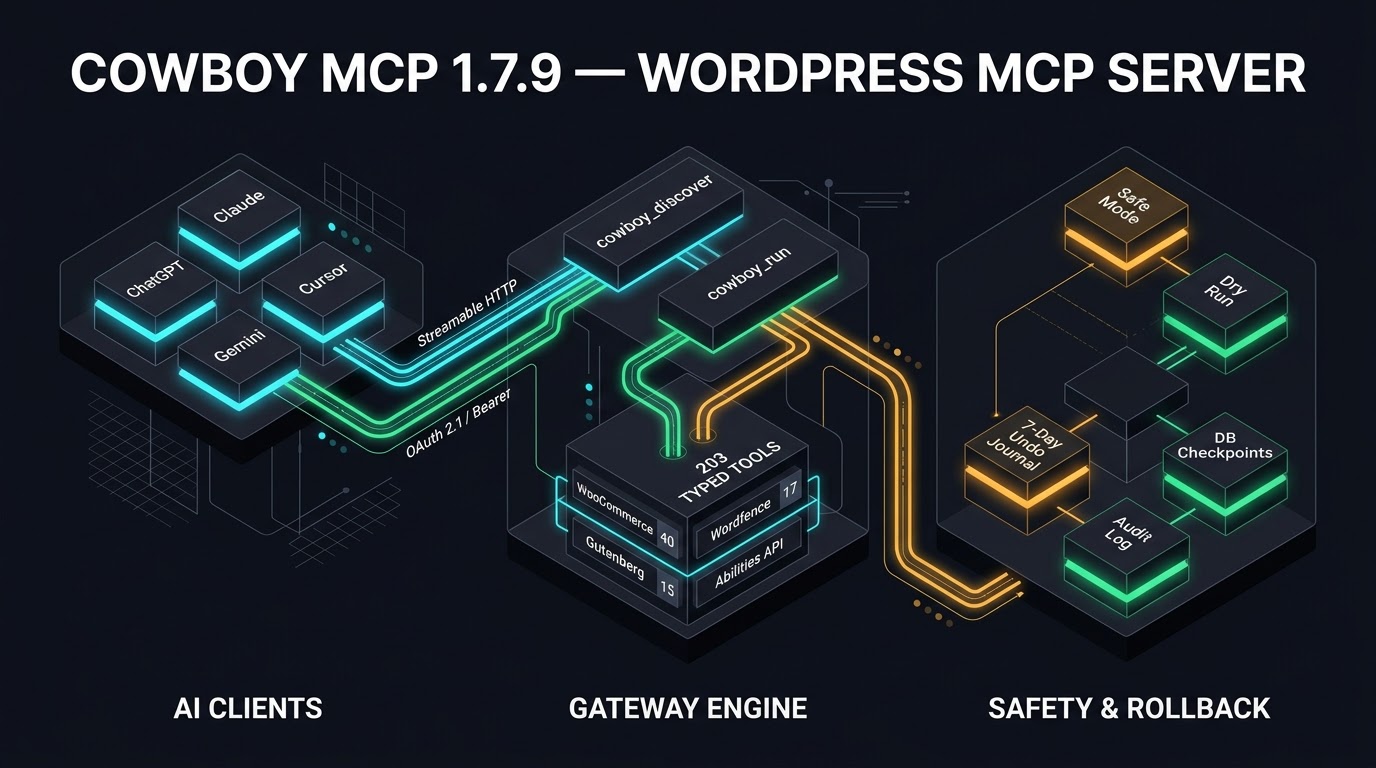
As WordPress sites increasingly adopt Model Context Protocol (MCP) integrations, site administrators face a recurring architectural trade-off: cloud-relayed convenience versus self-hosted control, and raw agent capability versus production safety. Cowboy MCP 1.7.9, authored by Andrew Ivanov (februality) and updated on November 20, 2026 on the WordPress.org Plugin Directory, takes a distinctly self-hosted, safety-first approach. It turns any WordPress 6.2+ installation into a native Streamable HTTP MCP server exposing up to 203 typed tools—with zero cloud relay, zero paid tiers, a 7-day per-change undo journal, and one-click database checkpoints.
Pricing and install stats verified as of November 22, 2026: Cowboy MCP 1.7.9 is free and open source under the GPL-2.0-or-later license, holds 2,000+ active installations, carries a 5.0 out of 5 star rating across 8 five-star reviews, and shows 6 out of 6 support issues resolved over the past two months on WordPress.org.
Cost Model and Licensing Breakdown
Unlike freemium WordPress MCP connectors that meter daily requests, lock WooCommerce tools behind annual subscriptions, or route traffic through a vendor-hosted proxy, Cowboy MCP ships its entire 203-tool catalog in a single free plugin:
| Cost Component | Cowboy MCP 1.7.9 | Notes & Verification |
|---|---|---|
| Plugin License & Core | $0 (GPL-2.0-or-later) | All 203 tools, undo journal, and DB checkpoints included |
| Pro / Paid Tier | None | No upsells, credits, or request quotas in plugin |
| Cloud Relay / Proxy Fees | $0 (None) | Direct Streamable HTTP endpoint on your own WordPress host |
| AI Client / LLM Costs | User-paid (BYOK / Plan) | Depends on client: e.g., Claude, ChatGPT Plus/Pro, Gemini, Cursor |
Because there is no hosted middleware, the only ongoing cost is whichever AI client or API billing plan you connect to the endpoint. According to the Cowboy MCP documentation, free client tiers work for several integrations—including Claude's single custom connector slot, Grok's free plan, Gemini CLI's free tier, VS Code GitHub Copilot Free, and self-hosted n8n Community Edition—while ChatGPT custom MCP plugins require a Plus, Business, Enterprise, or Edu account and Perplexity custom connectors require Pro, Max, or Enterprise.
Architecture: Two-Tool Gateway and Streamable HTTP
Loading 203 full JSON tool schemas into an LLM's context window on every turn would consume thousands of tokens and degrade tool-selection accuracy. Cowboy MCP solves this in includes/class-mcp-tools.php by exposing only two gateway meta-tools to the client during tools/list:
cowboy_discover: Allows the connected AI agent to query available tools on demand by domain or capability.cowboy_run: Dispatches the selected tool with arguments through the security, permission-scoping, dry-run, and audit pipeline.
The server speaks JSON-RPC 2.0 over Streamable HTTP (MCP 2025-06-18) at /wp-json/cowboy-mcp/v1/endpoint, registered as a native WordPress REST route via includes/class-mcp-transport.php. There is no Node.js sidecar, no Composer vendor directory, and no build step. It requires WordPress 6.2+ (tested up to 7.1.5) and PHP 8.0+, and it runs even on shared hosts where WP-CLI or shell_exec() is unavailable.
Beyond tools, the server also publishes 17 read-only MCP resources (including wordpress://tools/catalog), 4 resource templates (wordpress://posts/{id}, wordpress://options/{name}, wordpress://plugins/{slug}, wordpress://users/{id}), and 8 guided workflow prompts covering site audits, troubleshooting, SEO, security hardening, and performance.
Tool Coverage Across 203 Typed Actions
Integrations activate automatically only when the corresponding third-party plugin is active on the site, keeping the active surface area minimal:
| Domain / Integration | Tool Count | Key Capabilities |
|---|---|---|
| Content & Revisions | 27 | Posts/pages/CPTs (5), taxonomies (4), comments (4), media (4), menus (6), options (1), revision list/diff/restore (3) |
| Gutenberg & Site Editor | 15 (8 classic) | Block-tree read/edit by path, block types, patterns, FSE templates/parts, global styles, navigation |
| Site Administration | 29 | Users/roles (5), plugins (6), themes (5), wp-content files (4), DB health/repair (5), WP-CLI/system (3), site health (1) |
| Diagnostics & Safety | 18 | Error log, HTTP/email tests, hooks, transients, REST routes, Connection Doctor (10); undo/checkpoints (6); batch/audit (2) |
| WooCommerce | 40 | Products, variations, orders, refunds, coupons, customers, stock, tax/shipping/payment settings, sales reports |
| Wordfence Security | 17 | Security scans, firewall rules, blocked IPs, live traffic, activity, settings |
| The Events Calendar | 13 | Events, venues, organizers (11), plus Events Calendar Pro recurring series and single-date cancellation (2) |
| Page Builders & ACF | 35 | SiteOrigin (12), ACF field groups/repeaters (9), Elementor (7), Beaver Builder with dry-run diff (7) |
| SEO, Caching & Forms | 9 | Yoast/Rank Math/AIOSEO/SEOPress meta audit (4), WP Rocket/LiteSpeed/W3TC cache (4), WPForms/Gravity/CF7 (1) |
On WordPress 6.9+, Cowboy MCP bridges bidirectionally with the core WordPress Abilities API. Every permitted tool registers as a cowboy-mcp/* ability—making it callable via wp ability run, the core Abilities REST endpoint, or the official WordPress MCP Adapter—while still routing through Cowboy MCP's safe mode, audit log, and undo journal. Conversely, abilities registered by other plugins are exposed as tools to connected agents (though external plugin abilities enforce their own permission checks and are not covered by Cowboy MCP's undo journal).
Security, OAuth 2.1, and Role Permissions Audit
Giving an autonomous agent write access to wp_posts, WooCommerce orders, or theme files introduces real operational risk. Cowboy MCP addresses this through a layered security architecture implemented across includes/class-mcp-auth.php, includes/class-mcp-oauth.php, and includes/class-mcp-security.php:
- Inert on Activation: Activating the plugin exposes the REST route, but all requests are rejected until an administrator either generates an API key or explicitly enables browser sign-in (OAuth 2.1) and approves an application consent screen.
- OAuth 2.1 & Credential Scoping: Both OAuth connections and API keys carry explicit capability modes—
full,read_only,drafts_only, or acustomallowlist of specific tools. Indrafts_onlymode, edits to live posts are written to a draft copy rather than modifying published content. Crucially,readOnlyHintand tool allowlists are enforced at dispatch insidecowboy_runand batch calls, preventing privilege escalation via the gateway meta-tool. - Hashed Credentials & Header Fallback: API keys are displayed once at creation and stored as one-way hashes; OAuth tokens are likewise stored hashed. Default rate limiting caps requests at 120 per minute per key, alongside an
Originallowlist. For hosts or staging firewalls that stripAuthorization: Bearerheaders, Cowboy MCP supports anX-Cowboy-MCP-Keyheader fallback (improved in version 1.7.9 alongside local HTTP site key flows for Claude Code, Claude Desktop, and Gemini CLI). - Safe Mode & Dry Runs: Safe mode is enabled by default. Any tool annotated with
destructiveHintrefuses execution until the client resends the call withconfirm: trueafter reviewing a preview. Every non-read-only tool also supportsdry_run: true. - Guardrails & Power Mode: Protected options (
siteurl,active_plugins, credentials, and the plugin's own settings), dangerous SQL statements, and risky WP-CLI subcommands (eval,shell,db drop) are blocklisted using a shell-style tokenizer. Outbound HTTP tools enforce SSRF validation, file writes are confined towp-contentwith pre-write PHP syntax checking, andmu-pluginswrites remain blocked unless a human administrator manually enables Power Mode inwp-admin. Power Mode can never be toggled via the API, and even when active, credential-option protection and secret redaction stay enforced.
Rollback Mechanics: Undo Journal vs. Database Checkpoints
Cowboy MCP separates granular reversibility from full-table recovery:
- Per-Change Undo Journal (
class-mcp-rollback.php): Captures before-state snapshots for posts, options, users, media deletions, menus, taxonomy terms, comments, WooCommerce objects, SEO meta, Gutenberg/FSE edits, page-builder layouts, search-replace rows, and plugin/theme package actions. Changes are retained for 7 days by default, support conflict detection and redo-on-undo, and can be rolled back individually or in batches viawp_undo_changeor the Activity tab. Actions without a true inverse—such as sent emails, cache flushes, outbound HTTP requests, or arbitrary WP-CLI commands—are explicitly logged as non-undoable rather than silently ignored. - Database Checkpoints (
class-mcp-checkpoint.php): Creates prefix-scoped dumps of site database tables with atomic restore (retaining up to 5 checkpoints). Checkpoints run automatically before plugin/theme updates and mutating WP-CLI commands. Safe plugin/theme updates also take a file backup and run a post-update health check that automatically restores the prior version if the site breaks. Note that database checkpoints restore database tables only, not uploaded media files or theme/plugin code.
Performance, Bloat, and Lock-In Evaluation
To evaluate production suitability, we audited Cowboy MCP's footprint across four operational dimensions (note: exact database row sizes and query timings are inferred from the documented plugin architecture and GitHub source layout rather than benchmarked on a live traffic load; confidence: medium-high):
wp_optionsAutoload Bloat: Audit logs are written to a dedicated{prefix}cowboy_mcp_audit_logcustom table and auto-pruned after 30 days, keeping high-churn operational logs out ofwp_options. Tool domain definitions are lazy-loaded on demand rather than serialized into autoloaded options.- Frontend Script Bloat: Zero frontend impact. Cowboy MCP is a backend REST/admin plugin; its JavaScript and CSS assets live strictly under
admin/for the five-tabwp-adminsettings interface (Connections,Settings,Activity,Logs,About), adding no public scripts or styles to visitor page loads. - Telemetry & External Calls: According to the WordPress.org External Services disclosure, Cowboy MCP sends zero telemetry. External requests occur only when an agent installs/updates plugins or themes from WordPress.org, calls an outbound URL requested by the user, or when an administrator opens the OAuth consent screen to fetch an AI client's public metadata document (e.g.,
claude.ai,chatgpt.com,openai.com,perplexity.ai). - Lock-In & Portability: Lock-in is effectively zero. The plugin is GPL-2.0 open source, implements the open Streamable HTTP MCP specification (
2025-06-18), and bridges directly to WordPress core's native Abilities API on WordPress 6.9+. Switching to the official WordPress MCP Adapter or another Streamable HTTP server requires only updating the endpoint URL in your AI client.
Frequently Asked Questions
How is Cowboy MCP 1.7.9 different from the official WordPress MCP Adapter?
The official WordPress MCP Adapter is a protocol bridge that exposes abilities registered via the WordPress 6.9+ Abilities API and ships no site-management tools of its own. Cowboy MCP works on WordPress 6.2+ with 203 built-in tools, OAuth 2.1 browser sign-in, Safe Mode, a 7-day undo journal, and database checkpoints—and on WordPress 6.9+ it also registers its tools as cowboy-mcp/* abilities so both can run side by side.
Does Cowboy MCP work on local WordPress sites like Local, Studio, or wp-env?
Yes. Version 1.7.9 specifically improves local HTTP workflows so terminal and IDE clients (Claude Code, Codex CLI, Gemini CLI, Cursor, VS Code, Opencode) connect using a one-click API key or local OAuth without needing a public HTTPS URL. Cloud-hosted web apps such as claude.ai and ChatGPT still require a public HTTPS endpoint because requests originate from the vendor's cloud servers.
Can I restrict an AI agent to read-only or draft-only access?
Yes. Every API key and OAuth 2.1 approval lets you choose full, read_only, drafts_only, or a custom list of allowed tools. In drafts_only mode, the agent can upload media and write drafts, while edits to published posts are saved to a draft copy for human review.
What happens if Cloudflare or my host blocks MCP authentication?
Cowboy MCP includes a built-in Connection Doctor (also runnable via wp cowboy-mcp doctor) that tests HTTPS, REST reachability, OAuth discovery, WAF rules, and LiteSpeed caching of /wp-json/. If a host strips the Authorization header, API-key clients can pass the credential via the X-Cowboy-MCP-Key header, and OAuth automatically falls back to /wp-json/ if /.well-known/ is blocked.
Are database checkpoints a full site backup?
No. Database checkpoints dump and atomically restore your WordPress prefix-scoped database tables, while safe plugin/theme updates back up the updated package files for automatic health-check rollback. They do not back up your entire wp-content/uploads media library or custom code outside that scope, so standard host or off-site backups remain essential.
Sources
- WordPress.org Plugin Directory: Cowboy MCP (v1.7.9) — Verified November 22, 2026 (plugin updated November 20, 2026; active installs, ratings, changelog, FAQ, and external services disclosure).
- GitHub Repository: februality/cowboy-mcp — Verified November 22, 2026 (architecture layout, GPL-2.0 license, safety model, and client connection matrix).
- Cowboy MCP Official Guide: WordPress MCP Server & Plugin Guide (2026) — Verified November 22, 2026 (last updated November 7, 2026; comparison table and self-hosted vs. hosted analysis).
- About Cowboy MCP — Verified November 22, 2026 (last updated October 5, 2026; author attribution and press facts).