

Automation
n8n vs. Temporal for Long-Running Agentic Workflows: Architecture, Limits & Cost Guide
An evergreen technical guide comparing n8n and Temporal for long-running agentic workflows—covering event-sourced replay vs. Redis queue mode, execution timeouts, n8n 3.0 breaking changes, and November 2026 cloud vs. self-hosted pricing.
11 min read
n8n vs. Temporal for Long-Running Agentic Workflows: Architecture, Limits & Cost Guide
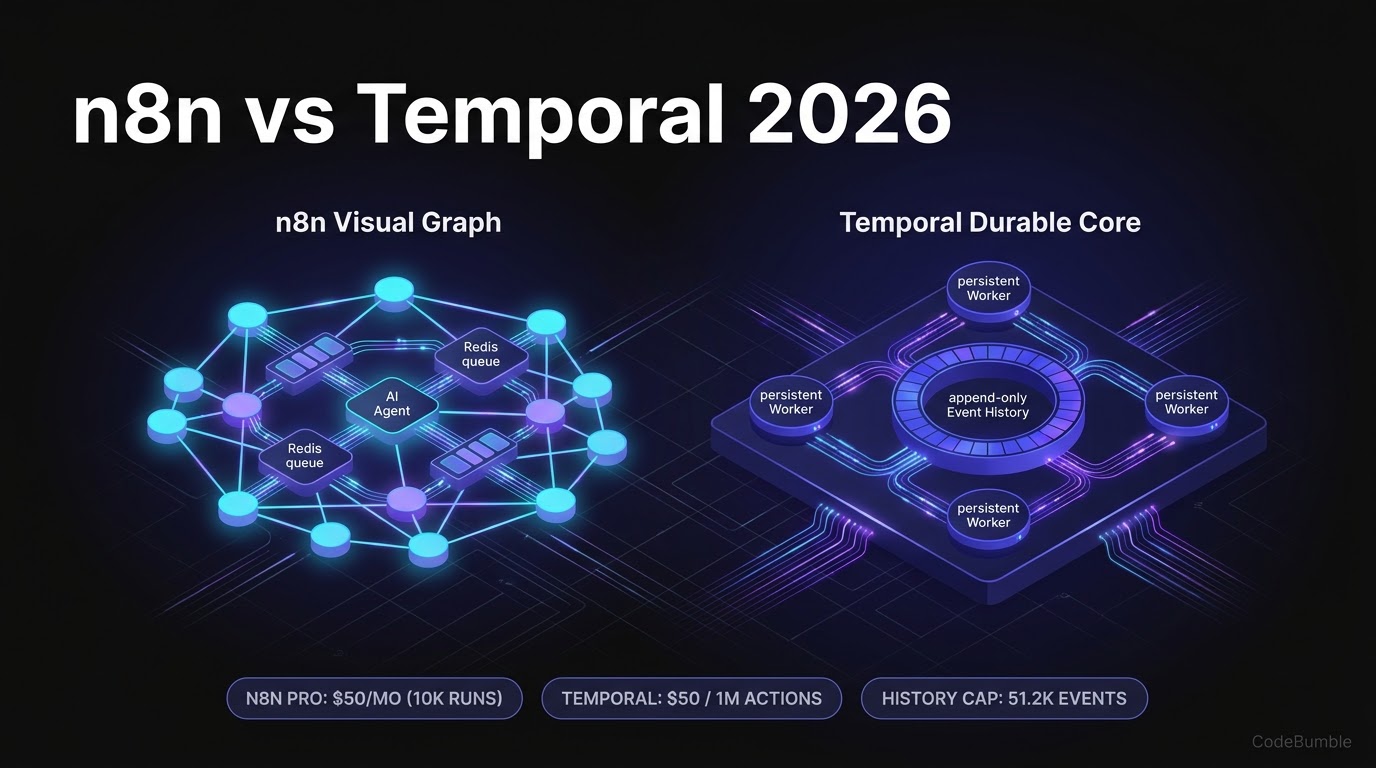
Evergreen Technical Guide — Verified with November 2026 pricing, execution limits, and n8n 3.0 pre-release documentation.
Executive Summary
- Different architectural primitives: n8n is a visual, node-graph workflow platform optimized for rapid SaaS/API integration (1,000+ connectors) and native LangChain-based AI Agent nodes, whereas Temporal is a code-first durable execution engine that persists every state transition in an append-only Event History for deterministic replay.
- Execution limits define the breaking point: n8n Cloud caps single runs at 5 minutes (Starter) and 40 minutes (Pro), and the upcoming n8n 3.0 release (beta October 27, 2026; stable targeted early December 2026) drops the default Code node timeout from 300s to 60 seconds and mandates Docker for self-hosting (AY Automate). Temporal imposes no wall-clock time limit on workflows, capping individual runs instead at 51,200 Events or 50 MB of history before requiring
Continue-As-New(Temporal Docs). - Distinct unit economics at scale: n8n Cloud bills per full workflow execution regardless of step count ($24/mo Starter for 2,500 runs; $60/mo Pro for 10,000 runs on monthly billing as of November 2026), while Temporal Cloud bills per Action ($50 per million actions Pay-As-You-Go, scaling down to $25/million with volume, plus active/retained storage).
- The pragmatic production pattern: Many engineering teams avoid forcing one tool to do both jobs—using n8n as the front-door webhook/SaaS integration layer and Temporal as the durable backend for multi-hour, human-in-the-loop, or high-retry agentic loops.
Core Mechanism: Visual Node Graph vs. Event-Sourced Durable Execution
When an AI agent executes a 3-step webhook-to-Slack summary, almost any orchestrator works. The architectural differences between n8n and Temporal only surface when an agentic workflow runs for hours or days, calls flaky third-party APIs, pauses for human approval, or crashes mid-flight during a container deploy.
How n8n Executes Workflows
n8n models automation as a directed graph of nodes stored as JSON definitions. Triggers (webhooks, schedules, app events) initiate an execution that flows sequentially or in branches across integration nodes, native AI Agent nodes (with chat models, window/vector memory, and MCP tool support), and JavaScript/Python Code nodes (n8n vs. Temporal).
In production, self-hosted n8n scales horizontally using queue mode:
- Main instance: Serves the editor UI, API endpoints, and webhook ingestion.
- Redis: Buffers pending execution jobs.
- Worker processes: Pull jobs from Redis and execute workflow graphs in parallel.
- PostgreSQL: Persists workflow definitions, encrypted credentials, and execution logs.
Crucially, n8n's durability operates at the execution and node boundary, not via deterministic code replay. If a worker crashes or OOM-kills mid-execution, that in-flight run fails unless handled by node-level retries or an Error Trigger workflow, and operators inspect or replay from the failed node via the UI.
How Temporal Executes Workflows
Temporal separates orchestration logic (Workflows) from side effects (Activities) using an event-sourced state machine:
- Workflows: Deterministic functions written in TypeScript, Python, Go, Java, .NET, PHP, Ruby, or Rust. Workflows cannot perform direct network I/O or non-deterministic calls; instead, they schedule Activities and durable Timers.
- Activities: Side-effecting tasks (calling an LLM API, querying a database, invoking an external tool) executed by stateless Worker processes polling Task Queues.
- Event History: Every command and result (Activity scheduled, completed, failed, Timer fired, Signal received) is appended to a persistent Event History. If a Worker crashes mid-workflow, a healthy Worker pulls the Event History and replays the Workflow code deterministically—skipping already-completed Activities by returning their recorded results—until it reaches the exact point of failure.
sequenceDiagram
    participant Client as Trigger / API
    participant TService as Temporal Service (Event History)
    participant Worker as Worker Process
    participant LLM as LLM / External Tool

    Client->>TService: Start AgentWorkflow (WorkflowId: agent-104)
    TService->>Worker: Dispatch Workflow Task
    Worker->>TService: Schedule Activity: callReasoningModel()
    Worker->>LLM: Execute LLM call (Attempt 1)
    LLM--xWorker: HTTP 429 / Worker Crash
    Note over TService,Worker: Temporal auto-retries with exponential backoff
    Worker->>TService: Replay Event History & Retry Activity
    Worker->>LLM: Execute LLM call (Attempt 2)
    LLM-->>Worker: JSON Tool Plan
    TService->>TService: Append ActivityTaskCompleted to History
    Worker->>TService: Wait on Durable Timer / Human Signal (hours/days)
Managing Long-Running State with Continue-As-New
Because Temporal's Event History is bounded at 51,200 Events or 50 MB (logging warnings after 10,240 Events or 10 MB), indefinitely running agent loops or high-iteration actor workflows must checkpoint their state atomically using Continue-As-New (Temporal Limits). Here is a minimal, safe TypeScript pattern for a long-running agent loop:
import { proxyActivities, workflowInfo, continueAsNew, condition, defineSignal, setHandler } from '@temporalio/workflow';

const { runAgentStep } = proxyActivities<typeof import('./activities')>({
  startToCloseTimeout: '2 minutes',
  retry: { initialInterval: '2s', maximumAttempts: 5 },
});

export const approvalSignal = defineSignal<[boolean]>('approval');

export async function agenticLoopWorkflow(state: { step: number; contextId: string; approved?: boolean }): Promise<void> {
  let approved = state.approved ?? false;
  setHandler(approvalSignal, (decision) => { approved = decision; });

  while (state.step < 1000) {
    // Wait up to 7 days for human-in-the-loop approval without holding worker RAM
    if (state.step === 1 && !approved) {
      await condition(() => approved, '7 days');
    }

    await runAgentStep(state.contextId, state.step);
    state.step += 1;

    // Checkpoint before Event History grows too large
    if (workflowInfo().continueAsNewSuggested) {
      await continueAsNew<typeof agenticLoopWorkflow>({ ...state, approved });
    }
  }
}
Notice what happens during await condition(() => approved, '7 days'): the Worker frees its memory and threads while Temporal persists the timer and waits for an external Signal—something impossible in a standard n8n execution without splitting workflows across webhook callbacks and external database state.
Reliability, Cost & Performance Analysis
Execution Limits & Failure Behavior
| Architectural Dimension | n8n (Cloud & Self-Hosted) | Temporal (Cloud & Self-Hosted) |
|---|---|---|
| Execution Model | Visual node graph; Redis queue mode for worker scaling | Code-first deterministic Workflows + stateless Activity Workers |
| Wall-Clock Run Limit | Cloud Starter: 5 min; Cloud Pro: 40 min; Self-hosted: configurable (n8n 3.0 Code node default drops to 60s) | No wall-clock time limit; Workflows can sleep on durable Timers for months |
| State / History Cap | Full execution payloads stored in Postgres unless pruned (EXECUTIONS_DATA_PRUNE=true) |
51,200 Events or 50 MB per run (warns at 10,240 Events / 10 MB); 4 MB per transaction; 2,000 max pending Activities/Signals |
| Failure Recovery | Node-level retries + Error Trigger workflows; manual UI replay from failed node | Automatic Activity retries with exponential backoff; deterministic crash recovery via Event History replay |
| AI Agent Primitives | Built-in AI Agent node (LangChain), window/vector memory, MCP support, 1,000+ SaaS nodes | No built-in SaaS catalog; wraps OpenAI Agents SDK, Google ADK, or custom LLM calls as durable Activities |
| License | Sustainable Use License (source-available; internal business/non-commercial use) | MIT License (open-source core) |
November 2026 Pricing Math: Per-Execution vs. Per-Action
Pricing models diverge sharply depending on workflow complexity and step count. Based on verified November 2026 pricing data from Temporal's pricing page, EnrichLabs' November 21, 2026 n8n breakdown, and Osher Digital's October 28, 2026 production review:
| Tier / Deployment | Verified Pricing (Nov 2026) | Included Capacity & Key Limits | Cost Behavior for Agentic Workflows |
|---|---|---|---|
| n8n Cloud Starter | $24/mo ($20/mo billed annually) | 2,500 executions/mo, 5 concurrent runs, 5-min timeout, 1 shared project | Step count is free—a 25-node agent run counts as 1 execution, but 5-min timeout bites slow LLM chains |
| n8n Cloud Pro | $60/mo ($50/mo billed annually) | 10,000 executions/mo, 20–50 concurrent runs, 40-min timeout, 3 shared projects | Good for mid-volume teams; an extra 50K-execution Pro tier exists before Business |
| n8n Business (Self-Hosted) | $960/mo ($800/mo billed annually) | 40,000 executions/mo, 6 shared projects, SSO, dev/prod environments | Overages billed at $4,800 per 300,000 executions; self-hosted only |
| n8n Self-Hosted Community | $0 license (~$15–$40 AUD/mo VPS) | Unlimited executions and workflows; single instance handles ~50K–100K runs/mo before queue mode | Best unit economics at high volume; requires ops discipline (Postgres pruning, encryption key backups) |
| Temporal Cloud (Pay-As-You-Go) | $50 / 1M Actions (volume discounts down to $25 / 1M) | $150 free credits for 90 days; $0.042/GBhr Active Storage, $0.00105/GBhr Retained Storage; 99.9% SLA | Every Workflow start, Activity, Timer, and Signal counts as an Action; a 10-step agent costs ~12–20 Actions |
| Temporal Self-Hosted | $0 license (Kubernetes + DB + Workers) | Full control over persistence, Task Queues, and visibility | Highest ops overhead; best reserved for teams already running Kubernetes and observability stacks |
Concrete cost comparison: Suppose an agentic workflow averages 15 billable Temporal Actions per run (1 workflow start, 10 LLM/tool Activities, 2 retries, 2 timers/signals) and executes 100,000 times per month:
- On Temporal Cloud, 100,000 runs × 15 Actions = 1.5 million Actions, which costs roughly $75/month in Action fees (plus modest GB-hour storage and your own Worker compute).
- On n8n Cloud, 100,000 executions exceeds Starter and base Pro tiers, pushing you toward Business or self-hosted Community on a $15–$40/month VPS with Redis queue mode.
Conversely, if a workflow only runs 3,000 times a month across 40 different SaaS integrations, writing and maintaining 40 custom Temporal Activities in TypeScript or Python costs far more in engineering salary than a $24–$60/month n8n Cloud plan.
Vendor Lock-In & Licensing Caveats
- n8n's Sustainable Use License: You can self-host n8n free for internal business purposes, but you cannot redistribute it as a multi-tenant SaaS where external customers connect their own accounts and build workflows without a commercial license (EnrichLabs).
- Temporal's Replay Determinism Constraint: Temporal is MIT-licensed and avoids commercial lock-in, but Workflow code is coupled to Temporal's deterministic replay rules. Modifying live Workflow logic without Worker Versioning or
patched()checks can trigger non-determinism errors on in-flight long-running executions.
Practical Implementation & Trade-Offs
Decision Framework: n8n vs. Temporal vs. Running Both
Choose n8n when integration speed and visual observability dominate:
- Your workflows stitch together 5–20 SaaS APIs (HubSpot, Slack, Notion, Google Workspace, Postgres) where n8n's 1,000+ pre-built nodes eliminate weeks of boilerplate.
- Non-engineering stakeholders or ops leads need to inspect node inputs/outputs visually and re-run failed steps from the browser.
- Runs complete within seconds to a few minutes and do not require multi-day sleep states or strict distributed transaction guarantees.
Choose Temporal when durability, code rigor, and scale dominate:
- Agentic workflows run for hours, days, or weeks—waiting on asynchronous human approvals, batch webhooks, or multi-stage research loops.
- Failures mid-execution (such as partial financial mutations or multi-tool LLM chains) require automatic exponential-backoff retries, Saga compensation, and crash-proof state recovery.
- Your team requires Git-native pull-request reviews, unit/replay testing in CI, and strict static typing rather than diffing large workflow JSON exports.
Run both together when you need glue and durability:
- Use n8n as the edge orchestration layer for incoming webhooks, OAuth credential management, and lightweight notifications.
- When a trigger requires a long-running, multi-step AI investigation or stateful orchestration, have n8n invoke a Temporal Workflow via HTTP/API gateway, then let Temporal signal back to an n8n webhook upon completion.
Critical n8n 3.0 Migration Gotchas (Late 2026)
If you are deploying or upgrading self-hosted n8n in late 2026, factor in the n8n 3.0 breaking changes documented in AY Automate's November 10, 2026 upgrade guide:
- Docker is mandatory: n8n 3.0 drops
npm installandnpx n8nsupport for self-hosted deployments (Kubernetes/Helm remain supported). - One-way upgrade: There is no rollback path from 3.0 to 2.x; teams must run
Settings > Migration Reporton 2.x, back up the database and~/.n8nencryption key, and test on staging first. - Stricter defaults for AI & Code nodes: Legacy AI Agent v1 modes (Plan and Execute, ReAct, SQL Agent) are removed in favor of the unified Tools Agent,
N8N_RUNNERS_TASK_TIMEOUTdrops from 300s to 60s, and~/.n8n/binaryDatarenames to~/.n8n/storage.
Frequently Asked Questions
Can n8n handle multi-day human-in-the-loop AI agent approvals?
n8n supports Wait nodes and webhook-resumed executions, which work for moderate approval queues. However, long-lived pauses across thousands of concurrent runs are harder to version and recover across container restarts than Temporal's durable condition() and Signals, which persist state cleanly in Event History without holding Worker memory.
How much does self-hosted n8n cost compared to Temporal Cloud?
A single self-hosted n8n Community instance with PostgreSQL and Caddy runs comfortably on a $15–$40 AUD/month VPS for 50,000–100,000 executions/month before needing Redis queue mode (Osher Digital). Temporal Cloud has no base monthly fee and charges $50 per million Actions (plus active/retained storage), making low-to-medium Action volumes inexpensive while avoiding Kubernetes cluster maintenance.
Does Temporal have built-in AI Agent and MCP integrations like n8n?
No. Temporal provides durable execution primitives and pre-built SDK integrations for frameworks like the OpenAI Agents SDK and Google ADK, but prompt templates, vector stores, and SaaS connectors live in your application code rather than a visual catalog (n8n vs. Temporal).
What happens if a Temporal Workflow exceeds 51,200 Events?
Temporal logs warnings starting at 10,240 Events (or 10 MB) and terminates the Workflow Execution if it exceeds 51,200 Events or 50 MB (Temporal Docs). To run unbounded agent loops safely, check continueAsNewSuggested in your SDK and call continueAsNew() to roll state into a fresh Event History under the same WorkflowId.
Should I upgrade self-hosted n8n to 3.0 immediately?
Wait for the early December 2026 stable release for production systems, as 3.0.x builds in November 2026 are still pre-releases and n8n 2.x receives security and critical bug fixes for 12 months after 3.x stable ships. However, teams still on n8n 1.x face a December 31, 2026 end-of-support deadline and must upgrade to 2.x first (AY Automate).
Sources
- Temporal — Temporal Platform Pricing Options (Verified November 2026): https://temporal.io/pricing
- Temporal Documentation — Workflow Execution Limits & System Limits (Verified November 2026): https://docs.temporal.io/workflow-execution/limits
- n8n — n8n vs. Temporal: Workflow Orchestration Tools Compared (Verified November 2026): https://n8n.io/vs/temporal/
- AY Automate — n8n 3.0 Upgrade Guide: Breaking Changes and Checklist (Published November 10, 2026): https://www.ayautomate.com/blog/n8n-3-0-upgrade-guide
- EnrichLabs — n8n Pricing 2026: Cloud Plans, Costs and Free Self-Hosting (Published November 21, 2026): https://www.enrichlabs.ai/blog/n8n-pricing
- Osher Digital — n8n in 2026: A Review After Three Years of Production (Updated October 28, 2026): https://osher.com.au/blog/n8n-review-powerful-workflow-automation-tool/