

WordPress
WordPress MCP Adapter 0.7.2 vs. Easy MCP AI 2.5.0: Architecture, Pricing & Security
Both the official WordPress MCP Adapter (v0.7.2) and Themeisle's Easy MCP AI (v2.5.0) shipped major updates on November 19, 2026, pushing combined active installations past 120,000. Here is how their Abilities API hooks, OAuth 2.1 vs. Application Password security, and free BYOK cost models compare as of November 2026.
9 min read
WordPress MCP Adapter 0.7.2 vs. Easy MCP AI 2.5.0: Architecture, Pricing & Security
Executive Summary
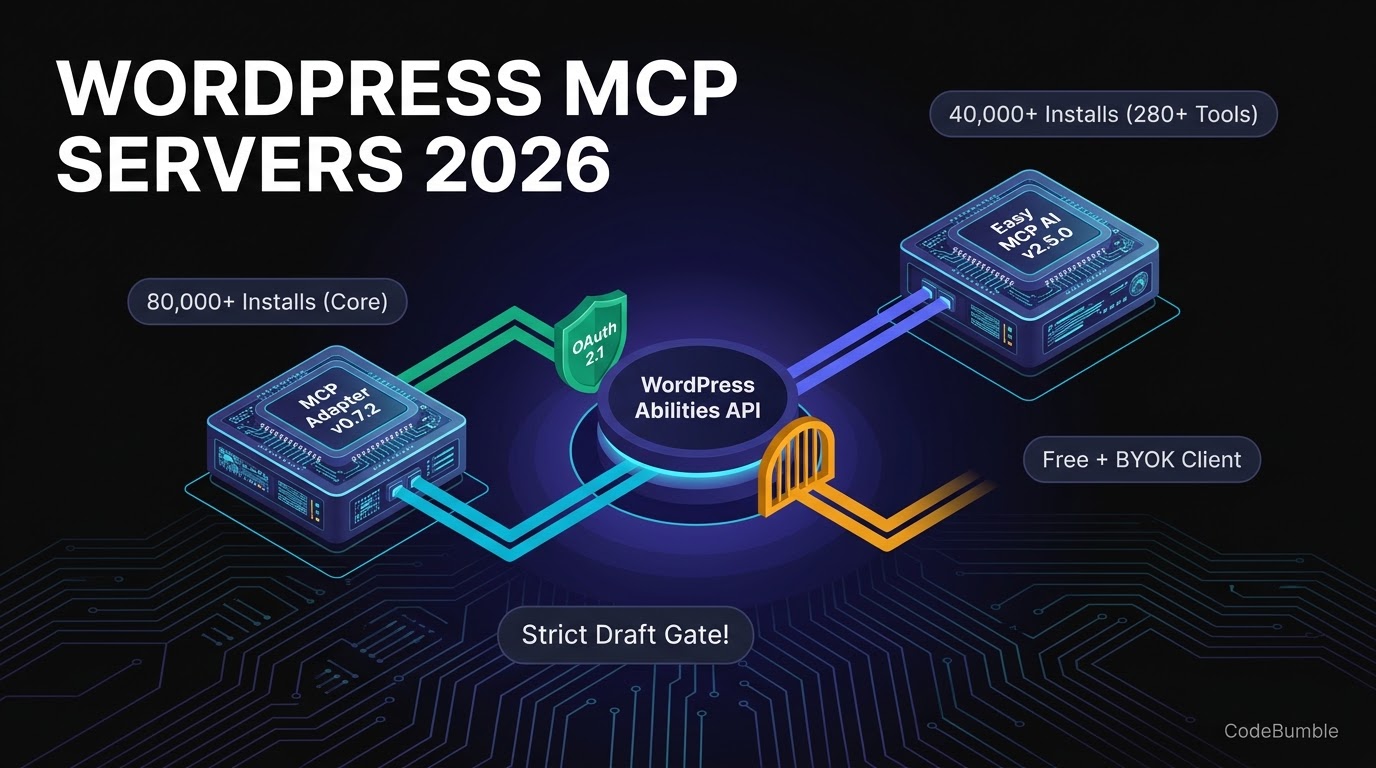
On November 19, 2026, the two largest Model Context Protocol (MCP) server plugins on WordPress.org both shipped notable updates within 24 hours of each other: the official WordPress MCP Adapter released v0.7.2 (now at 80,000+ active installations), and Themeisle's Easy MCP AI released v2.5.0 (now at 40,000+ active installations). Both plugins turn a WordPress site into an MCP server so external AI clients such as Claude, ChatGPT, Cursor, GitHub Copilot, and OpenAI Codex CLI can discover and execute site actions—without charging a plugin subscription fee.
Pricing and install stats verified as of November 21, 2026: Both plugins are 100% free on WordPress.org (GPL-2.0-or-later for MCP Adapter; free core with all 280+ tools included for Easy MCP AI) and operate on a Bring-Your-Own-Client / BYOK model—you pay only your existing AI client subscription or LLM API provider directly, plus any optional third-party SEO/analytics API accounts (such as Semrush, Ahrefs, or DataForSEO) you choose to connect. The architectural trade-off is sharp: MCP Adapter is a lightweight protocol bridge for developers registering WordPress 6.9+ Abilities, whereas Easy MCP AI is a turnkey OAuth 2.1 server with 280+ prebuilt tools, an Audit Log, and Strict Draft Mode.
| Metric / Capability | WordPress MCP Adapter (v0.7.2) |
Easy MCP AI (v2.5.0) |
Verified Date |
|---|---|---|---|
| WordPress.org Active Installs | 80,000+ | 40,000+ | Nov 21, 2026 |
| Latest Version & Release Date | v0.7.2 (Nov 19, 2026) |
v2.5.0 (Nov 19, 2026) |
Nov 21, 2026 |
| Minimum WordPress / PHP | WP 6.9+ / PHP 7.4+ |
WP 6.0+ / PHP 7.4+ |
Nov 21, 2026 |
| Tested Up To | WordPress 7.1.5 |
WordPress 7.1.5 |
Nov 21, 2026 |
| Pricing & Usage Model | Free plugin (GPL-2.0-or-later), BYOK AI client |
Free plugin (280+ tools), BYOK AI client & external SEO APIs | Nov 21, 2026 |
| Built-in Tools | 3 meta-tools + 3 read-only core abilities (opt-in) | 280+ tools (130+ WP core, 47 WooCommerce, 56 SEO/GA4/GSC) | Nov 21, 2026 |
| Authentication | Application Passwords (Basic) or custom OAuth | Built-in OAuth 2.1 (PKCE) + SHA-256 API tokens | Nov 21, 2026 |
Growth Signals & WordPress.org Telemetry
Adoption of MCP server infrastructure inside WordPress has accelerated sharply since the WordPress Core AI Team published MCP Adapter v0.7.0 to the WordPress.org Plugin Directory on October 7, 2026:
- WordPress MCP Adapter (
mcp-adapter): As documented in InstaWP's technical review, the plugin crossed 50,000+ active installations by October 26, 2026, reached 60,000+ active installations by November 5, 2026 (alongside578,905total Packagist installs forwordpress/mcp-adapter), and now reports 80,000+ active installations on WordPress.org as of November 21, 2026. It holds a5.0 / 5star rating (2 reviews), supports 7 locales, and shippedv0.7.2on November 19, 2026. - Easy MCP AI (
easy-mcp-ai): Developed by Themeisle, Easy MCP AI has reached 40,000+ active installations as of November 21, 2026, with a 4.9 / 5 star rating (17 five-star reviews, 1 three-star review) and 19 out of 19 support issues resolved in the past two months. Itsv2.5.0release on November 19, 2026 added Strict Draft Mode, Elementor container/section tools, Smart Slider 3 tools, Loco Translate integration, and configurable per-user/per-site rate limits.
Why are both plugins growing simultaneously? Because they serve overlapping but distinct layers of the WordPress ecosystem. Many plugins—including WooCommerce 11.2.2, which still bundles wordpress/mcp-adapter ^0.3.0 in its composer.json per InstaWP—depend on the canonical MCP Adapter as a protocol bridge, while site owners and agencies wanting instant OAuth 2.1 connections to Claude.ai or ChatGPT web connectors gravitate toward Easy MCP AI.
flowchart LR
    C[AI Client: Claude, ChatGPT, Cursor, Codex] -->|OAuth 2.1 / SHA-256 Token| E[Easy MCP AI v2.5.0: /wp-json/easy-mcp-ai/v1/mcp]
    C -->|App Password / STDIO WP-CLI| M[MCP Adapter v0.7.2: /wp-json/mcp/mcp-adapter-default-server]
    E -->|280+ Built-in Tools| WP[WordPress Core, WooCommerce, Yoast/Rank Math, ACF]
    E -->|Opt-in Adapter| AB[WordPress 6.9+ Abilities API]
    M -->|Discover / Inspect / Execute| AB
    AB --> WP
AI Architecture, Pricing Breakdown & Verification Timestamp
How Each Plugin Hooks Into WordPress
- WordPress MCP Adapter (
v0.7.2): Requires WordPress6.9+because it reads the core Abilities API (wp_register_ability()). Rather than dumping dozens of tool schemas into an LLM's context window, its default server at/wp-json/mcp/mcp-adapter-default-serverexposes exactly three meta-tools (mcp-adapter/discover-abilities,mcp-adapter/get-ability-info, andmcp-adapter/execute-ability, sanitized to hyphenated names on the wire). Abilities are private by default and must opt in viameta.mcp.public = true. Inv0.7.2(Nov 19, 2026), ability inputs are now prepared and validated before permission callbacks run, and clients that omit theMCP-Protocol-Versionheader afterinitializeno longer trigger an HTTP 400 error. - Easy MCP AI (
v2.5.0): Supports WordPress6.0+because it ships its own 280+ ready-made MCP tools (130+core WordPress,47WooCommerce,6ACF,10Events Calendar,10BuddyPress, and56external SEO/analytics tools) at/wp-json/easy-mcp-ai/v1/mcp, and also acts as an opt-in MCP adapter for WordPress6.9+Abilities underEasy MCP AI → Tools → Abilities. Both plugins support the stateless MCP2026-07-28and2025-11-25protocol revisions.
Pricing, Credits & BYOK Breakdown (Verified November 21, 2026)
| Cost Component | WordPress MCP Adapter (v0.7.2) |
Easy MCP AI (v2.5.0) |
Verified Date |
|---|---|---|---|
| Plugin License / Free Tier | $0 (100% free, GPL-2.0-or-later) |
$0 (100% free, all 280+ tools unlocked) |
Nov 21, 2026 |
| Paid Plan / Credit Packs | None ($0 / unmetered) |
None ($0 / unmetered plugin calls) |
Nov 21, 2026 |
| Hosted Relay / Proxy Fees | $0 (runs locally on your PHP server) |
$0 (runs locally on your PHP server) |
Nov 21, 2026 |
| LLM / AI Client Cost (BYOK) | User's own Claude, Cursor, or API plan | User's own Claude, ChatGPT, Cursor, or Codex plan | Nov 21, 2026 |
| Optional Cloud / External APIs | N/A | EasyMCP Cloud block tools (free, off by default); GA4/GSC/Semrush/Ahrefs/DataForSEO use your own API keys | Nov 21, 2026 |
Confidence note: All version numbers, active install counts, Tested up to headers, and pricing details above are verified directly from the official WordPress.org plugin directory listings and Make WordPress AI posts accessed on November 21, 2026. Neither plugin charges per-token markups because the WordPress server never calls OpenAI, Anthropic, or Google AI models directly—the user's external MCP client handles all LLM inference.
WordPress Performance Footprint, Security & Lock-In Check
Giving an external AI agent write access to a production WordPress database requires auditing three operational risks: default transport permissions, database/autoload bloat, and outbound telemetry.
1. Authentication & Default Permissions
- MCP Adapter's
readCapability Trap: As highlighted in InstaWP's security audit, if you register or use anMCP Adapterserver without a custom transport permission callback, it defaults to checkingcurrent_user_can( 'read' )—which every logged-in account, including Subscribers, possesses. On WooCommerce stores or membership sites with open registration, site owners should immediately raise this via themcp_adapter_default_transport_permission_user_capabilityfilter:
// Restrict the default MCP Adapter HTTP endpoint to administrators only
add_filter( 'mcp_adapter_default_transport_permission_user_capability', function () {
    return 'manage_options';
} );
- Application Passwords vs. OAuth 2.1:
MCP Adapterrelies on WordPress Application Passwords over HTTP Basic auth (or STDIO viawp mcp-adapter serve), which means web clients likeclaude.aiand ChatGPT web connectors (which require OAuth) cannot connect toMCP Adapterout of the box.Easy MCP AIsolves this with a built-in OAuth 2.1 server (PKCE, Dynamic Client Registration, refresh-token rotation with reuse detection, and per-grant tool scopes), alongside SHA-256 hashed API tokens, AES-256-GCM encrypted external credentials, a120requests/minute default rate limit, and Strict Draft Mode (which blocks AI clients from publishing live content or editing published posts).
2. wp_options Autoload, Frontend Bloat & Outbound Calls
- Frontend TTFB Impact: Neither plugin injects frontend JavaScript or CSS on public visitor pages—both operate strictly over
/wp-json/REST endpoints (or WP-CLI STDIO forMCP Adapter). - Database & Session Footprint:
MCP Adapterstores HTTP session initialization parameters in WordPress storage; inv0.7.1, maintainers capped session initialization data at4 KiBand stopped storingclientInfo.iconsto prevent oversizedwp_options/database writes.Easy MCP AIstores Audit Log entries (30-day default retention) and Change History before/after snapshots—on high-volume sites, administrators should monitor Audit Log table growth or adjust retention. - Outbound Calls & Bundling Conflicts:
MCP Adaptercan trigger an admin notice ("Another version of MCP Adapter is already loaded") if an older plugin bundles its own Composer copy (e.g., WooCommerce11.2.2bundling^0.3.0). Meanwhile,Easy MCP AIkeeps its threeEasyMCP Cloudblock tools disabled until turned on and syncs signed skill instructions once daily fromskills.easymcpai.comonce a client connects—which privacy-conscious teams can disable inwp-config.php:
// Disable daily signed skills sync in Easy MCP AI
define( 'EASY_MCP_AI_SKILLS_SYNC', false );
3. Lock-In & Portability
Because MCP Adapter builds on the WordPress Core Abilities API, any abilities you register remain standard WordPress core hooks (wp_register_ability()). Likewise, Easy MCP AI writes standard WordPress posts, WooCommerce products, ACF meta, and Yoast/Rank Math fields—deactivating either plugin leaves zero proprietary shortcodes or broken frontend content behind.
Practical Verdict: Which One Should You Install?
- Install
MCP Adapter(v0.7.2) if: You are a plugin/theme developer registering customWordPress 6.9+Abilities (Requires Plugins: mcp-adapter), or a solo developer using local WP-CLI STDIO with Cursor or Claude Code who wants minimal core infrastructure. Pin versions across client fleets since it is pre-1.0. - Install
Easy MCP AI(v2.5.0) if: You run a content site, WooCommerce store, or agency site on WordPress6.0+–7.1.5and want instant OAuth 2.1 connectors for Claude web/desktop or ChatGPT, 280+ prebuilt SEO/store tools, an Audit Log, Change History rollbacks, and Strict Draft Mode.
Frequently Asked Questions
1. Do WordPress MCP Adapter or Easy MCP AI cost money or charge per AI token?
No. As verified on November 21, 2026, both MCP Adapter and Easy MCP AI are free plugins on WordPress.org with no hosted relay fees or token markups. You bring your own AI client (such as Claude, ChatGPT, or Cursor) and, for Easy MCP AI's external SEO tools, your own GA4, Search Console, Semrush, or Ahrefs API keys.
2. Why does MCP Adapter require WordPress 6.9 while Easy MCP AI works on WordPress 6.0+?
MCP Adapter is a pure bridge for the WordPress Abilities API, which shipped in WordPress core 6.9. Easy MCP AI ships its own built-in library of 280+ WordPress, WooCommerce, and SEO tools that work down to WordPress 6.0, while optionally adapting WordPress 6.9+ Abilities when available.
3. Can I use Claude.ai or ChatGPT web connectors with the official WordPress MCP Adapter?
Not without adding a separate OAuth layer. Per InstaWP's setup guide, MCP Adapter authenticates HTTP requests with WordPress Application Passwords (Basic auth), whereas web versions of Claude and ChatGPT require OAuth. Easy MCP AI includes built-in OAuth 2.1 with PKCE for direct web connector sign-in.
4. Is WordPress MCP Adapter safe on a WooCommerce or membership site out of the box?
Not with default settings. Without an explicit transport permission callback, MCP Adapter checks the read capability—allowing any logged-in Subscriber to reach the server. Raise the capability to manage_options via mcp_adapter_default_transport_permission_user_capability or bind connections to a dedicated least-privilege user.
5. What changed in the November 19, 2026 releases (v0.7.2 and v2.5.0)?
MCP Adapter v0.7.2 fixed HTTP 400 errors for clients that omit MCP-Protocol-Version after initialize, validated ability inputs before permission checks, and updated Jetpack Autoloader to 6.0.3. Easy MCP AI v2.5.0 introduced Strict Draft Mode (preventing AI from publishing live content), per-user/per-site rate limits, Elementor container/section tools, and Loco Translate integration.
Sources
- WordPress.org Plugin Directory — MCP Adapter (v0.7.2) (Updated November 19, 2026; verified November 21, 2026): https://wordpress.org/plugins/mcp-adapter/
- WordPress.org Plugin Directory — Easy MCP AI (v2.5.0) (Updated November 19, 2026; verified November 21, 2026): https://wordpress.org/plugins/easy-mcp-ai/
- Make WordPress AI Team — The MCP Adapter Plugin is Now Available on WordPress.Org (Published October 7, 2026): https://make.wordpress.org/ai/2026/10/07/the-mcp-adapter-plugin-is-now-available-on-wordpress-org/
- WordPress Developer Blog — From Abilities to AI Agents: Introducing the WordPress MCP Adapter (Published February 4, 2026): https://developer.wordpress.org/news/2026/02/from-abilities-to-ai-agents-introducing-the-wordpress-mcp-adapter/
- InstaWP — Official WordPress MCP Adapter Review (2026): v0.7.1 Setup and Security (Updated November 6, 2026): https://instawp.com/wordpress-mcp-adapter-review/