

WordPress
Easy MCP AI 2.5.0 Adds Strict Draft Mode to WordPress: Features, $0 Pricing, and Footprint Review
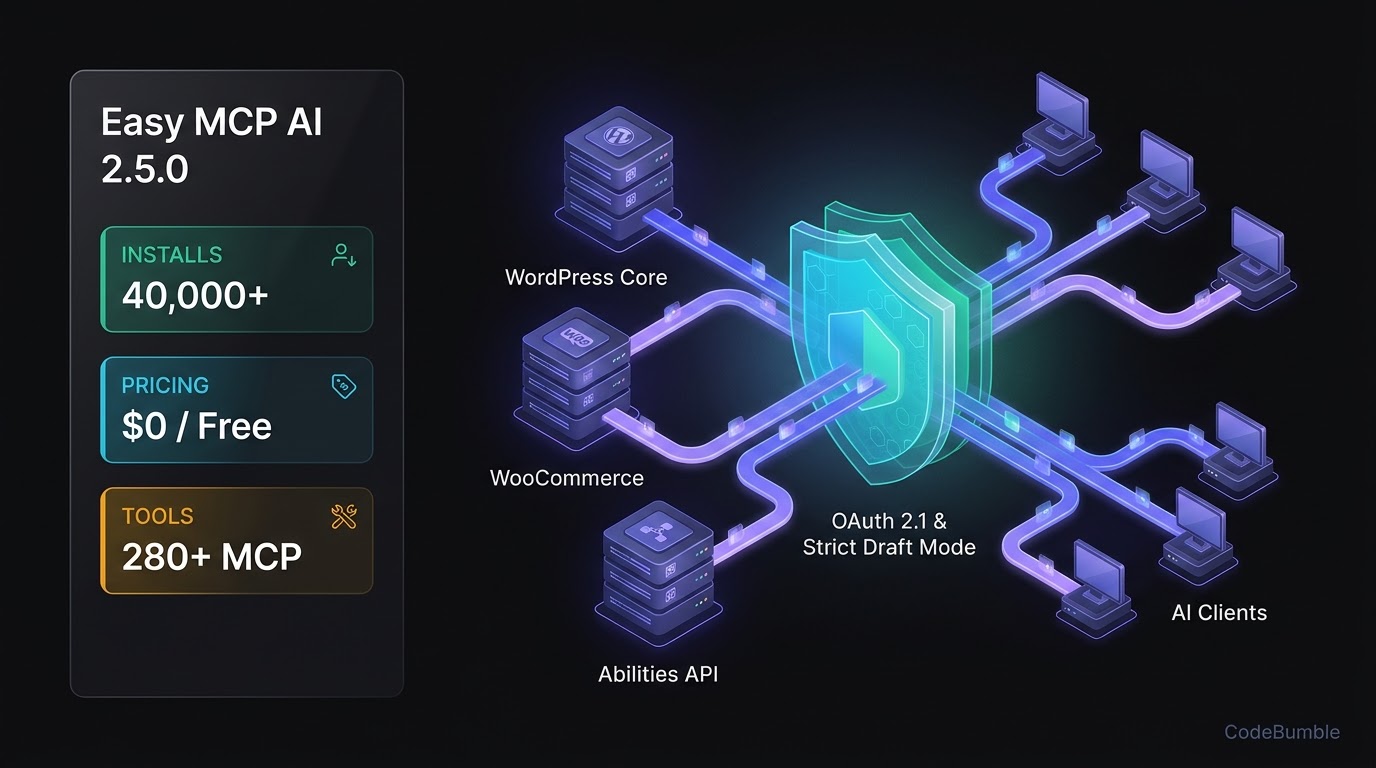
Easy MCP AI 2.5.0 just crossed 40,000+ active WordPress installations while shipping Strict Draft mode, Elementor container controls, and 280+ MCP tools at $0 with no daily request meter. Verified as of November 21, 2026, this review breaks down its WordPress.org telemetry, BYOK external API caveats, OAuth 2.1 security model, and database/performance footprint against the official WordPress MCP Adapter 0.7.2 and miniOrange Secure MCP Server 1.5.8.
8 min read
Easy MCP AI 2.5.0 Adds Strict Draft Mode to WordPress: Features, $0 Pricing, and Footprint Review
Executive Summary
- Featured Plugin:
Easy MCP AI(easy-mcp-ai), maintained by Themeisle (which acquired the plugin in September 2026 per Cowboy MCP). - Latest Release & Verification Date: Version
2.5.0, updated on November 19–20, 2026 (WordPress.org). All pricing, active install counts, and compatibility stats in this review were verified as of November 21, 2026. - How AI & MCP Were Added: Instead of embedding a metered LLM sidebar inside
wp-admin, Easy MCP AI turns your self-hosted WordPress site into a direct Model Context Protocol (MCP) server (/wp-json/easy-mcp-ai/v1/mcp) with 280+ built-in tools plus a no-code adapter for plugins that register WordPress 6.9+ Abilities API hooks (WordPress.org). - Verified Scale & Starting Cost:
40,000+active installations,4.9 / 5stars (17 five-star reviews, 1 three-star), and$0(100% free with no paid tiers or daily request caps)—though users supply their own AI client subscription (Claude, ChatGPT, Cursor) and Bring-Your-Own-Key (BYOK) credentials for external SEO/analytics APIs (WordPress.org).
Growth Signals & WordPress.org Telemetry
Among standalone WordPress MCP server plugins, Easy MCP AI has posted one of the steepest adoption curves in the directory. Originally added to WordPress.org on March 25, 2026, it held 30,000+ active installations on November 8, 2026 (Cowboy MCP) and climbed to 40,000+ active installations by November 21, 2026 (WordPress.org).
Verified WordPress.org directory telemetry as of November 21, 2026:
- Active Installations:
40,000+(up from30,000+earlier in November 2026) (WordPress.org) - Current Version:
2.5.0(updated ~1 day prior to November 21, 2026) (WordPress.org) - WordPress Compatibility: Requires
6.0or higher;Tested up to: 7.1.5(WordPress.org) - PHP Floor:
7.4or higher (WordPress.org) - User Rating & Support Health:
4.9 out of 5 starsacross 18 reviews, with20 out of 20support issues resolved in the last two months (WordPress.org)
What Shipped in Version 2.5.0
The 2.5.0 release focuses on editorial guardrails, page-builder control, and multilingual workflows (WordPress.org):
- Strict Draft Mode: Prevents connected AI agents from publishing live posts or modifying already-published content—forcing all AI-authored work into drafts for human review.
- Elementor & Smart Slider 3 Controls: Adds Elementor section insertion and column management with automatic resizing, fixes container/widget spacing and typography persistence, and adds Smart Slider 3 slide read/edit tools.
- Multilingual & Search Tooling: Introduces Loco Translate file read/update tools, post language controls, translation-linking tools,
wp_find_in_post, and site-wide text search across posts, custom fields, and taxonomy terms. - Per-User, Site & Connection Rate Limits: Adds configurable tool-call limits alongside content-hash and size metadata on post read/write replies, plus a Revoke control for connected AI apps directly inside WordPress user profiles.
AI Architecture, Pricing Breakdown & Verification Timestamp
How Easy MCP AI Hooks Into WordPress
Unlike cloud-relayed MCP plugins (such as WPVibe or Uncanny Automator's hosted relay) or WordPress.com-routed servers (Jetpack), Easy MCP AI runs its MCP server directly inside your WordPress PHP runtime at /wp-json/easy-mcp-ai/v1/mcp (WordPress.org). It supports the current MCP 2026-07-28 specification alongside backwards compatibility for 2025-11-25, 2025-06-18, and 2025-03-26 clients over Streamable HTTP (or mcp-remote for stdio-only clients).
Its 280+ tools span four functional layers (WordPress.org):
- Core WordPress (
130+tools): Posts, pages, custom post types, Gutenberg blocks, media uploads, menus, users, comments, and revisions. - Plugin Integrations (
90+tools):47WooCommerce tools (products, variations, orders, coupons, shipping, sales reports),6Advanced Custom Fields (ACF) tools,10The Events Calendar tools,10BuddyPress tools, and SEO connectors for Yoast SEO, Rank Math, AIOSEO, SEOPress, Slim SEO, and The SEO Framework. - SEO & Analytics (
50+/56tools): Direct connectors for Google Analytics 4 (13tools), Google Search Console (6tools), Semrush (13tools), SE Ranking (15tools), DataForSEO (8tools), and Ahrefs (1Domain Rating tool). - WordPress
6.9+Abilities API Adapter: Under Easy MCP AI → Tools → Abilities, administrators can toggle on any ability registered by third-party plugins so it appears as an MCP tool without writing custom adapter code (WordPress.org).
Pricing Breakdown & Ecosystem Comparison (Verified November 21, 2026)
Every pricing figure, quota, and install count below was verified as of November 21, 2026 against WordPress.org listings and published vendor comparisons:
| Plugin | Active Installs | Free Tier & Limits | Paid Plan Pricing | BYOK / External API Costs | Verified Date |
|---|---|---|---|---|---|
Easy MCP AI (v2.5.0) |
40,000+ |
$0 — Unlimited (all 280+ tools included; default 120 req/min self-imposed rate limit) | None (no paid tier) | Required for AI client (Claude/ChatGPT) + external SEO/analytics APIs (GA4, GSC, Semrush, DataForSEO, etc.) | Nov 21, 2026 |
Official MCP Adapter (v0.7.2) |
80,000+ |
$0 — Unlimited (infrastructure bridge only; requires WP 6.9+ and abilities from other plugins) | None | Required for AI client | Nov 21, 2026 |
miniOrange Secure MCP Server (v1.5.8) |
10,000+ |
100 requests/day enforced via miniOrange Gateway; 483 tools across 34 categories | Pro $79/yr early-bird until Nov 30 ($99/yr regular) for 500 req/day, Divi, & 72-hr undo (WPShout) |
Required for AI client | Nov 21, 2026 |
Important BYOK & Cloud Caveats: While Easy MCP AI itself charges $0 and never calls OpenAI, Anthropic, or Google LLMs on your behalf, connecting the 56 External Data tools requires your own Google service-account JSON key or paid Semrush, SE Ranking, DataForSEO, or Ahrefs API credentials (WordPress.org). Additionally, three optional EasyMCP Cloud block tools (blocks_execute, blocks_schema_get, atomic_wind_context) communicate with mcp.easymcpai.com if enabled—though they remain dormant unless you explicitly switch on the Cloud tools group (WordPress.org).
WordPress Performance Footprint, Security & Lock-In Check
1. Frontend Bloat & wp_options Autoload Impact
Because Easy MCP AI operates purely as a backend REST/MCP endpoint and wp-admin configuration interface, it injects no frontend visitor scripts or CSS on public pages—meaning zero direct impact on Largest Contentful Paint (LCP), Interaction to Next Paint (INP), or Cumulative Layout Shift (CLS) for human visitors.
However, administrators should monitor two server-side storage areas:
- Audit Log & Change History Retention: By default, the Audit Log retains tool-call records (including refused calls and client IPs) for 30 days, and Change History stores before/after snapshots on new installs (WordPress.org). High-frequency automated agents can grow database log tables if you do not tune rate limits or retention.
- Daily Signed Skills Sync: Once an AI client connects, Easy MCP AI fetches signed task skills once per day from
skills.easymcpai.com(sending only the plugin version). Security-conscious teams running air-gapped or strict outbound-firewall sites can disable this cleanly inwp-config.php(WordPress.org):
// Disable daily signed skills sync in Easy MCP AI
define( 'EASY_MCP_AI_SKILLS_SYNC', false );
2. OAuth 2.1, Capability Checks, and Reversibility
Hands-on testing by WPShout confirmed that Easy MCP AI's audit log records exact calls (wp_list_posts, wp_create_post with status=draft) and tags admin-bound keys appropriately. Its security model relies on:
- OAuth 2.1 with PKCE & Dynamic Client Registration: Refresh-token rotation with reuse detection, audience binding, and SHA-256 hashed token storage, while external SEO/analytics API keys are encrypted with AES-256-GCM (WordPress.org).
- WordPress User & Role Binding: Every tool call executes under the bound WordPress user's native capabilities. Assigning an Editor or custom least-privilege role prevents an AI client from installing plugins or modifying site options (WordPress.org).
- Draft Mode vs. Undo Trade-Off: Version
2.5.0's Strict Draft mode stops agents from publishing live content, and Change History provides before/after diffs alongside native WordPress revisions—but unlike Cowboy MCP or StifLi Flex MCP, Easy MCP AI does not include a one-click database checkpoint or MCP-callable undo tool (Cowboy MCP).
3. Data Portability & Deactivation Lock-In
Because all content, WooCommerce products, ACF fields, and SEO metadata written through Easy MCP AI are stored in standard WordPress core and plugin tables (wp_posts, wp_postmeta, wp_terms), deactivating or uninstalling Easy MCP AI leaves zero content lock-in. Only the plugin's own Audit Log, Change History diffs, and OAuth client registrations are specific to the plugin.
Frequently Asked Questions (FAQ)
Is Easy MCP AI really free with no request limits?
Yes. As verified on November 21, 2026, Easy MCP AI (v2.5.0) includes all 280+ MCP tools at $0 with no paid Pro tier and no vendor-imposed daily request quota (WordPress.org). It enforces a configurable default rate limit of 120 requests per minute per token on your own server, and you pay only for your own AI client (e.g., Claude or ChatGPT) and any third-party SEO/analytics APIs you connect.
How does Easy MCP AI compare to the official WordPress MCP Adapter?
The official MCP Adapter (v0.7.2, 80,000+ active installs as of November 21, 2026) requires WordPress 6.9+ and acts purely as an Abilities-to-MCP transport layer—it ships no built-in WooCommerce, SEO, or content tools of its own and relies on Application Passwords by default. Easy MCP AI works on WordPress 6.0+, includes 280+ ready-made tools plus an OAuth 2.1 server out of the box, and also acts as an Abilities API adapter on WordPress 6.9+ (WordPress.org).
Does Easy MCP AI work on localhost or behind Cloudflare?
Yes, with two caveats. For local development, OAuth accepts plain HTTP on direct loopback addresses (127.0.0.1 or ::1), and local terminal clients (Claude Code, Codex CLI, Cursor) can connect directly (WordPress.org). On live sites behind Cloudflare, Flexible SSL breaks OAuth sign-in—you should switch Cloudflare SSL/TLS to Full (Strict) (WordPress.org).
Can Easy MCP AI prevent an AI agent from accidentally publishing or deleting live pages?
In version 2.5.0, enabling Strict Draft mode blocks AI clients from publishing new posts or modifying already-published content (WordPress.org). You can also scope each OAuth grant or API token to read-only tools, bind it to a non-admin WordPress user, and require approval before destructive actions.
Does Easy MCP AI send my WordPress content to Themeisle's servers?
No, for standard site operations. All content, WooCommerce, and SEO plugin tools run locally inside your WordPress PHP environment and return results directly to your authenticated AI client (WordPress.org). The only optional external plugin service is the EasyMCP Cloud block tools group (disabled until you turn it on) and the daily signed skills check (skills.easymcpai.com), which can be disabled via EASY_MCP_AI_SKILLS_SYNC.
Sources
- WordPress.org Plugin Directory — Easy MCP AI (
v2.5.0) — https://wordpress.org/plugins/easy-mcp-ai/ (Updated November 19–20, 2026; verified November 21, 2026) - WordPress.org Plugin Directory — Official MCP Adapter (
v0.7.2) — https://wordpress.org/plugins/mcp-adapter/ (Updated November 19–20, 2026; verified November 21, 2026) - WordPress.org Plugin Directory — miniOrange Secure MCP Server (
v1.5.8) — https://wordpress.org/plugins/miniorange-secure-mcp-server/ (Updated November 18–19, 2026; verified November 21, 2026) - Cowboy MCP — Best WordPress MCP Plugins Compared (November 2026) — https://cowboymcp.com/compare (Updated November 8, 2026)
- WPShout — Best WordPress MCP Plugins in 2026 (Free and Paid, Compared) — https://wpshout.com/best-wordpress-mcp-plugins/ (Published October 30, 2026)