

Device
macOS 27.3 Beta 2 Overhauls Full Disk Access and System & App Protection Override to Sandbox AI Agents
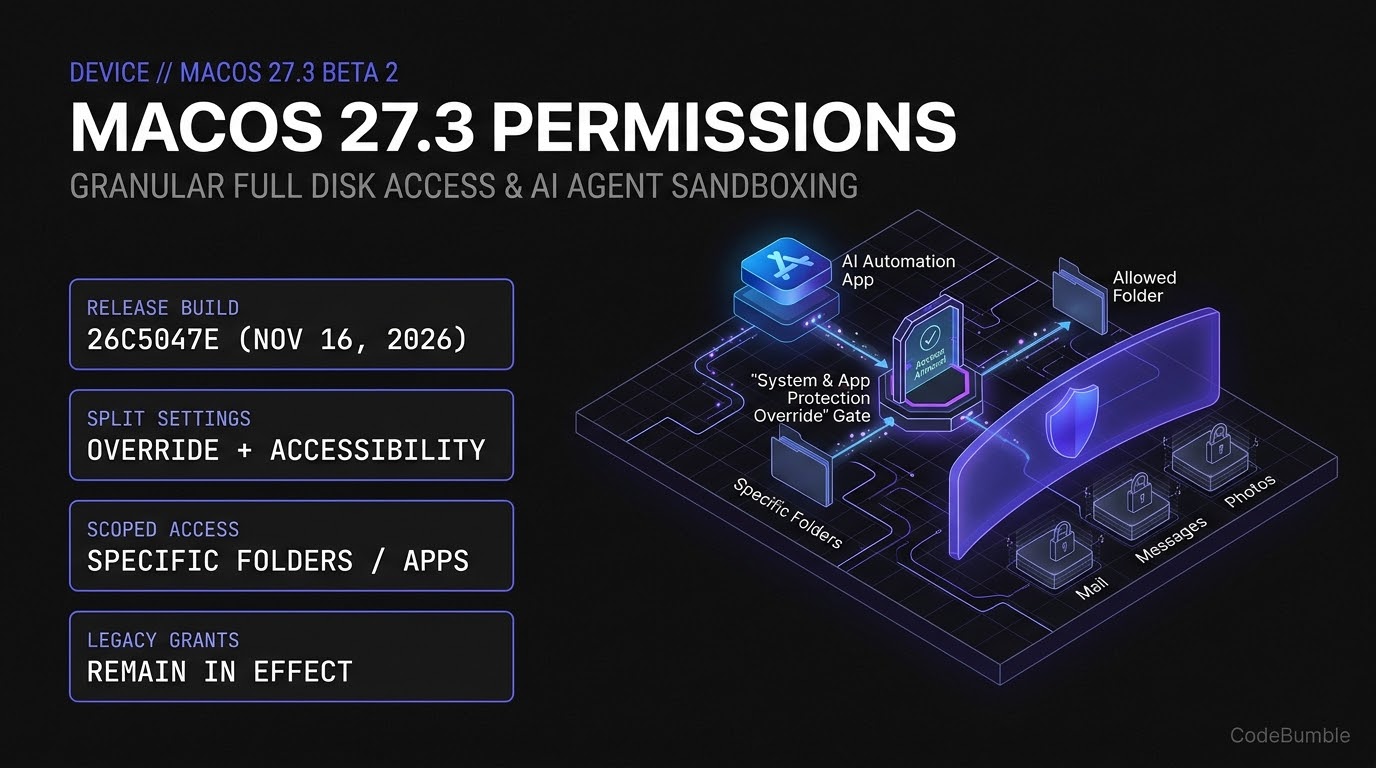
Apple's macOS 27.3 beta 2 (26C5047e) splits Device Control and Data Access into System & App Protection Override and Accessibility, letting users scope Full Disk Access to specific folders or apps instead of handing AI agents blanket disk control. Learn what changes, how legacy grants behave, and how to audit your Mac.
9 min read
macOS 27.3 Beta 2 Overhauls Full Disk Access and System & App Protection Override to Sandbox AI Agents
Executive Summary
On November 16, 2026, Apple seeded macOS 27.3 developer beta 2 (build 26C5047e, alongside iOS 27.3 beta 2 build 24C5049d per Apple Developer Releases) and published a new Apple Support specification (HT149699) overhauling how Mac applications request broad disk and UI-automation privileges. Previously, granting Full Disk Access or Device Control and Data Access handed an application—including autonomous AI desktop agents—all-or-nothing access to emails, Messages, Photos, browsing sessions, and other user accounts.
In macOS 27.3, Apple splits Device Control and Data Access into two separate controls—System & App Protection Override and Accessibility—and introduces granular scoping for new permission requests. Instead of clicking an all-access toggle, users can now restrict requesting apps to specific protected folders or specific target applications, choose Ask First or At Any Time per controlled app, and monitor active system-level control via a persistent menu bar indicator. As Help Net Security reported on November 17, 2026, Apple explicitly cited the growing reach of autonomous AI agents as a primary driver for the architectural split.
Confidence level: High for the macOS 27.3 beta 2 (26C5047e) permission model, UI flow, legacy grant behavior, and developer entitlement path, all verified against Apple's November 16 support document, Apple Developer Releases, Help Net Security, and AppleInsider. Note that Apple has not yet published full entitlement schema documentation for disk-backup and assistive-technology exemptions; additionally, early tester complaints regarding the non-dismissible menu bar indicator reflect beta 2 behavior and may evolve before final release.
Technical Mechanics and Architecture
Splitting Device Control and Data Access into Two Enforcement Planes
Before macOS 27.3 beta 2, macOS bundled broad automation and protection-bypass controls in ways that forced users into binary trust decisions. As AppleInsider and Apple Support detail, macOS 27.3 separates those capabilities:
- Full Disk Access (Scoped Folder Mode vs. Bypass System Protections):
- Scoped Mode (
Choose Folder): Allows an app to access only the specific protected folders selected by the user while keeping TCC (Transparency, Consent, and Control) protections enforced across Mail, Messages, Photos, and other accounts. - Full Bypass (
Bypass System Protections): Requires explicit multi-action confirmation (Read, Change, Delete, and Export All Your Data; View Hidden and Recently Deleted Photos; Browse As You on Websites) plus password authentication.
- Scoped Mode (
- System & App Protection Override (Scoped App Control):
- Replaces the data/control override portion of Device Control and Data Access.
- Users click Choose Apps to restrict an AI agent or automation tool to controlling only one or two designated apps, with a per-app policy selector (Ask First vs. At Any Time).
- Full bypass requires confirming Control Your Mac, Apps, and Settings and Monitor Everything You Do (seeing background windows and capturing keystrokes).
- Accessibility:
- Dedicated to assistive technologies (screen readers, voice control) and traditional accessibility automation, with Apple planning dedicated entitlements for assistive-tech and disk-backup developers to preserve pre-27.3 onboarding flows where appropriate.
+-------------------------------------------------------------------------+
|               MACOS 27.3 (26C5047E) TCC PERMISSION FLOW                 |
+-------------------------------------------------------------------------+
|                                                                         |
|  [Third-Party App / AI Agent Requests Access (New Grant)]               |
|   |                                                                     |
|   +---> [Full Disk Access]                                              |
|   |       |-- Option A: Choose Folder(s) --> Scoped TCC Allowlist       |
|   |       |    (Mail, Messages, Photos, other users remain PROTECTED)   |
|   |       |-- Option B: Bypass System Protections (Password + Confirm)  |
|   |                                                                     |
|   +---> [System & App Protection Override]                              |
|   |       |-- Option A: Choose Apps --> Per-app "Ask First"/"At Any Time"|
|   |       |-- Option B: Full Control (Keystrokes + Background Windows)  |
|   |       |-- Menu Bar Indicator: Active whenever override is in use    |
|   |                                                                     |
|   +---> [Accessibility] (Screen readers / Voice control / Entitlements) |
|                                                                         |
+-------------------------------------------------------------------------+
Legacy Grants vs. New Permission Requests
As NeoTeo and Help Net Security confirm, the new granular prompt flow applies only to new permission requests approved after upgrading to macOS 27.3. Any Full Disk Access or Accessibility grants already approved prior to the update remain in effect—meaning existing AI agents or backup utilities keep their blanket permissions until an administrator or user explicitly revokes and re-adds them.
Safe Read-Only Audit Script: Inspecting Local App Permissions
For Mac fleet engineers and security-conscious developers, auditing which apps currently hold legacy blanket grants is essential before relying on macOS 27.3's new defaults. Run this safe, read-only shell/Python audit on a Mac to inspect non-system apps listed in user-accessible TCC or /Applications entitlements without modifying system databases:
#!/usr/bin/env bash
# Safe, read-only inspection of installed apps and current macOS version
set -euo pipefail

echo "=== 1. macOS Build & Version ==="
sw_vers

echo "=== 2. Check User-Space TCC Database (Read-Only if Terminal has FDA) ==="
USER_TCC="$HOME/Library/Application Support/com.apple.TCC/TCC.db"
if [ -r "$USER_TCC" ]; then
  sqlite3 "$USER_TCC" \
    "SELECT service, client, auth_value, last_modified FROM access WHERE service IN ('kTCCServiceSystemPolicyAllFiles','kTCCServiceAccessibility','kTCCServicePostEvent') ORDER BY service, client;" 2>/dev/null \
    || echo "Note: TCC query skipped or restricted."
else
  echo "User TCC.db not readable without Full Disk Access (expected on hardened systems)."
fi

echo "=== 3. Instructions to Re-Scope Legacy Blanket Grants in macOS 27.3 ==="
echo "Open System Settings > Privacy & Security > Full Disk Access (or System & App Protection Override),"
echo "select an existing broad app, click (-), then (+) to re-add with Choose Folder / Choose Apps."
Evidence and Operational Impact
The table below summarizes the behavioral shift between pre-27.3 macOS releases and macOS 27.3 beta 2 (26C5047e) based on Apple Support (HT149699), Help Net Security, and NeoTeo:
| Permission Dimension | Pre-macOS 27.3 Behavior | macOS 27.3 Beta 2 (26C5047e) |
Security & UX Impact |
|---|---|---|---|
| Full Disk Access | Binary all-or-nothing toggle | Choose Folder or Bypass System Protections | Protects Mail, Messages, Photos from scoped apps |
| Control & Data Access | Combined Device Control and Data Access | Split into System & App Protection Override + Accessibility | Separates UI assistive tools from arbitrary app control |
| App Control Granularity | Blanket control over all apps | Choose Apps + Ask First / At Any Time | Limits AI agents to specific target apps |
| Active Usage Telemetry | Minimal visual cue | Persistent menu bar indicator | Early testers note it cannot yet be dismissed |
| Existing Grants | Active | Remain in effect on upgrade | Requires manual revoke/re-add to tighten old apps |
| Backup / Assistive Apps | Standard prompt | Entitlement path (known apps temporarily exempted) | Prevents breaking legitimate Time Machine/screen readers |
Two practical consequences stand out from early beta 2 testing reported by Help Net Security:
- Menu bar indicator friction: Beta testers on Reddit noted that the new menu bar reminder appears whenever an app uses system-level control—even for previously approved window-management utilities—with no built-in toggle to hide it in beta 2.
- Developer onboarding breakage: Apple warned developers directly that apps must gracefully handle receiving access to only a subset of folders or apps rather than assuming blanket Full Disk Access, or risk silent permission errors during onboarding.
Hardening and Deployment Playbook
Follow these six steps to prepare Mac fleets and developer apps for macOS 27.3.
1. Audit and Re-Scope Legacy Full Disk Access Grants
Because existing permissions survive the macOS 27.3 upgrade unchanged, open System Settings > Privacy & Security > Full Disk Access and System & App Protection Override, remove (−) any AI coding assistants or automation tools that previously received blanket access, and re-add (+) them using Choose Folder or Choose Apps.
2. Enforce "Ask First" for High-Risk Target Apps
Inside System & App Protection Override, set sensitive apps (password managers, Mail, Messages, Terminals, or corporate browsers) to Ask First rather than At Any Time so an AI automation agent cannot drive them silently in the background.
3. Harden Third-Party Mac Apps Against Partial Grants
If you ship a macOS developer tool or agent, update your file-access onboarding to handle EPERM / NSCocoaErrorDomain partial-folder errors gracefully and document the exact folders or target bundle IDs your workflow requires (as recommended by Apple Support).
4. Apply Entitlements Only for Genuine Backup or Assistive Tools
If you maintain a disk-backup utility or assistive-technology app that genuinely requires pre-27.3 Full Disk Access or Accessibility behavior, track Apple's upcoming entitlement documentation rather than instructing users to click Bypass System Protections.
5. Update MDM / Enterprise Privacy Preferences Policy Control (PPPC) Profiles
Enterprise Mac administrators should test existing MDM PPPC payloads against macOS 27.3 beta 2 (26C5047e) in a staging ring to verify how System & App Protection Override interacts with managed Accessibility and SystemPolicyAllFiles profiles.
6. Rollback Note
If a critical internal automation tool fails under scoped folder/app restrictions in macOS 27.3 beta 2, you can temporarily restore full access for that specific signed binary via System Settings > Privacy & Security > Bypass System Protections (after verifying code signature and developer identity) while updating the app's onboarding code—without downgrading the OS build.
Frequently Asked Questions (FAQ)
1. Does macOS 27.3 automatically revoke my existing Full Disk Access permissions?
No. According to Help Net Security and NeoTeo, the new granular prompts apply only to new permission requests. Previously granted permissions remain active until you manually remove and re-add the app.
2. What replaced Device Control and Data Access in macOS 27.3?
Apple split Device Control and Data Access into two separate settings in System Settings > Privacy & Security: System & App Protection Override and Accessibility.
3. Can I restrict an AI automation app to only one or two apps on my Mac?
Yes. Under System & App Protection Override, click Choose Apps to select only the specific apps the tool may control, and choose Ask First or At Any Time next to each app (Apple Support HT149699).
4. What happens if an app is granted Bypass System Protections in System & App Protection Override?
Per Apple's support documentation, bypassing system protections lets the app read, change, delete, and export all your data, view hidden/recently deleted photos, browse as you on websites, control your Mac and settings, and monitor everything you do (including background windows and keystrokes).
5. Will legitimate disk backup apps and screen readers break?
Apple states that developers of disk-backup apps and assistive technologies can request entitlements to preserve pre–macOS 27.3 behavior for new installs, and known apps currently retain existing behavior without an entitlement while full entitlement details are finalized.
Sources
- Apple Support — If an app asks for Full Disk Access or System & App Protection Override on your Mac (
HT149699) (Published November 16, 2026) - Apple Developer Releases — macOS 27.3 beta 2 (
26C5047e) & iOS 27.3 beta 2 (24C5049d) (Published November 16, 2026) - Help Net Security — Apple splits Mac app permissions fearing overreaching AI agents (Published November 17, 2026)
- AppleInsider — macOS 27.3 beta 2 lets you limit what AI automation apps can do (Published November 16–17, 2026)
- NeoTeo — Apple's macOS 27.3 beta 2 changes Mac permissions (Published November 17, 2026)