

Web performance
Windows 11 KB5132061 Quietly Enables Memory Integrity (HVCI): VBS Kernel Isolation vs. Gaming Performance
Windows 11 KB5132061 is gradually enabling Memory Integrity (HVCI) and VBS on eligible 25H2/26H2 PCs while respecting existing opt-outs. Explore the security vs. gaming FPS trade-off and PowerShell audit steps.
8 min read
Windows 11 KB5132061 Quietly Enables Memory Integrity (HVCI): VBS Kernel Isolation vs. Gaming Performance
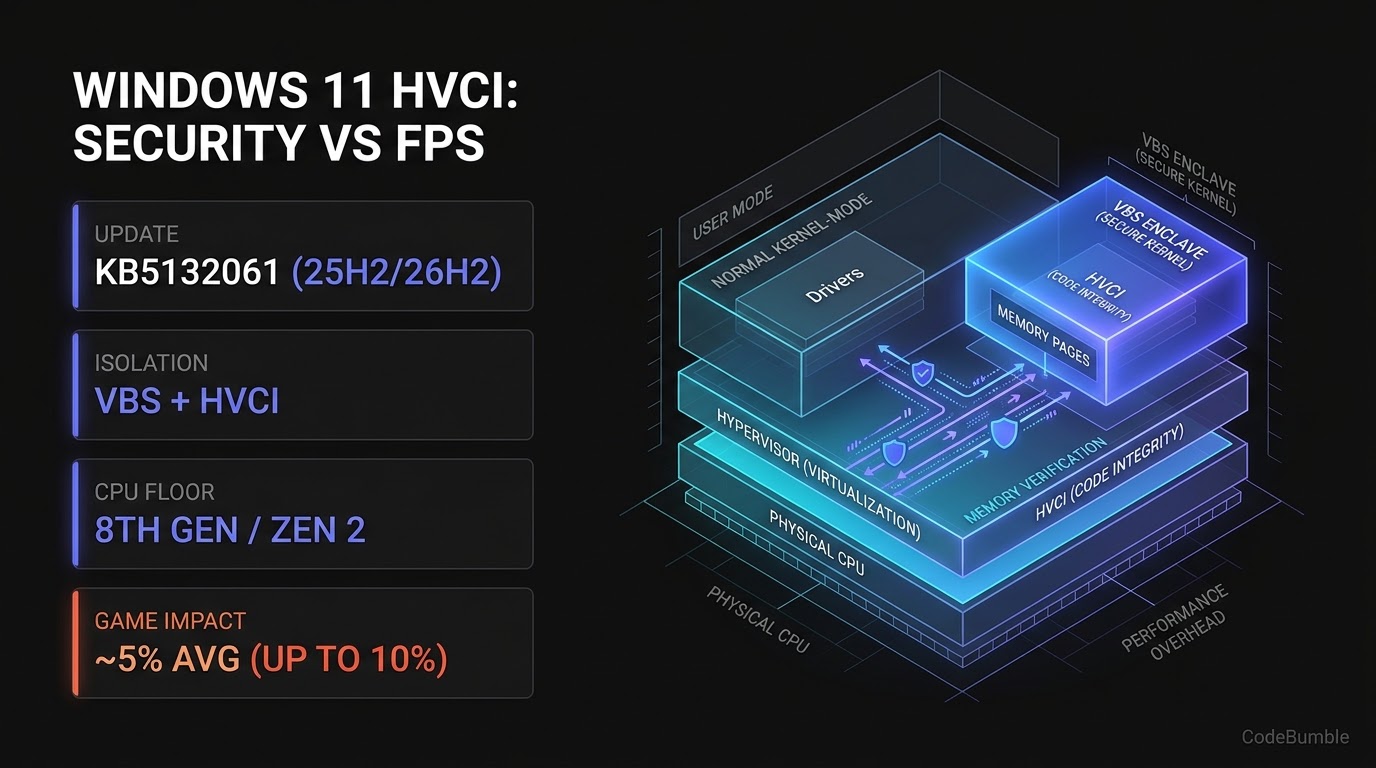
Executive Summary
With the November 10, 2026 Patch Tuesday cumulative update—KB5132061 (OS Builds 26300.9974, 26200.9974, and 26100.9974)—Microsoft began a gradual rollout that automatically enables Memory Integrity, technically known as Hypervisor-Protected Code Integrity (HVCI), on eligible Windows 11 25H2 and 26H2 PCs, including systems previously upgraded from Windows 10. As TechPowerUp reported on November 13, 2026, the change graduates from the October 28 preview update (KB5127936) and activates Virtualization-Based Security (VBS) alongside HVCI after passing hardware, driver, and performance readiness checks.
Critically, Microsoft's rollout respects existing user or IT administrator opt-outs: systems where Memory Integrity was previously turned off are left unchanged. For systems where HVCI is newly enabled during the update, the trade-off is measurable: HVCI blocks unverified kernel-mode drivers even if an attacker compromises the Windows kernel, but virtualization-assisted memory verification carries a documented gaming overhead—averaging ~5% and reaching up to 10% in select titles during Tom's Hardware testing on a Core i9-13900K and RTX 4090.
This briefing explains how VBS and HVCI enforce kernel code integrity, summarizes the compatibility and performance evidence from KB5132061 and KB5127936, and provides read-only PowerShell verification scripts plus enterprise/enthusiast tuning and rollback steps.
Technical Mechanics and Architecture
How VBS and HVCI Isolate Kernel-Mode Driver Execution
In a traditional non-virtualized Windows kernel, any exploit or vulnerable third-party driver running at Ring 0 can allocate executable kernel memory pages and load unsigned or malicious code. Virtualization-Based Security (VBS) shifts the trust boundary beneath the Windows OS itself by using hardware virtualization (Intel VT-x / AMD-V) to run a Windows hypervisor and an isolated VBS Enclave (Secure Kernel).
When Memory Integrity (HVCI) is enabled on top of VBS, all kernel-mode code-integrity verification and page-permission enforcement move inside that hypervisor-managed enclave. Even if malware compromises the normal OS kernel, it cannot inject an unverified driver or flip writable kernel pages to executable without passing hypervisor validation:
+-----------------------------------------------------------------------------+
|      WINDOWS 11 KB5132061: VBS & MEMORY INTEGRITY (HVCI) ARCHITECTURE       |
+-----------------------------------------------------------------------------+
|                                                                             |
|  [ WINDOWS 11 25H2 / 26H2 UPDATE READINESS GATE (KB5132061 / KB5127936) ]   |
|   |-- Checks: CPU >= 8th Gen Intel / AMD Zen 2 + compatible kernel drivers  |
|   |-- Respects: Existing user or IT admin HVCI opt-out (leaves off if set)  |
|   +-- Eligible PCs: Enables VBS (if off) + HVCI automatically               |
|             |                                                               |
|             v                                                               |
|  [ HARDWARE HYPERVISOR BOUNDARY (Intel VT-x / AMD-V) ]                      |
|   |-- Normal OS Kernel (Ring 0)      |  [ VBS Secure Kernel Enclave ]       |
|   |    Loads drivers / runs games    |   HVCI verifies driver signatures    |
|   |    (cannot self-grant exec pages)|   & locks executable memory pages    |
|   +----------------------------------+--------------------------------------+
|             |                                                               |
|             v                                                               |
|  [ PERFORMANCE & COMPATIBILITY TRADE-OFF ]                                  |
|   |-- Security: Blocks unverified kernel drivers even post-kernel-compromise|
|   |-- Anti-Cheat: Required by Riot Vanguard On-Demand mode (HVCI + VBS)     |
|   +-- Overhead: ~5% avg gaming FPS drop, up to 10% in select titles         |
+-----------------------------------------------------------------------------+
Rollout Scope, Eligibility, and Compatibility Matrix
Verified across KB5132061, KB5127936, and TechPowerUp:
| Attribute / Component | Verified Detail | Operational Implication |
|---|---|---|
| Target Builds | Windows 11 25H2 & 26H2 (KB5132061, OS Builds 26300.9974 / 26200.9974 / 26100.9974) |
Gradual rollout originating from Oct 28 preview KB5127936 (26300.9818 / 26200.9818) |
| CPU Eligibility Floor | Appears to require 8th Gen Intel or AMD Zen 2 (or newer) | Older CPUs or systems failing driver/performance checks remain untouched |
| Existing Opt-Outs | Respected by Windows Update | PCs where a user or IT admin already disabled HVCI are left alone |
| VBS Prerequisite | Automatically enabled if absent on eligible PCs | Turning on HVCI activates VBS underneath it |
| Gaming & Anti-Cheat | ~5% avg FPS drop (up to 10%); required by Riot Vanguard On-Demand | Competitive gamers may see frame-rate dips, yet some anti-cheats require HVCI + VBS |
Known KB5132061 Install Errors |
0x80070306, 0x800f0989, 0x800f0993 |
Microsoft states an automatic fix is being applied via Windows Update |
Defensive System-Engineering Code: Auditing VBS & HVCI State via PowerShell
Whether you manage a fleet of Windows 11 workstations or want to verify if KB5132061 flipped Memory Integrity on your own PC, use the following read-only PowerShell script to query Windows' Win32_DeviceGuard WMI class and the HypervisorEnforcedCodeIntegrity registry key without modifying system state:
# Read-only audit of VBS and HVCI (Memory Integrity) status on Windows 11
$dg = Get-CimInstance -ClassName Win32_DeviceGuard -Namespace root\Microsoft\Windows\DeviceGuard

$vbsStatus = switch ($dg.VirtualizationBasedSecurityStatus) {
    0 { "Not enabled" }
    1 { "Enabled but not running" }
    2 { "Enabled and running" }
    default { "Unknown ($($dg.VirtualizationBasedSecurityStatus))" }
}

# SecurityServicesRunning contains 2 when HVCI (Memory Integrity) is active
$hvciRunning = ($dg.SecurityServicesRunning -contains 2)

$hvciReg = Get-ItemProperty `
    -Path "HKLM:\SYSTEM\CurrentControlSet\Control\DeviceGuard\Scenarios\HypervisorEnforcedCodeIntegrity" `
    -ErrorAction SilentlyContinue

[PSCustomObject]@{
    OSBuild             = (Get-ItemProperty "HKLM:\SOFTWARE\Microsoft\Windows NT\CurrentVersion").CurrentBuild
    VBSStatus           = $vbsStatus
    HVCIRunning         = $hvciRunning
    HVCIRegistryEnabled = if ($null -ne $hvciReg) { [bool]$hvciReg.Enabled } else { $false }
} | Format-List
Evidence: Security Justification vs. Real-World Performance Trade-Offs
Evaluating Microsoft's November 2026 servicing notes alongside independent hardware reporting highlights why HVCI sits at the center of an ongoing OS design tension:
- Why Microsoft Is Expanding HVCI Now: As TechPowerUp noted in its broader November 2026 security coverage, Microsoft's November Patch Tuesday addressed two actively exploited local privilege-escalation flaws (
CVE-2026-81963andCVE-2026-85880) among hundreds of Windows fixes. Expanding VBS + HVCI across Windows 1125H2and26H2—especially on PCs upgraded in-place from Windows 10 that never received clean-install VBS/HVCI defaults—hardens the kernel against post-compromise unsigned driver loading. - Readiness Checks Prevent Driver Bricking: Before flipping HVCI on during
KB5132061, Windows runs readiness checks across hardware, installed kernel drivers, and performance. If an incompatible legacy driver is present, HVCI is not forced on. - Documented Gaming Performance Impact: In 2023 testing cited by TechPowerUp, Tom's Hardware benchmarked HVCI/VBS on a Core i9-13900K and RTX 4090, measuring an average ~5% frame-rate reduction in games and up to 10% in specific titles. Notably, Microsoft itself previously published (and later pulled) a 2022 support article advising gamers to disable Memory Integrity to reclaim performance—creating friction for enthusiast PCs, though anti-cheat systems like Riot's Vanguard On-Demand mode now explicitly require both HVCI and VBS.
- Confidence & Benchmark Caveat: Confidence Level: High on
KB5132061/KB5127936build numbers, opt-out preservation, and0x80070306/0x800f0989/0x800f0993install error codes (verified against Microsoft Support and TechPowerUp). Benchmark Caveat: Neither Microsoft nor independent reviewers have published a fresh November 2026 benchmark suite measuringKB5132061HVCI overhead specifically on26H2or newer non-gaming creative workloads (such as video or photo editing); the~5%/up to 10%figure reflects Tom's Hardware's 2023 Core i9-13900K / RTX 4090 gaming dataset.
Tuning & Administration Playbook
Step 1: Audit Post-Update VBS and HVCI Status
After installing KB5132061, run the read-only PowerShell audit script above (or msinfo32.exe → Virtualization-based security) to confirm whether VBSStatus is Enabled and running and HVCIRunning is True.
Step 2: Enforce Consistent Policy Across Enterprise Fleets
If your organization manages Windows 11 25H2/26H2 via Intune or Group Policy, explicitly define Turn On Virtualization Based Security and Hypervisor-Enforced Code Integrity policies rather than relying on consumer gradual-rollout defaults, ensuring uniform security posture and predictable benchmark baselines across hardware cohorts.
Step 3: Check for KB5132061 Install Failures (0x80070306, 0x800f0989, 0x800f0993)
If Windows Update fails to apply KB5132061 with 0x80070306, 0x800f0989, or 0x800f0993, check Windows Update retry status—Microsoft is deploying an automatic servicing fix to affected devices through Windows Update.
Step 4: Verify Driver Compatibility & Anti-Cheat Requirements Before Toggling HVCI
Before changing Memory Integrity on a workstation or gaming PC, inspect loaded kernel drivers (driverquery /v) for older third-party hardware utilities, and verify whether games you play (such as titles using Riot Vanguard On-Demand) require HVCI + VBS to launch.
Step 5: Rollback & Opt-Out Notes
- Clean Toggle Rollback: Open Windows Security → Device security → Core isolation details, switch Memory integrity to Off, and reboot. Because
KB5132061explicitly respects existing user and IT admin opt-outs, turning Memory Integrity off prevents future cumulative updates from silently re-enabling it. If you notice a driver conflict or unexpected stutter immediately afterKB5132061, record a baseline frame-time sample before and after toggling Memory Integrity. - Compatibility Warning: Do not disable hardware virtualization in UEFI/BIOS if you rely on WSL2, Docker Desktop (Hyper-V backend), or Windows Sandbox, as disabling virtualization disables all Hyper-V-dependent developer workloads alongside VBS.
Frequently Asked Questions
1. Will Windows 11 KB5132061 force Memory Integrity back on if I already turned it off?
No. Per Microsoft's KB5127936 and TechPowerUp, the gradual rollout respects existing user and IT administrator preferences—PCs where Memory Integrity was already disabled are left alone.
2. Which Windows 11 versions and CPUs are eligible for the automatic HVCI rollout?
The rollout targets eligible Windows 11 25H2 and 26H2 systems (including PCs upgraded from Windows 10) that pass hardware, driver, and performance readiness checks—appearing to require at least an 8th Gen Intel or AMD Zen 2 processor.
3. How much performance does Memory Integrity (HVCI) cost in games?
In Tom's Hardware testing on a Core i9-13900K and RTX 4090, enabling HVCI/VBS resulted in an average ~5% frame-rate drop in games, and up to 10% in select titles. Fresh 26H2 creative-app benchmarks have not yet been published.
4. Where do I turn Memory Integrity off if my PC slows down after KB5132061?
Navigate to Windows Security → Device security → Core isolation details, toggle Memory integrity to Off, and restart your PC. Note that some anti-cheat systems (such as Riot's Vanguard On-Demand mode) require both HVCI and VBS to remain enabled.
5. What should I do if KB5132061 fails with error 0x80070306, 0x800f0989, or 0x800f0993?
Microsoft has acknowledged those three installation error codes on some PCs and is rolling out an automatic fix directly through Windows Update.
6. What is the difference between VBS and Memory Integrity (HVCI)?
Virtualization-Based Security (VBS) is the underlying Windows hypervisor isolation layer, while Memory Integrity (HVCI) is a specific security feature running inside VBS that verifies kernel-mode drivers and prevents unsigned or unverified code from becoming executable in kernel memory. When KB5132061 enables Memory Integrity on an eligible PC, it also enables VBS if VBS was not already active.
Sources
- Microsoft Support: November 10, 2026—KB5132061 (OS Builds 26300.9974, 26200.9974 and 26100.9974) — Released November 10, 2026.
- Microsoft Support: October 28, 2026—KB5127936 (OS Builds 26300.9818 and 26200.9818) Preview — Released October 28, 2026.
- TechPowerUp: Microsoft Turns On Memory Integrity for More Windows 11 PCs With November Update — Published November 13, 2026.