

Engineering
Cloudflare Kitesurf vs. Headless Chromium: Inside the Open-Source Rust/Wasm Browser Engine for AI Agents
Cloudflare open-sourced Kitesurf under Apache 2.0—a stateless Rust/Wasm browser engine for AI agents that runs in Cloudflare Workers V8 isolates with 3-7x less memory and CPU than headless Chromium. Get the architecture breakdown, SSRF/Access Worker guard, and pilot playbook.
8 min read
Cloudflare Kitesurf vs. Headless Chromium: Inside the Open-Source Rust/Wasm Browser Engine for AI Agents
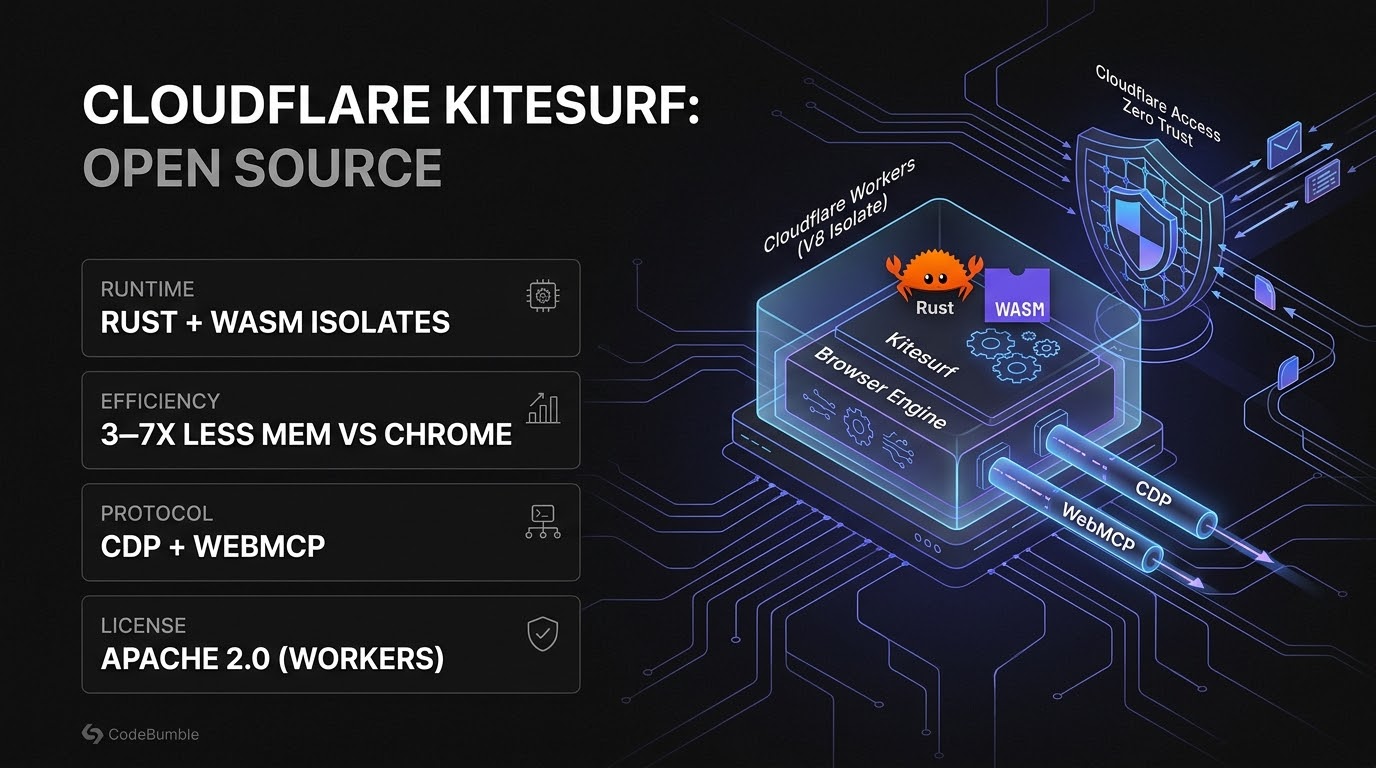
Executive Summary
On November 13, 2026, Cloudflare open-sourced Kitesurf under the permissive Apache 2.0 license, fulfilling a commitment made when it first debuted the experimental browser engine during Agents Week in August 2026. Unlike traditional headless browser fleets that wrap Chromium inside multi-gigabyte Linux containers, Kitesurf is a stateless, from-scratch browser engine written in Rust and compiled to WebAssembly (Wasm) to execute directly inside Cloudflare Workers V8 isolates—or locally on 127.0.0.1:8787.
For engineering teams building autonomous AI agents, web scrapers, and automated QA harnesses, Kitesurf targets a concrete infrastructure bottleneck: colocating browser rendering with edge inference without paying the memory and cold-start tax of Chromium containers. In Cloudflare's prior benchmarks cited by explainx.ai, Kitesurf used roughly 3× to 7× less memory and CPU than headless Chromium while speaking the Chrome DevTools Protocol (CDP) and WebMCP, allowing existing Puppeteer and MCP clients to attach.
However, Kitesurf explicitly trades full site compatibility for isolate density, and open-sourcing the engine shifts operational security responsibility onto the deploying team. Before running pnpm run deploy on your own Cloudflare account, engineering teams must lock the CDP/WebMCP endpoints behind Cloudflare Access Zero Trust policies, enforce SSRF egress controls, and benchmark real-world wall-clock latency against Chromium.
Kitesurf (Workers V8 Isolates) vs. Headless Chromium Containers
Per Cloudflare Blog, Unite.AI, and explainx.ai:
| Architectural Dimension | Headless Chromium (Containerized) | Cloudflare Kitesurf (Open Source, Nov 13, 2026) |
|---|---|---|
| Engine Implementation | C++ Chromium / Blink / V8 | From-scratch Rust compiled to WebAssembly (Wasm) |
| Execution Boundary | Heavy OS containers / VMs | Cloudflare Workers V8 isolates (or local 127.0.0.1:8787) |
| State Model | Persistent profiles / shared process state | Stateless per-request/isolate execution |
| Memory & CPU Footprint | Multi-gigabyte container overhead | ~3× to 7× less memory and CPU (Cloudflare benchmarks) |
| Control Protocols | Chrome DevTools Protocol (CDP) | CDP (Puppeteer-compatible) + WebMCP + terminal rendering |
| Primary Trade-Off | Maximum web compatibility | Higher density & lower cost vs. narrower site compatibility & higher wall-clock latency on some pages |
| License & Deployment | BSD / Managed Browser Run APIs | Apache 2.0; self-hosted in your own Cloudflare account |
Technical Mechanics and Architecture
How Kitesurf Executes DOM, CSS, and JavaScript Inside V8 Isolates
Kitesurf is not a Chromium fork. Instead, it implements HTML parsing, CSS evaluation, JavaScript execution, and screenshot/terminal rendering inside a Rust-to-Wasm binary packaged for Cloudflare Workers. By exposing a Chrome DevTools Protocol (CDP) surface alongside WebMCP (added in Cloudflare's September 28, 2026 update), coding agents and Puppeteer scripts can drive Kitesurf without rewriting their automation harness:
+-----------------------------------------------------------------------------+
|        CLOUDFLARE KITESURF: STATELESS RUST/WASM AGENT BROWSER STACK         |
+-----------------------------------------------------------------------------+
|                                                                             |
|  [ AI AGENT / AUTOMATION HARNESS ]                                          |
|   Puppeteer / CDP Client / Claude Code / MCP Client                         |
|     |                                                                       |
|     +---> [ CLOUDFLARE ACCESS (Zero Trust Auth Gate) ]                      |
|             |-- Rejects unauthenticated public CDP/WebMCP connections       |
|             v                                                               |
|  [ CLOUDFLARE WORKERS V8 ISOLATE (Apache 2.0 Self-Hosted Kitesurf) ]        |
|   |-- Rust/Wasm Browser Core (HTML Parser + CSS Engine + JS + Screenshots)  |
|   |-- Protocol Adapters: CDP Endpoint + WebMCP + Terminal Rendering         |
|   +-- Egress Policy Guard: Blocks RFC 1918 / Metadata / Internal IPs (SSRF) |
+-----------------------------------------------------------------------------+
Defensive Engineering Pattern: Hardening a Self-Hosted Kitesurf Worker Against SSRF & Unauthorized CDP Control
Exposing a self-hosted CDP or WebMCP browser engine on a public *.workers.dev URL without authentication turns your Cloudflare account into an open proxy and potential SSRF pivot. As Codiatech and explainx.ai emphasize, self-hosted deployments should always sit behind Cloudflare Access and enforce strict URL-scheme and hostname validation before navigating.
Below is a safe, defensive Cloudflare Worker wrapper pattern (TypeScript) that validates service-token headers and blocks private/metadata IP ranges before forwarding navigation targets to an internal Kitesurf engine binding:
export interface Env {
  KITESURF_SERVICE: Fetcher;
  ALLOWED_ACCESS_AUD: string;
}

const BLOCKED_HOST_PATTERNS = [
  /^localhost$/i,
  /^127\./,
  /^10\./,
  /^192\.168\./,
  /^172\.(1[6-9]|2[0-9]|3[0-1])\./,
  /^169\.254\.169\.254$/, // Cloud metadata endpoint
  /^\[::1\]$/,
];

export function isSafeNavigationUrl(rawUrl: string): boolean {
  try {
    const parsed = new URL(rawUrl);
    if (parsed.protocol !== "https:" && parsed.protocol !== "http:") {
      return false;
    }
    return !BLOCKED_HOST_PATTERNS.some((re) => re.test(parsed.hostname));
  } catch {
    return false;
  }
}

export default {
  async fetch(request: Request, env: Env): Promise<Response> {
    // 1. Require Cloudflare Access JWT assertion at the Worker boundary
    const accessJwt = request.headers.get("Cf-Access-Jwt-Assertion");
    if (!accessJwt) {
      return new Response("Unauthorized: Cloudflare Access JWT required", { status: 401 });
    }

    // 2. Validate requested target URL to mitigate SSRF
    const targetUrl = new URL(request.url).searchParams.get("url");
    if (targetUrl && !isSafeNavigationUrl(targetUrl)) {
      return new Response("Forbidden: Disallowed navigation target", { status: 403 });
    }

    // 3. Forward validated request to the self-hosted Kitesurf engine
    return env.KITESURF_SERVICE.fetch(request);
  },
};
Evidence: Timeline, Performance Trade-Offs, and Caveats
- Release Timeline: Cloudflare introduced Kitesurf on August 6, 2026 during Agents Week, shipped WebMCP support, expanded browser APIs, and terminal rendering on September 28, 2026, and open-sourced the full repository under Apache 2.0 on November 12–13, 2026 (Cloudflare Blog, Unite.AI).
- Resource Efficiency vs. Latency: Cloudflare's August benchmarks cited by explainx.ai indicate 3× to 7× lower memory and CPU consumption than headless Chromium, while noting higher wall-clock latency on certain complex real-world pages.
- Confidence Level: High on licensing (Apache 2.0), Rust/Wasm architecture, CDP/WebMCP support, and November 13 open-source release.
- Benchmark Caveat: Cloudflare's November 13 open-source announcement does not publish a new, standardized cross-site compatibility matrix or updated p95 wall-clock latency table for the open-sourced build. Because Kitesurf is explicitly labeled an experimental engine, engineering teams should run a controlled pilot on their own target URLs before migrating production browser workloads off Chromium.
Engineering Evaluation & Deployment Playbook
Step 1: Run Kitesurf Locally Before Deploying to Workers
Clone the open-source Kitesurf repository, inspect the Rust/Wasm build configuration, and launch the local development server on loopback (127.0.0.1:8787) so no unauthenticated CDP port is exposed to your LAN.
Step 2: Benchmark Compatibility and Wall-Clock Latency on Your Target Corpus
Run your existing Puppeteer or WebMCP agent test suite against both headless Chromium and local Kitesurf across 50–100 representative target pages. Measure task completion accuracy, DOM/JS execution parity, p95 wall-clock latency, and Worker CPU-time consumption rather than relying solely on synthetic memory numbers.
Step 3: Lock Down Self-Hosted Workers with Cloudflare Access & SSRF Guards
Before running pnpm run deploy to your Cloudflare account:
- Disable public
*.workers.devunauthenticated access and place the Worker route behind Cloudflare Access (requiring Service Tokens for automated agents). - Enforce strict URL-scheme (
http:/https:only) and private-IP/metadata-endpoint filtering (isSafeNavigationUrl) to block SSRF. - Cap per-request navigation timeouts and output payload sizes to stay within Workers CPU and memory limits.
Step 4: Route Workloads Hybrid-Style (Kitesurf + Chromium Fallback)
Use Kitesurf for high-volume, stateless DOM extraction, WebMCP interactions, and lightweight JS rendering, while routing complex SPA checkouts or legacy WebGL/canvas flows that fail compatibility checks to managed Browser Run / Chromium containers.
Step 5: Rollback Notes
Because Kitesurf exposes a standard CDP endpoint, switching an automation harness back to headless Chromium or Cloudflare's managed Browser Run API requires only swapping the WebSocket CDP connection URL in your Puppeteer/MCP client configuration—zero agent logic rewrites are required.
Frequently Asked Questions
1. Is Cloudflare Kitesurf based on Chromium or Blink?
No. Kitesurf is a from-scratch, stateless browser engine written in Rust and compiled to WebAssembly (Wasm) to run inside Cloudflare Workers V8 isolates—with zero Chromium or OS container dependencies.
2. What license is Kitesurf released under?
Cloudflare open-sourced Kitesurf on November 13, 2026 under the permissive Apache 2.0 license, allowing teams to inspect, modify, run locally, or deploy it to their own Cloudflare Workers accounts.
3. Does Kitesurf work with Puppeteer and MCP?
Yes. Kitesurf exposes the Chrome DevTools Protocol (CDP) for Puppeteer-compatible clients and supports WebMCP (added in September 2026) along with terminal rendering for AI coding agents.
4. How much faster or lighter is Kitesurf than headless Chromium?
Cloudflare benchmarks cited in November 2026 coverage report roughly 3× to 7× less memory and CPU than headless Chromium, though Kitesurf can exhibit higher wall-clock latency and narrower site compatibility on complex pages.
5. Is Kitesurf ready to replace all production Chromium fleets?
Not yet. Cloudflare explicitly classifies Kitesurf as an experimental browser engine, and teams should run a scoped pilot behind Cloudflare Access and SSRF controls before migrating critical workflows.
Sources
- Cloudflare Blog: Kitesurf is now open source — Published November 13, 2026.
- Unite.AI: Cloudflare Open-Sources Kitesurf Browser Engine for AI Agents — Published November 14, 2026.
- explainx.ai: Cloudflare Kitesurf Open Source: Deploy an Agent Browser on Workers — Published November 14, 2026.
- Codiatech: Kitesurf: Browser Automation Pilot and Access Boundaries — Published November 13, 2026.
- Ubuntu Buzz: Cloudflare Releases Open-Source Kitesurf Stateless AI Browser — Published November 14, 2026.
Deeper Engineering Context: Why V8 Isolates Change Agent Browser Economics
Traditional browser-automation stacks—whether running Puppeteer, Playwright, or Selenium against headless Chromium—suffer from a fundamental impedance mismatch with AI agent loops. Each Chromium instance spawns a multi-process OS tree (browser, renderer, GPU/SwiftShader, and network service processes) consuming hundreds of megabytes to gigabytes of RAM, requiring Linux container orchestration, and introducing noticeable cold-start latency when scaled horizontally.
By compiling a Rust HTML/CSS/JS engine directly to WebAssembly (Wasm) inside Cloudflare Workers V8 isolates, Kitesurf collapses that container fleet into stateless, millisecond-spin-up edge workers. As Ubuntu Buzz and explainx.ai note, this model also benefits Linux/Ubuntu ML pipelines and coding-agent harnesses (such as Claude Code and MCP-connected tools) that need high-throughput web inspection without maintaining heavy Chromium Docker images.
At the same time, Kitesurf enters a rapidly evolving niche alongside Zig-built alternatives like Lightpanda 1.0 (released October 30, 2026). For enterprise platform teams, the decision criteria are straightforward:
- Use Kitesurf when you already standardize on Cloudflare Workers, want 3× to 7× lower memory/CPU for stateless DOM/JS/WebMCP tasks, and want Apache 2.0 source control inside your own Cloudflare account.
- Keep Headless Chromium when your workflow requires 100% browser-engine fidelity on complex single-page apps, authenticated multi-tab user sessions, WebGL/canvas-heavy dashboards, or strict visual-regression pixel parity.
- Enforce Defense-in-Depth: Whenever you self-host Kitesurf via
pnpm run deploy, bind local testing to127.0.0.1:8787, require Cloudflare Access (Cf-Access-Jwt-Assertion) on all production Worker routes, and validate every outbound navigation target against RFC 1918 and cloud metadata (169.254.169.254) blocklists.
Managed Browser Run APIs vs. Self-Hosted Workers
Finally, open-sourcing Kitesurf gives teams a clear build-versus-buy choice: continue consuming Cloudflare's managed Browser Run APIs for zero-maintenance operations, or fork the Apache 2.0 codebase to customize DOM/WebMCP adapters and run inside your own Workers account. In production Workers deployments, always verify the Cf-Access-Jwt-Assertion token cryptographically against your Cloudflare Access team domain's JWKS endpoint—not merely by checking header presence—before allowing any agent to drive browser sessions.