

Vulnerability
CVE-2026-119977: WordPress Upgrade-Window RCE in 2026
A long-form security briefing for WordPress owners, developers, agencies, and hosting teams
14 min read
Updating WordPress is supposed to close security gaps. CVE-2026-119977 concerns an unusual exception: under specific conditions, the upgrade process itself briefly exposes an opportunity for unauthenticated server-side code execution.
WordPress addressed the upgrade-process weakness in 7.1.4, released on October 28, 2026, with security releases for older branches as well. The operational priority is straightforward: protect upgrade staging from public requests, install the appropriate official security release, verify the result, and investigate suspicious activity without confusing attack attempts with successful compromise.
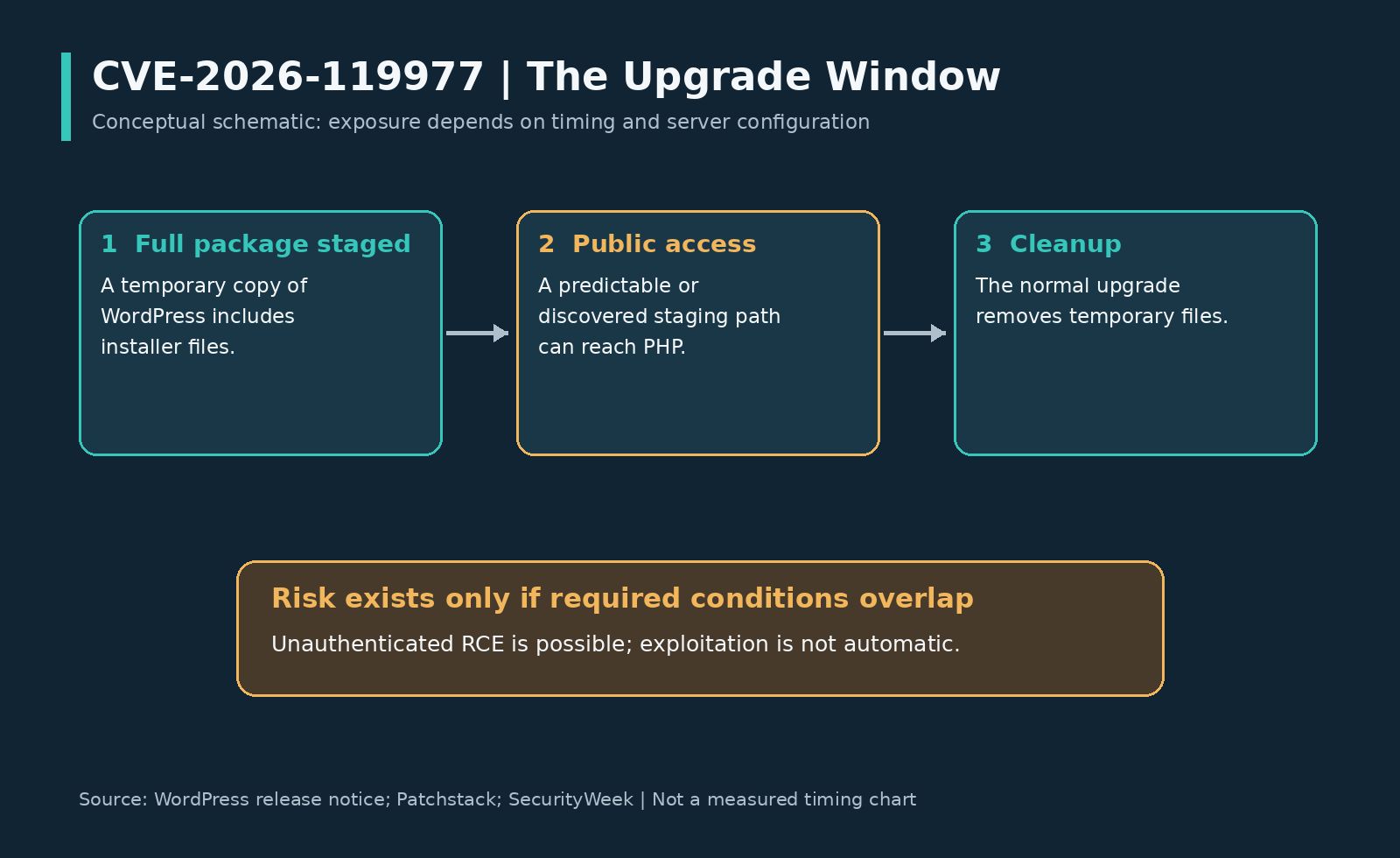
Original explanatory diagram. The stages are conceptual; their widths do not represent measured durations.
The Moment That Matters
Consider an illustrative maintenance session: an administrator starts a core update, the package is extracted, files are replaced, and temporary material is removed. The administrator sees a routine task; the security question is whether anything in the temporary working area becomes independently reachable while that task is underway.
In this case, the issue is not simply that a visitor can download an archive. A full WordPress package can place installer functionality inside a temporary tree that some web servers make publicly accessible and executable as PHP. If an attacker reaches that staged installation at the right moment, the temporary copy can become an execution surface separate from the ordinary, configured website.
That distinction explains the otherwise counterintuitive headline. An update is a transition between application states, and those transitional files need protection too—not just the finished installation.
The Vulnerability at a Glance
OpenCVE snapshot and its embedded CVE record identify the following details; the published CVE record is the authoritative place to track subsequent changes.
| Field | Detail |
|---|---|
| Identifier | CVE-2026-119977. |
| Product | WordPress Core, rather than a third-party plugin. |
| Vulnerability | Unauthenticated upgrade-window staged-installer remote code execution. |
| Severity | CVSS v3.1 8.1 — High. |
| Weakness classification | CWE-367, a time-of-check/time-of-use race condition. |
| Attack prerequisites | Network access; no WordPress privileges; high attack complexity; no victim interaction required by the vector. |
| Latest-branch fix | WordPress 7.1.4, released October 28, 2026. |
| Credited researcher | Umut Bayram. |
| CVE publication | October 31, 2026, 05:33:07 UTC, according to the supplied record. |
The recorded vector is CVSS:3.1/AV:N/AC:H/PR:N/UI:N/S:U/C:H/I:H/A:H. Its combination of high potential impact and high complexity is important: the issue is serious, but an exposed WordPress version is not the same thing as an immediately successful exploit.
What Actually Goes Wrong
Temporary Files Become a Website
WordPress uses wp-content/upgrade/ as a working area when unpacking update packages. For the full-package core update involved here, the extracted material includes the files needed for a separate WordPress installation, including installer-related PHP.
Security depends on how the hosting stack treats that working area. Files that are temporary from the updater’s perspective can still be public resources from the web server’s perspective. If PHP requests can reach them, their short lifetime does not stop them from executing during that lifetime.
Predictability Reduces the Search
Patchstack’s analysis describes older extraction names being derived from the package name, alongside cleanup behavior that could remove the index.php used to discourage directory listing. Those behaviors made the temporary area easier to locate or enumerate in relevant configurations.
Directory listing and direct file access are not interchangeable. Disabling a folder listing removes one discovery mechanism; it does not inherently stop a request for a file whose location is already known. That is why meaningful protection must address access to the staged tree, not merely whether the browser displays its contents.
Timing Is a Prerequisite
The staged installer is useful to an attacker only while the required files remain reachable and before the relevant cleanup completes. Published reporting describes windows lasting seconds in normal laboratory conditions, but that is not a universal timing guarantee for every host, storage system, or update run.
The CVE maps the flaw to CWE-367; more generally, a time-of-check/time-of-use weakness concerns a security-relevant state changing between checking and using a resource. For administrators, the actionable point is the overlap: upgrade activity, accessible temporary files, executable PHP, and sufficient time must coincide.
Four Conditions Must Align
Available reporting identifies four practical prerequisites for the documented attack path.
- A full-package core update includes the installer files. The relevant exposure is not established merely by observing any plugin or theme update.
- The staging tree accepts public web requests and PHP execution. A network block that applies before PHP changes the exposure substantially.
- The staging location is predictable or discoverable. Temporary-file naming and directory visibility affect this condition.
- The attacker completes the necessary interaction before cleanup. Reaching one file is not, by itself, proof that the complete execution path succeeded.
The no-user-interaction metric does not mean that an upgrade can materialize without any operational trigger. It means the attack does not require the victim to click an exploit or approve the attacker’s actions; a legitimate administrator or an automatic update mechanism can create the relevant upgrade window.
The Limits of Potential Impact
The documented consequence is server-side code execution, which is more serious than a cosmetic defacement or a browser-only script injection. Depending on the PHP worker’s effective access, possible consequences include alteration of writable application files, access to data available to the application, and changes that outlast the original update window.
However, remote code execution does not automatically mean operating-system root access. The eventual blast radius depends on permissions, account isolation, database access, and other boundaries in the hosting environment. Claims that every affected site exposes every neighboring site or guarantees complete server takeover go beyond the evidence available for this CVE.
This is a reason to examine containment as well as patching. WordPress’s hardening guidance emphasizes limiting access, controlling writable files, and reducing the damage a compromised installation can cause.
Attacks Versus Successful Compromises
Attack activity is not hypothetical. On October 30, The Hacker News reported Wordfence telemetry recording 62,969 blocked attempts in a 24-hour reporting interval against this upgrade-process weakness. The article also describes prolonged polling of small groups of sites and requests testing staging-layout variations.
Those figures measure reported requests—not unique victims, not successful installations, and not confirmed server takeovers. The distinction matters because an attacker can make many unsuccessful requests while waiting for a rare condition.
There is also a timing difference between reports: the October 30 coverage described the flaw before it had a CVE identifier, whereas the supplied record gives the CVE publication time as October 31. That publication sequence reconciles the older wording; it does not justify discarding the attack telemetry or treating an absent KEV entry as an all-clear.
Evidence boundary: the reporting reviewed establishes attempts to exploit the flaw. It does not establish that 62,969 sites were compromised or provide a verified count of successful compromises through this vulnerability.
Affected Versions and Fixes
The CVE record identifies branch-specific affected ranges from WordPress 4.7 through 7.1.3; the shorthand should not be mistaken for a claim that every later maintenance release on every older branch remains vulnerable. For example, 6.8.11 is in an affected range, while the corresponding security release is 6.8.12.
The following table pairs the supplied affected ranges with the fixed releases listed in WordPress’s official version documentation, independently reproduced in the release coverage.[6][7]
| Branch | Affected range, inclusive | Security release |
|---|---|---|
| 7.1 | 7.1.0–7.1.3.[7] | 7.1.4. |
| 7.0 | 7.0.0–7.0.7.[7] | 7.0.8. |
| 6.9 | 6.9.0–6.9.10.[7] | 6.9.11. |
| 6.8 | 6.8.0–6.8.11.[7] | 6.8.12. |
| 6.7 | 6.7.0–6.7.10.[7] | 6.7.11. |
| 6.6 | 6.6.0–6.6.10.[7] | 6.6.11. |
| 6.5 | 6.5.0–6.5.13.[7] | 6.5.14. |
| 6.4 | 6.4.0–6.4.13.[7] | 6.4.14. |
| 6.3 | 6.3.0–6.3.13.[7] | 6.3.14. |
| 6.2 | 6.2.0–6.2.14.[7] | 6.2.15. |
| 6.1 | 6.1.0–6.1.15.[7] | 6.1.16. |
| 6.0 | 6.0.0–6.0.17.[7] | 6.0.18. |
| 5.9 | 5.9.0–5.9.19.[7] | 5.9.20. |
| 5.8 | 5.8.0–5.8.18.[7] | 5.8.19. |
| 5.7 | 5.7.0–5.7.20.[7] | 5.7.21. |
| 5.6 | 5.6.0–5.6.22.[7] | 5.6.23. |
| 5.5 | 5.5.0–5.5.23.[7] | 5.5.24. |
| 5.4 | 5.4.0–5.4.24.[7] | 5.4.25. |
| 5.3 | 5.3.0–5.3.26.[7] | 5.3.27. |
| 5.2 | 5.2.0–5.2.29.[7] | 5.2.30. |
| 5.1 | 5.1.0–5.1.27.[7] | 5.1.28. |
| 5.0 | 5.0.0–5.0.30.[7] | 5.0.31. |
| 4.9 | 4.9.0–4.9.34.[7] | 4.9.35. |
| 4.8 | 4.8.0–4.8.33.[7] | 4.8.34. |
| 4.7 | 4.7.0–4.7.38.[7] | 4.7.39. |
These are the security-release versions associated with this disclosure, not a promise that no subsequent update will be needed. WordPress states that only its latest version is actively supported; courtesy backports do not turn a legacy branch into a long-term support commitment.
WordPress 4.6 and earlier are outside the supplied affected ranges and no longer receive these security updates. Being outside this record is not evidence that such installations are secure overall; migrate them rather than treating omission as a security endorsement.
What the Patch Changes
Patchstack’s published code analysis identifies three complementary changes rather than a single naming adjustment.
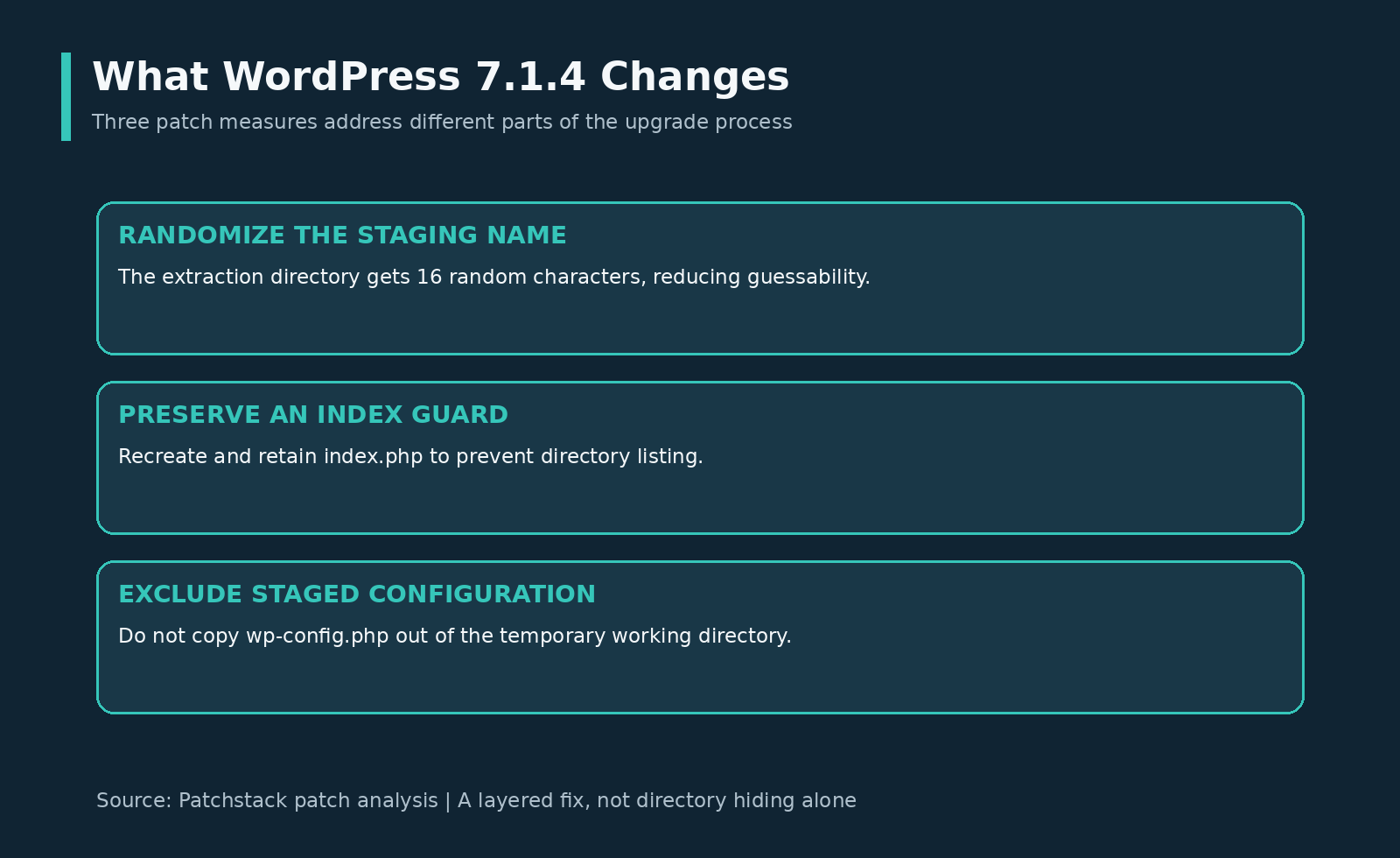
Original infographic based on the published patch analysis; not a screenshot of WordPress source code.
| Change | Security purpose | Important limitation |
|---|---|---|
| Append 16 random characters to extraction names. | Reduce predictable staging locations. | Random naming is not equivalent to denying public access. |
Recreate and retain the directory’s index.php guard. |
Reduce exposure through directory listings. | Listing protection alone is not a universal block on known PHP paths. |
Exclude wp-config.php from files copied out of the working directory. |
Prevent propagation of staged configuration into the destination during core replacement. | This is an updater behavior change, not a reason to delete the legitimate site configuration. |
The practical lesson is layered protection. Discovery resistance, safer handling of configuration files, and server-level controls address different parts of the problem.
Where Firewall Protection Runs
A firewall that loads only as part of the established WordPress application may never run when a request directly executes PHP from a separate staged copy. Installing a security plugin therefore does not automatically prove coverage for every PHP entry point under the document root.
However, a blanket statement that all PHP-based firewalls are ineffective would also be too broad. Wordfence’s firewall optimization documentation distinguishes ordinary plugin loading from an Extended Protection configuration that uses PHP’s auto_prepend_file mechanism before application code loads.
For this CVE, ask a concrete question: does the protective layer actually run or block requests in the upgrade staging directory? Confirm configuration inheritance and current vendor guidance with the host; do not substitute the presence of a plugin icon for an enforcement test.
Block Public Staging Access
Patchstack recommends denying web access to wp-content/upgrade/ at the web server. This is a defensive control for the staging exposure, not a substitute for installing the fixed WordPress release.
The examples below are administrator-written configuration patterns, not vendor-certified universal patches. Adapt the path to the actual installation and have the host validate the configuration, especially on managed hosting, custom content directories, and subdirectory installations.
Nginx Example
For a conventional root installation using /wp-content/upgrade/, a server-level prefix location can reject HTTP requests before they reach PHP.
# Add inside the relevant server block; validate before reloading.
location ^~ /wp-content/upgrade/ {
    return 403;
}
The ^~ modifier matters because Nginx ordinarily considers regular-expression locations after prefix matching; an appropriately matching ^~ location stops that later regex search. Existing more-specific locations, aliases, installation prefixes, and origin-routing arrangements still require review rather than blind copy-and-paste.
Apache Example
An Apache 2.4 administrator can use a filesystem-scoped rule for the real upgrade working directory.
# Example path only: replace with the actual filesystem directory.
<Directory "/srv/www/example/wp-content/upgrade">
    Require all denied
</Directory>
Apache’s authorization controls provide the access-denial mechanism; a host must confirm the effective virtual-host configuration and any configuration merging. Avoid relying solely on an .htaccess placed inside a temporary directory that the updater may clean.
Validate the final control on the origin, not just through a cached front-end response. A harmless host-assisted static-file check and a harmless PHP-handler check in the controlled staging area can verify different behaviors; do not use an exploit payload or run tests on sites without authorization.
Patch Without Creating Confusion
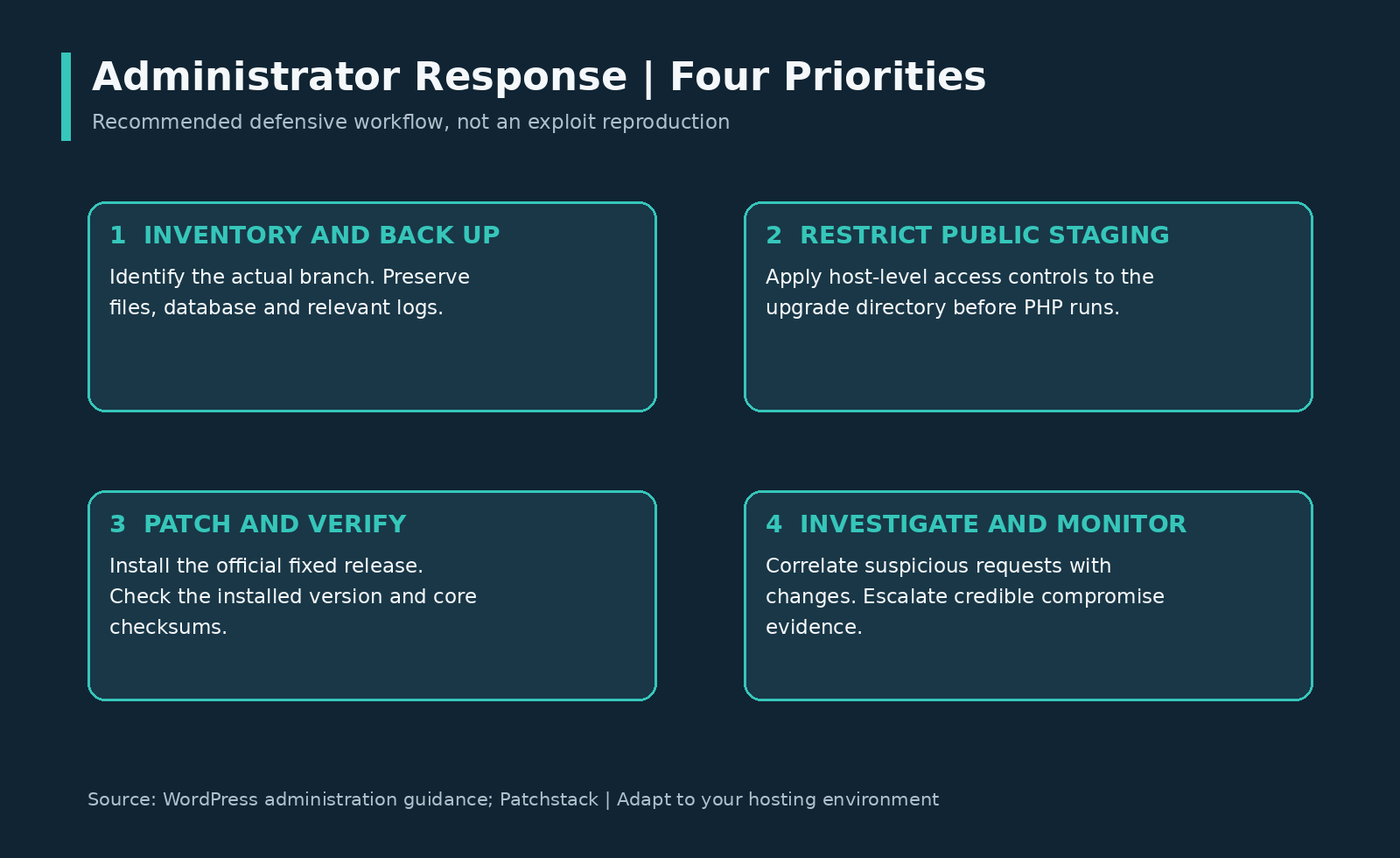
Recommended operational sequence. Adapt the steps to the site’s hosting and incident-response procedures.
Establish the Starting State
Inventory the installed core branch, the actual content directory, recent update activity, and the people responsible for hosting controls. Take a recoverable backup of both files and the database before making changes; WordPress documents these as separate parts of a complete restoration set.
An authorized administrator can display the installed version with WP-CLI:
wp core version
If compromise is suspected, preserve relevant logs and filesystem evidence before overwriting or deleting material. Run operational commands from a trusted administrative environment; do not assume a potentially compromised site is a reliable source of forensic truth.
Install the Official Release
WordPress provides the release through Dashboard → Updates → Update Now, while sites configured for automatic background updates can receive it automatically. Check the installed result rather than assuming that a scheduled or automatic update completed.
For an approved update to the current official stable release, WP-CLI provides:
wp core update
For a deliberately approved update on the 7.1 branch to the release discussed here, a specific version can be selected:[8][15]
wp core update --version=7.1.4
Use one update method appropriate to the installation, not both commands as a mandatory sequence. Do not force an older target over a newer secure installation merely to match an article’s example; the version flag selects a release and the current official release should guide the change plan.
Because the issue concerns upgrading, restrict public staging access before the remedial update where operationally possible. The answer is not to postpone security updates indefinitely or disable them across the fleet.
Verify Files and Functionality
Afterward, confirm the installed version and compare core files with official checksums.
wp core version
wp core verify-checksums
The checksum command compares core files against WordPress.org’s published values; its purpose is narrower than a complete malware investigation.
A clean core check does not certify the database, plugins, themes, uploads, cron entries, or every executable file on the hosting account. Also test the site’s critical workflows, such as login, publishing, and checkout where applicable, before closing the maintenance ticket.
What to Investigate Afterwards
For this disclosure, a useful investigation starts with HTTP requests for PHP files underneath the upgrade working area and compares them with actual core update times. Repeated polling is particularly relevant because it matches the observed effort to catch a short-lived condition.
On an authorized host using conventional Nginx log paths, this read-only example selects potentially relevant requests for review; adjust the location and log format to the environment.
grep -Ei '/wp-content/upgrade/.*\.php' /var/log/nginx/access.log
This is a triage filter, not a complete detector. Rotated or compressed logs, a CDN, an application gateway, a custom content path, and URL normalization can all change what evidence is available. Review the actual request history and supporting host evidence rather than interpreting the absence of one text match as proof that no attempt occurred.
| Observation | What it can support | What it cannot establish alone |
|---|---|---|
| Repeated requests to staged PHP paths. | Reconnaissance or an attempt to catch the update window. | Successful execution or persistent compromise. |
| An HTTP 200 response to a suspicious request. | A request was served according to that logging layer. | That an installer completed or malicious PHP executed. |
| A new unexplained administrator, plugin, or PHP file. | A reason to escalate and inspect site integrity. | Attribution specifically to this CVE. |
| Core checksum differences. | Files differ from the reference release and need explanation. | That every difference is malicious or this CVE caused it.[3] |
Review unexpected accounts, recently changed executable files, unfamiliar plugins, and unexplained configuration changes alongside access and error logs. If evidence points to compromise, contain the installation, involve the hosting or incident-response team, preserve evidence, and plan recovery from trusted material rather than treating a version update as malware removal.
A Timeline With Context
| Date | Event |
|---|---|
| October 28, 2026 | WordPress 7.1.4 released; the official announcement credits Umut Bayram for the upgrade-process finding. |
| October 28, 2026 | Patchstack publishes its technical analysis of the upgrade weakness and patch measures. |
| October 30, 2026 | Public reporting describes Wordfence’s observed exploitation attempts, including the reported 62,969 blocked requests in a 24-hour interval. |
| October 30, 2026, 17:17:35 UTC | CVE reservation timestamp in the supplied record. |
| October 31, 2026, 05:33:07 UTC | CVE-2026-119977 publication timestamp in the supplied record. |
The patch predates CVE publication in this sequence. A feed announcing a new identifier is therefore not necessarily announcing a vulnerability for which a fix has only just become available.
Questions Worth Asking
Is This a Plugin Vulnerability?
No. The affected component is WordPress Core’s upgrade workflow; deleting a particular plugin does not install the core fix.
Is Every Update Exploitable?
No. The described path requires a full-package core update containing installer files and the other reachability and timing conditions. Do not extend the finding to every theme update, plugin update, partial update, or deployment model without evidence.
Should Automatic Updates Be Disabled?
Not as a blanket response. WordPress recommends keeping the application current, and the documented defenses are patching plus controlling access to the upgrade working area.
Does Maintenance Mode Stop It?
Do not assume that a visible maintenance page proves coverage. The issue involves direct access to a separate staged installation, so a control tied only to the ordinary application’s request path may not protect that tree.
Is WordPress 6.x Unaffected?
No. Multiple 6.x branches are explicitly covered, with corresponding fixed maintenance releases such as 6.8.12 and 6.9.11. Compare the complete installed version against its branch’s fixed version.
Does Patching Remove Existing Malware?
No such guarantee follows from installing this fix. Updating removes the vulnerable behavior going forward; existing unauthorized files, accounts, or other changes require a separate investigation and remediation process.
Operational Closure Criteria
For an agency or hosting team, record more than a successful update notification. A practical closure record should identify the actual installed branch and fixed version, the enforcement point protecting staging requests, the backup location, the verification result, and any follow-up investigation opened from suspicious evidence.
#WordPress #CyberSecurity #CVE2026119977 #WebsiteSecurity #PatchManagement