

SEO
Google Search Analytics API & AI Reporting Gap: Technical SEO Guide
On November 16, 2026, Google expanded the Search Analytics API with brandedClassification, webMultimodal, and filterLists, four days before SEO backlash erupted on November 20 over Google's AI search measurement advice. Here is how to implement the new API dimensions and close the AI reporting gap.
10 min read
Google Search Analytics API & AI Reporting Gap: What Changed and How to Measure Organic Visibility
Executive Summary
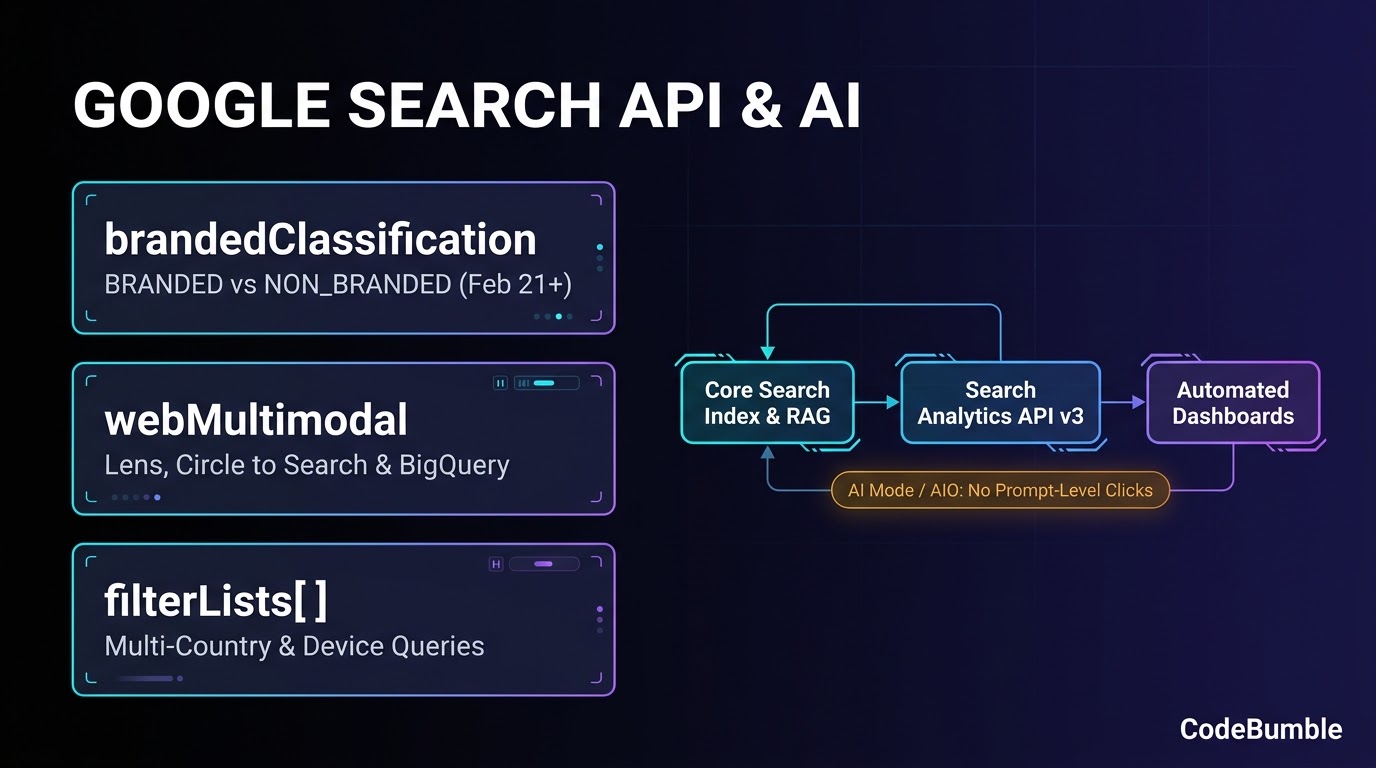
On November 16, 2026, Google's Search Console team shipped three programmatic reporting capabilities to the Search Analytics API: brandedClassification (BRANDED vs. NON_BRANDED), type: "webMultimodal" (covering Google Lens, Circle to Search on Android, and image uploads), and filterLists[] for multi-country and multi-device queries in a single request. Four days later, on November 20, 2026, Search Engine Land reported sharp pushback from SEOs and publishers over Google's AI search guidance, which urged brands to measure leads and sales rather than "unproven proxy metrics" even though Search Console still aggregates AI Overviews and AI Mode clicks inside general web totals without prompt-level or AI-surface click breakdowns.
This technical guide separates confirmed Google Search Central documentation from independent click-through telemetry, details the exact JSON payloads and constraints of the November 2026 Search Analytics API release, and outlines a zero-budget measurement workflow using Search Console, BigQuery, and preview controls.
| Capability / Surface | Availability (Nov 2026) | API / Documentation Status | Key Constraint |
|---|---|---|---|
brandedClassification |
Live in API (data from Feb 21, 2026) | Search Analytics: query | equals only; cannot combine with query filter; eligible top-level properties only |
type: "webMultimodal" |
Live in API & BigQuery bulk export | Search Central Blog | Covers Lens, Circle to Search, and Search image uploads; no conversion attribution |
filterLists[] |
Live in API (country, device) |
Search Analytics: query | Cannot filter the same dimension in both filters[] and filterLists[] |
| AI Overviews & AI Mode | Aggregated in web search type |
AI Features Docs | No separate prompt-level or AI-surface click breakdown in the Search Analytics API |
How the Ranking, Retrieval, and Reporting Pipeline Works
To understand why the reporting gap persists, it helps to trace how Google retrieves pages for classic Search versus AI Overviews and AI Mode, and where Search Console logs those impressions and clicks.
According to Google's Guide to Optimizing for Generative AI Features on Google Search (updated July 10, 2026) and its AI Features documentation (updated December 10, 2025), generative AI features on Google Search are rooted in core Search ranking and quality systems rather than a separate index. Specifically, Google documents two retrieval mechanisms:
- Retrieval-Augmented Generation (RAG / Grounding): Google's models rely on core Search ranking systems to retrieve relevant, up-to-date web pages from the Search index, then extract supporting facts and display clickable links.
- Query Fan-Out: For complex or multi-part prompts—especially in AI Mode—the model issues multiple concurrent, related sub-queries across subtopics and data sources (for example, turning
"how to fix a lawn that's full of weeds"into fan-out queries for"best herbicides for lawns","remove weeds without chemicals", and"how to prevent weeds in lawn").
flowchart LR
    U[User Query or Visual Input] --> R{Search Surface}
    R -->|Classic / Multimodal| IDX[Core Search Index]
    R -->|AI Overviews / AI Mode| FO[Query Fan-Out + RAG Grounding]
    FO --> IDX
    IDX --> SERP[SERP: Web Links, AI Citations, Lens Results]
    SERP --> GSC[Search Console & Search Analytics API v3]
    GSC -->|type=web| W[Combined Web + AI Overviews / AI Mode]
    GSC -->|type=webMultimodal| M[Lens, Circle to Search, Image Uploads]
    W -->|brandedClassification| B[BRANDED vs NON_BRANDED]
What Google Says You Can Ignore vs. What SEOs Observe
In its official AI optimization guide, Google explicitly lists several tactics circulating as "AEO" or "GEO" optimizations that site owners can ignore for Google Search:
llms.txtand special AI text files: Google states that Google Search itself does not usellms.txtfiles or special Markdown/AI markup, and maintaining them neither helps nor harms Google Search rankings.- Artificial content "chunking": Google's systems parse multi-topic pages without requiring publishers to split content into tiny standalone fragments.
- Rewriting for exact-match AI phrasing or chasing inauthentic mentions: Semantic matching handles synonyms, while spam systems filter out manipulative mentions.
- Special "AI schema": No special
schema.orgtype is required for AI Overviews or AI Mode; eligibility depends on being indexed and eligible to appear in Google Search with a snippet.
However, empirical studies and practitioner feedback reported by Search Engine Land on November 20, 2026 highlight a sharp tension between Google's framing and observed click behavior:
- Google-commissioned Ipsos survey (December 2025, 25 markets): Cited by Google VP Brendon Kraham, this self-reported shopping survey found that consumers who used AI during shopping journeys visited 12 touchpoints (nearly 3x as many as non-AI users), and 3 in 4 shoppers using AI Overviews or AI Mode reported faster, more confident decisions. Critics noted that the published summary does not disclose how many of those 12 touchpoints occurred on Google-owned properties versus open-web sites.
- Pew Research Center (March 2025, 900 U.S. adults): Found that users clicked traditional search results in 8% of visits when an AI summary appeared, compared with 15% without one. Only 1% of visits with AI summaries resulted in a click on a cited source, and users ended their browsing sessions after 26% of searches with AI summaries versus 16% without.
- Seer Interactive (June 2024 – September 2025): Documented a 61% decline in organic click-through rates for informational queries featuring AI Overviews.
- Reporting opacity: While Search Console introduced a Generative AI performance report beta in 2026 and counts AI Overviews/AI Mode traffic inside the
"Web"search type, SEOs criticized the lack of prompt-level fan-out visibility and AI-surface-separated click/conversion exports in the Search Analytics API.
Confidence note: The Search Analytics API specifications, Google's RAG/query fan-out architecture, and the Pew, Seer, and Ipsos figures are directly verified from the cited primary documentation and November 20, 2026 reporting; how Google internally classifies specific BRANDED vs. NON_BRANDED edge cases is proprietary and not publicly disclosed.
Actionable Playbook & Free Tool Stack
Even without prompt-level AI Mode exports, engineering and SEO teams can use the November 16, 2026 Search Analytics API additions to eliminate fragile regex brand lists, isolate visual/multimodal discovery, and automate regional reporting at zero tool cost.
1. Segment Branded vs. Non-Branded Demand via brandedClassification
Previously, automating branded versus non-branded reporting required maintaining brittle RE2 regular expressions for brand misspellings and product lines. With brandedClassification, Google groups or filters rows into BRANDED or NON_BRANDED server-side.
Documented constraints to handle in code:
- Only the
equalsoperator is supported indimensionFilterGroups[].filters[]. - You cannot combine
brandedClassification(either as adimensionor afilter) with aqueryfilter in the same API request. - Data is available starting February 21, 2026, and only for eligible top-level properties with sufficient query and impression volume (ineligible properties return zero rows).
{
  "startDate": "2026-10-20",
  "endDate": "2026-11-16",
  "dimensions": ["date", "brandedClassification"],
  "type": "web",
  "dimensionFilterGroups": [
    {
      "groupType": "and",
      "filterLists": [
        {
          "dimension": "country",
          "expressions": ["USA", "GBR", "CAN", "AUS"]
        },
        {
          "dimension": "device",
          "expressions": ["DESKTOP", "MOBILE"]
        }
      ]
    }
  ],
  "rowLimit": 25000
}
2. Track Visual & Multimodal Discovery with type: "webMultimodal"
Setting "type": "webMultimodal" returns impressions, clicks, CTR, and average position from Google Lens, Circle to Search on Android, and image uploads in Google Search. For properties with an active Search Console bulk data export, this data also flows into BigQuery.
{
  "startDate": "2026-10-20",
  "endDate": "2026-11-16",
  "dimensions": ["page", "country"],
  "type": "webMultimodal",
  "rowLimit": 5000
}
Practical takeaway: If you publish product pages, hardware specs, or original diagrams, pairing webMultimodal tracking with Image SEO best practices lets you measure visual search growth separately from classic web text results—and spot whether traffic shifts during the November 2026 core update (which began rolling out November 10, 2026) are text-driven or visual-driven.
3. Replace Multi-Call Loops with filterLists[]
Instead of issuing separate API calls per country or stitching long regexes, filterLists[] accepts an array of exact-match ISO 3166-1 alpha-3 country codes (country) or device types (DESKTOP, MOBILE, TABLET) in a single request. Note that a single request cannot filter on the same dimension in both filters[] and filterLists[] simultaneously.
4. Apply Granular Preview Controls Where AI Citations Misrepresent Content
In the November 20, 2026 backlash, recipe publisher Inspired Taste alleged that AI Overviews generated inaccurate versions of its recipes under its brand name. Google's AI Features documentation confirms that standard preview controls govern what can be surfaced in Search AI features:
nosnippetormax-snippet:[number](via<meta name="robots">orX-Robots-TagHTTP header) to cap or suppress snippet text.data-nosnippetHTML attribute on specific<div>,<span>, or<section>blocks (such as proprietary formulas, exact step-by-step recipes, or gated pricing tables) to exclude those sections from snippets and AI grounding while keeping the page indexed.Google-Extendedinrobots.txtto limit AI training and grounding in certain non-Search Google AI systems without blocking Googlebot for Search indexing.
<!-- Keep page indexed while shielding proprietary calculation blocks from snippets -->
<section data-nosnippet>
  <h3>Proprietary Benchmark Dataset</h3>
  <p>Exact methodology and raw table rows excluded from search snippets.</p>
</section>
Technical Audit & Execution Checklist
Run these checks using free, native tooling (Google Search Console, URL Inspection, Search Analytics API v3, and GA4) to validate your implementation and isolate reporting shifts:
- Verify
brandedClassificationeligibility: Run a testsearchAnalytics.querycall with"dimensions": ["brandedClassification"]for a date range on or after2026-02-21. If the response returns emptyrows, confirm you are querying the top-level domain/URL-prefix property rather than a subfolder property, and verify the site meets query volume thresholds. - Audit
filterLists[]payloads for conflicts: Inspect automated Python or Apps Script connectors to ensure no dimension appears in bothfilters[]andfilterLists[]within the samedimensionFilterGroupsobject, which triggers an API validation error. - Separate
webMultimodalfromwebin BigQuery / dashboards: If you use Search Console bulk export to BigQuery, verify your SQL views segmentwebMultimodalrows so visual search impressions do not get conflated with classic SERP clicks. - Cross-check core update volatility: Because the November 2026 core update began rolling out on November 10, 2026 (up to 2 weeks), wait at least one full week after Google marks the incident resolved on the Search Status Dashboard before attributing traffic changes to content or AI Overviews.
- Validate preview controls via URL Inspection: After adding
data-nosnippetormax-snippet, inspect the live crawled HTML in Search Console's URL Inspection tool to confirm Googlebot renders the attribute (especially on JavaScript-rendered frameworks). - Correlate landing-page engagement in GA4: Pair Search Console page-level
webclicks with GA4 average engagement time and conversion events per landing page to test whether lower-CTR informational pages still drive higher-intent sessions, as Google claims.
Frequently Asked Questions
1. Does the November 2026 Search Analytics API update expose AI Overviews or AI Mode clicks separately?
No. While Google added brandedClassification, type: "webMultimodal", and filterLists[] to the Search Analytics API on November 16, 2026, clicks and impressions from AI Overviews and AI Mode remain bundled inside the standard "web" search type in the API, without a dedicated searchAppearance or prompt-level breakdown.
2. Why did brandedClassification return an empty response for my property?
Per the Search Analytics: query reference, brandedClassification data is only available starting February 21, 2026, and only for top-level properties that meet sufficient query and impression volume thresholds. It also fails if combined with a query filter in the same request.
3. Does Google Search require an llms.txt file for AI Overviews or AI Mode?
No. Google's Optimizing for generative AI features guide explicitly states that Google Search does not use llms.txt files or special AI markup, and adding one neither helps nor harms Google Search visibility.
4. Can I block AI Overviews without deindexing my site from Google Search?
You can limit or prevent text from appearing in snippets and AI features using nosnippet, max-snippet, or block-level data-nosnippet attributes, as documented in AI Features and Your Website. However, Google notes that Google-Extended does not control inclusion in Google Search itself; Googlebot and snippet controls govern Search.
5. What should teams watch during the November 2026 core update?
Google started rolling out the November 2026 core update on November 10, 2026, with an estimated rollout of up to two weeks. Avoid making reactive structural changes mid-rollout; use brandedClassification and webMultimodal to separate brand-demand shifts and visual search fluctuations from non-branded organic ranking changes.
Sources
- Google Search Central Blog — New filtering and reporting capabilities in the Search Analytics API (Published November 16, 2026): https://developers.google.com/search/blog/2026/11/search-analytics-api-update
- Google Search Console API Reference — Search Analytics: query (Updated November 16, 2026): https://developers.google.com/webmaster-tools/v1/searchanalytics/query
- Search Engine Land — Google's AI search advice sparks backlash from SEOs (Published November 20, 2026): https://searchengineland.com/google-ai-search-advice-seo-backlash-502610
- Google Search Central Documentation — Optimizing your website for generative AI features on Google Search (Updated July 10, 2026): https://developers.google.com/search/docs/fundamentals/ai-optimization-guide
- Google Search Central Documentation — AI Features and Your Website (Updated December 10, 2025): https://developers.google.com/search/docs/appearance/ai-features
- Google Search Status Dashboard — November 2026 core update (Started November 10, 2026): https://status.search.google.com/incidents/WLxcJyC6jMWMfryxsKMc
- Search Engine Roundtable — Google Search Analytics API Adds Branded Queries, Multimodal & Country/Devices Filters (Published November 16, 2026): https://www.seroundtable.com/google-search-analytics-api-addition-42544.html