

SEO
Google Search Console Generative AI Performance Report Logging Bug (Nov 9–11, 2026): Separating Telemetry Errors from the Core Update
Google has confirmed a logging error in the Search Console Generative AI performance report that caused an artificial drop in AI Overviews and AI Mode impressions from November 9 to November 11, 2026—right as the November 2026 Core Update began rolling out. Here is how to verify the anomaly and filter it from your reporting pipelines.
8 min read
Google Search Console Generative AI Performance Report Logging Bug (Nov 9–11, 2026): Separating Telemetry Errors from the Core Update
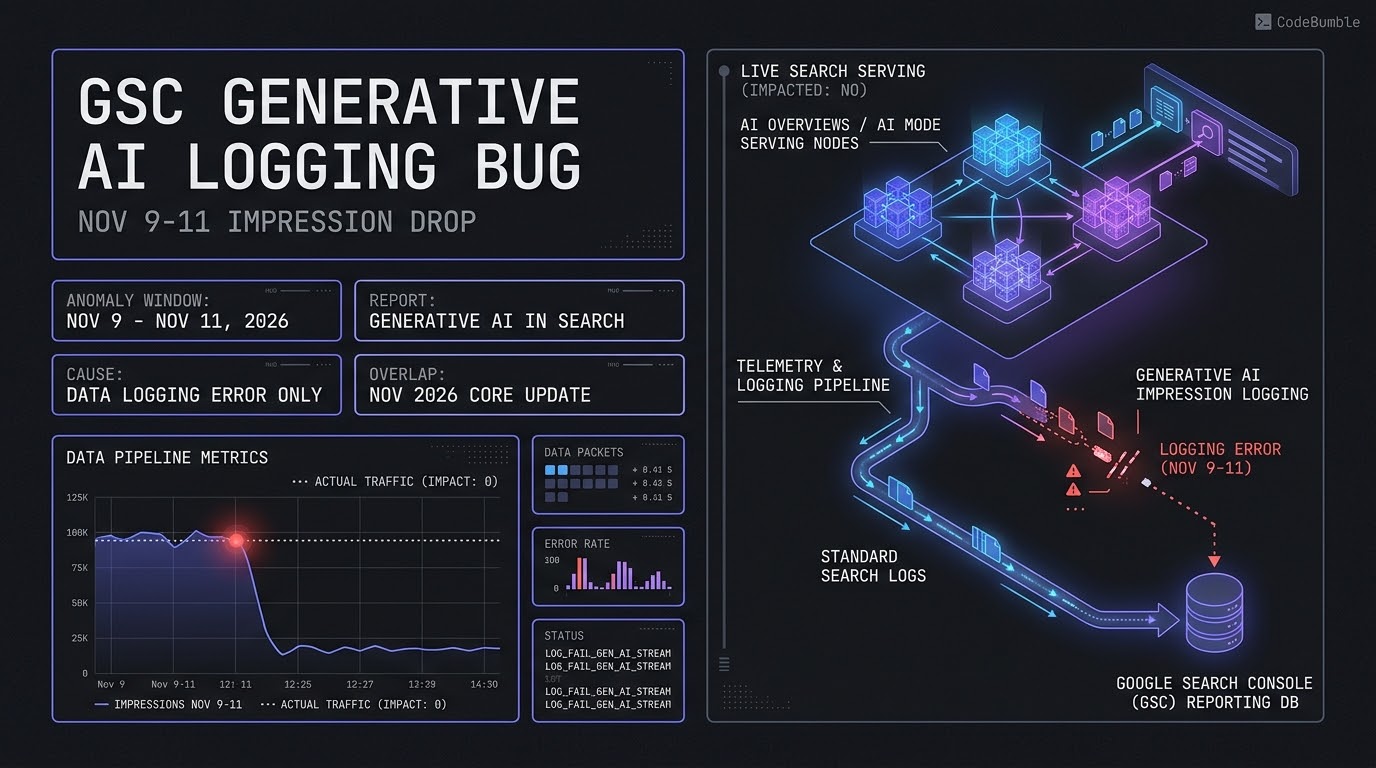
Executive Summary
On November 12–13, 2026, Google confirmed a telemetry logging error in the Google Search Console Generative AI performance report in Search affecting impression counts from November 9 through November 11, 2026. Published on Google's official Data anomalies in Search Console log and corroborated by Search Engine Roundtable, Search Engine Land, and Search Engine Watch, Google's notice states verbatim:
"A logging error caused a decrease in impressions on the Generative AI performance report in Search for data from November 9 - November 11, 2026. This issue affects data logging only."
For technical SEOs and analytics engineers, the timing creates a dangerous diagnostic trap. The logging error began on November 9—one day before Google initiated its November 2026 Core Update at 18:06 UTC on November 10, 2026. Teams reviewing Search Console dashboards mid-week can easily misinterpret the artificial three-day impression cliff in AI Overviews and AI Mode as an immediate algorithmic demotion.
Three operational realities define this incident:
- Zero Live Search Serving Impact: The bug is strictly confined to Search Console's reporting and logging pipeline. Actual site visibility, citations, and user impressions inside AI Overviews and AI Mode were unaffected.
- Repeated Telemetry Fragility in 2026: This is the second logging outage in the Generative AI in Search report since its global rollout on August 31, 2026 (following a similar August 13–17, 2026 logging drop), and arrives alongside an early-November bot-click spike and October 60-hour reporting delays.
- Mandatory Pipeline Exclusion: Automated Looker Studio dashboards, BigQuery Search Console bulk exports, and Python baseline scripts comparing pre- and post-core-update performance must explicitly exclude or annotate the November 9–11, 2026 window to prevent skewed executive reporting.
2026 Search Console Anomaly Context
The November 9–11 logging error is part of a broader pattern of reporting-layer anomalies documented on Google's Data anomalies in Search Console page during 2026:
| Anomaly Window (2026) | Affected Report / Surface | Root Cause / Impact | Operational Effect |
|---|---|---|---|
| Nov 9 – Nov 11 | Generative AI Performance Report (Search) | Data logging error | Artificial decrease in reported AI Overview / AI Mode impressions |
| Aug 13 – Aug 17 | Generative AI Performance Report (Search) | Data logging error | Artificial decrease in reported AI impressions |
| Aug 13 | Discover & Generative AI in Discover | Data logging error | Artificial drop in reported Discover clicks and impressions |
| Jun 24 / May 21 / May 7–8 | Discover Performance Report | Data logging errors | Single- and multi-day drops in Discover clicks/impressions |
| May 7 onwards | FAQ Rich Results | Feature deprecation | FAQ rich results stopped appearing in Search |
| Apr 16 – Apr 27 | Job Listing & Job Details | Data logging error | Missing impressions and clicks for Job Search appearance types |
Technical Mechanics: Telemetry Pipeline Failure vs. Live Serving
Understanding why a logging error drops reported impressions without altering real user traffic requires separating Google Search's serving plane from its analytics aggregation plane.
+-----------------------------------------------------------------------------+
|             GOOGLE SEARCH SERVING VS. SEARCH CONSOLE LOGGING PLANE          |
+-----------------------------------------------------------------------------+
|                                                                             |
|  [ LIVE SEARCH SERVING PLANE (UNAFFECTED) ]                                 |
|   User Query ---> Search Ranking + Gemini Grounding ---> AI Overviews / Mode|
|                                       |                                     |
|                                       +---> User Sees Links & Clicks Page   |
|                                       |     (Recorded in Web Search Clicks) |
|                                       v                                     |
|  [ TELEMETRY & LOGGING PIPELINE (DEGRADED NOV 9-11) ]                       |
|   Serving Impression Events ---> Log Ingestion & Aggregation                |
|     |-- Standard Web Search Pipeline ---> Intact                            |
|     +-- Generative AI Feature Pipeline ---> LOGGING ERROR (Nov 9 - Nov 11)  |
|                                              |                              |
|                                              v                              |
|                             [ Search Console Reporting DB ]                 |
|                             - System Annotation Added: Nov 9-11             |
|                             - Chart Shows Artificial Impression Drop        |
+-----------------------------------------------------------------------------+
1. What the Generative AI Performance Report Actually Measures
Rolled out worldwide to all properties as of August 31, 2026, the Generative AI performance report (Search) tracks impressions only (not clicks) for links to your site displayed inside AI Overviews and AI Mode. Clicks from AI Overviews and AI Mode are still counted—they are aggregated inside the main Performance report (Search) under the Web search type, with no built-in filter to isolate AI clicks from traditional organic clicks.
2. Why Property vs. Page Aggregation Matters
As Google's documentation notes, the Generative AI report aggregates data by property when grouped by country, device, or date, and by page (canonical URL) when grouped by page. Furthermore, Search Console excludes Search Labs experiments from this report. During the November 9–11 logging error, dropped telemetry events in the Generative AI ingestion stream caused both chart totals and canonical-URL table rows to undercount actual AI impressions, while the main Web Search report continued recording clicks normally.
3. The Core Update Collision (November 10, 2026)
Because Google launched the November 2026 Core Update on November 10 at 18:06 UTC—right in the middle of the November 9–11 logging drop—automated alerting scripts that monitor Search Console daily deltas will fire false-positive "AI visibility collapse" alerts.
Evidence: Confidence Level and Verification Signals
- Confidence Level: High. Google explicitly confirmed the logging error via an in-product system annotation on the Generative AI performance report and via its Data anomalies in Search Console documentation.
- Independent Verification: Search Engine Land, Search Engine Roundtable, and Search Engine Watch all reproduced screenshots showing the steep impression drop beginning Monday, November 9, 2026, paired with Google's official system annotation.
- Limitations: Google has not published the exact percentage of undercounted impressions per property (e.g., whether a property lost 30% or 90% of logged AI impressions during the three-day window), and backfilling lost logging data is generally not performed for Search Console logging anomalies.
Hardening Playbook: Anomaly Filtering, Annotations, and Reporting Hygiene
Analytics engineers and SEO leads should implement the following five steps to keep executive dashboards and core-update post-mortems accurate.
Step 1: Verify the System Annotation in Search Console
Open Search Console → Performance → Generative AI in Search and confirm the system annotation marker spanning November 9–11, 2026. Remember that per Google's Search Console Annotations documentation, chart annotations are hidden when you enable Comparison mode or 24-hour views—so always inspect the default multi-day view first.
Step 2: Add a Custom Core-Update Annotation for Stakeholders
To ensure anyone reading your property's charts over the next 500 days understands the overlap between the logging bug and the core update, add a custom annotation (up to 120 characters, max 200 annotations per property):
- Right-click the chart on November 10, 2026 in the main Performance report.
- Add a concise note (avoiding any PII), such as:
Nov 2026 Core Update began 18:06 UTC; GenAI report had Nov 9-11 logging bug.
Step 3: Filter Out Nov 9–11 in Automated Python / API Pipelines
If you pull Search Console data via the API or BigQuery into automated anomaly detectors or Looker Studio reports, explicitly mask the corrupted three-day window when computing rolling averages or core-update baselines:
import pandas as pd

ANOMALY_DATES = {"2026-11-09", "2026-11-10", "2026-11-11"}

def compute_clean_ai_baseline(csv_path: str) -> dict:
    """Computes clean pre-core-update AI impression metrics excluding Nov 9-11 logging bug."""
    df = pd.read_csv(csv_path)
    if "date" not in df.columns or "impressions" not in df.columns:
        raise ValueError("Expected 'date' and 'impressions' columns in GSC export.")

    clean_df = df[~df["date"].isin(ANOMALY_DATES)].copy()
    pre_update = clean_df[clean_df["date"] < "2026-11-10"]
    post_bug = clean_df[clean_df["date"] >= "2026-11-12"]

    return {
        "excluded_anomaly_rows": int(df["date"].isin(ANOMALY_DATES).sum()),
        "pre_update_avg_impressions": round(float(pre_update["impressions"].mean()), 2) if not pre_update.empty else 0.0,
        "post_bug_avg_impressions": round(float(post_bug["impressions"].mean()), 2) if not post_bug.empty else 0.0,
    }
Step 4: Cross-Check Web Search Clicks and Server Logs
Because clicks from AI Overviews and AI Mode are still logged in the main Performance report (Web search type) and on your origin/CDN access logs:
- Compare
clickson your top AI-cited canonical URLs in the main Search performance report from November 9–11 against November 2–4. - Verify in server/CDN logs that
Googlebotcrawl rates and200 OKresponse ratios remained normal across those dates.
Step 5: Rollback and Remediation Notes
- Do Not Toggle "Search Generative AI Control": Never switch your Search generative AI control setting or modify
nosnippet/Google-Extendeddirectives in response to a reporting dip. Excluding your site removes your links and grounding eligibility within 1–2 days, turning a harmless reporting bug into a real visibility loss. - Wait for Post-Core-Update Stabilization: Google recommends waiting at least one full week after the November 2026 Core Update finishes rolling out before evaluating real performance changes.
Frequently Asked Questions
1. Did the November 9–11 Search Console bug reduce my actual traffic from AI Overviews or AI Mode?
No. Google explicitly confirmed that "This issue affects data logging only." Your pages continued appearing and receiving clicks in AI Overviews and AI Mode normally; only the impression counts logged into the Generative AI performance report were underreported.
2. Why did the Generative AI impression drop happen at the same time as the November 2026 Core Update?
It was a coincidence in timing. The logging error began on November 9, whereas Google launched the November 2026 Core Update on November 10 at 18:06 UTC. Do not attribute the November 9–11 chart cliff to the core update.
3. Will Google backfill the missing Generative AI impressions from November 9–11?
Google's announcement does not promise a data backfill, and historically Search Console logging errors remain permanently visible in historical exports with a system annotation on the chart.
4. Why can't I see clicks in the Generative AI performance report?
The Generative AI performance report (Search) displays impressions only. Clicks from AI Overviews and AI Mode are counted inside the standard Performance report (Search) under the Web search type alongside regular organic clicks.
5. Why don't I see the system annotation when comparing two date ranges?
Search Console system and custom annotations do not appear in Comparison mode or 24-hour views. Switch back to a standard single date-range view (e.g., Last 28 days) to see the annotation marker.
Sources
- Google Search Console Help: Data anomalies in Search Console — Official Search Console anomaly log (November 2026).
- Google Search Console Help: Generative AI performance report (Search) — Official report documentation (2026).
- Search Engine Roundtable: Google Search Console Generative AI Performance Report Data Bug Nov 9 - 11 — Published November 12, 2026.
- Search Engine Land: Google Search Console performance report data bug Nov 9 -11 — Published November 12, 2026.
- Search Engine Watch: Google Search Console confirms AI performance report data bug — Published November 13, 2026.