

SEO
Google Search HTTP Referer Attribution: 4 Reasons Your Server Logs Drift From Search Console
Google Search Central's November 12, 2026 documentation details exact HTTP Referer values across Web, Android, and iOS, plus the 4 blank-Referer causes and 4 GSC-vs-logs drift factors. Includes Python and Nginx attribution code.
9 min read
Google Search HTTP Referer Attribution: 4 Reasons Your Server Logs Drift From Search Console
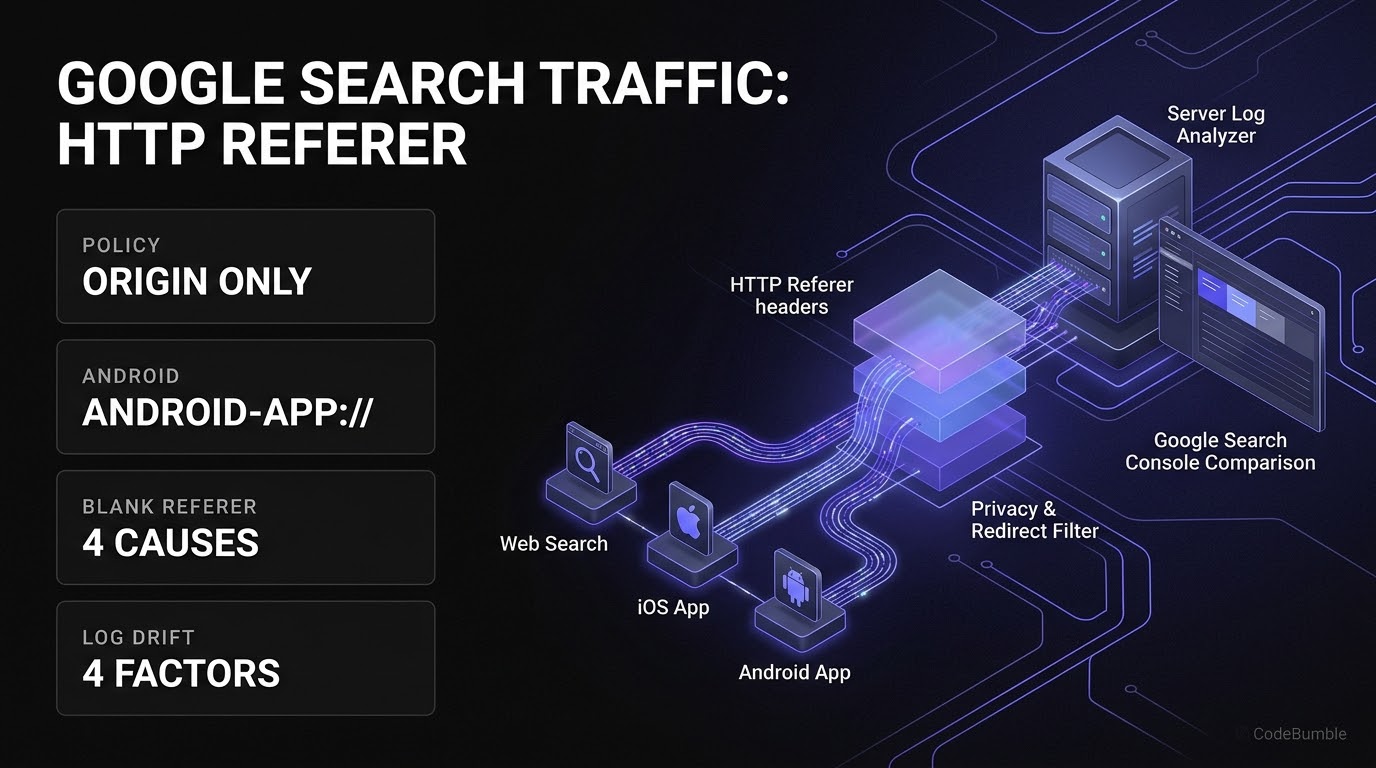
Executive Summary
On November 12, 2026, Google Search Central published a new technical reference—Identify Google Search traffic in your web analytics or server logs (announced as "Added a new page about identifying traffic from Google Search using HTTP Referer headers" and covered by Search Engine Roundtable on November 12 and in its November 13, 2026 Daily Search Forum Recap)—documenting the exact HTTP Referer headers sent when users click links from Google Search, Discover, and Google Images.
Because JavaScript-based analytics tags are frequently blocked by browser privacy protections, consent banners, and ad blockers, inspecting server-side HTTP Referer headers gives engineering and technical SEO teams an independent signal of organic search arrivals. However, Google's new documentation clarifies two critical realities that cause naive log-parsing scripts to undercount or misclassify traffic:
- Origin-Only Referrer Policy: Google Search sets its
Referrer-Policytoorigin, meaning theRefererheader contains only the scheme and host (such ashttps://www.google.com/), never the search query or URL path. - 4 Blank-Referer Scenarios & 4 GSC-vs-Logs Drift Factors: Private browsing, new-tab opens, native mobile search widgets, client-side redirects, and click-versus-load measurement differences routinely create gaps between Google Search Console (GSC) click totals, web analytics sessions, and raw server logs.
This guide breaks down the exact Referer patterns across Web, Android, and iOS surfaces, provides production-safe Python, Nginx, and read-only log-auditing queries, and outlines a verification playbook to prevent redirect loops, analytics misconfigurations, or strict Referrer-Policy headers from erasing your attribution data.
Official Google Search Referer Values by Surface
Per Google Search Central (published November 12, 2026), traffic from Google Discover and Google Images shares these exact same origin patterns:
| Google Surface | Exact HTTP Referer Value(s) |
Technical Notes |
|---|---|---|
| Google Search on the Web | https://www.google.com/ or local ccTLD (https://www.google.co.uk/, https://www.google.co.jp/, etc.) |
Uses origin referrer policy; path and query string are omitted |
| Google App on Android | android-app://com.google.android.googlequicksearchbox/https/www.google.com or https://www.google.com/ (or local ccTLD) |
Uses the android-app:// scheme when the app opens the link in a browser tab |
| Google App on iOS | https://www.google.com/ or local Google domain |
Same origin pattern as web search; note native widget transitions may strip Referer |
Note that if Google Search traffic appears missing or is unexpectedly bucketed under Referral or Direct inside a web analytics platform despite matching these Referer values at the edge, Google advises auditing custom channel grouping rules, referral exclusion lists, and active reporting filters before assuming a crawling or indexing drop.
Technical Mechanics and Architecture
How Referer Headers Flow—and Where Attribution Drops
When a user clicks a search result, the browser or Google App attaches an origin-scoped Referer header to the initial HTML document request. Subsequent subresource requests (CSS, JavaScript, images, and fonts) carry your own page's URL as their Referer—meaning log parsers must filter strictly to HTML landing-page requests (200 OK / 304, text/html) rather than counting every asset fetch on the page:
+-----------------------------------------------------------------------------+
|       GOOGLE SEARCH HTTP REFERER FLOW & 4 ATTRIBUTION DRIFT POINTS          |
+-----------------------------------------------------------------------------+
|                                                                             |
|  [ GOOGLE SEARCH SURFACES (Referrer-Policy: origin) ]                       |
|   |-- Web / iOS App  -> Referer: https://www.google.com/ (or local ccTLD)   |
|   +-- Android App    -> Referer: android-app://...googlequicksearchbox/...  |
|             |                                                               |
|             v                                                               |
|  [ BROWSER & CLIENT PRIVACY BOUNDARY (4 Blank-Referer Causes) ]             |
|   1. Private browsing & anti-fingerprinting modes                           |
|   2. Opening results in a new tab (browser-dependent)                       |
|   3. Native mobile search widget -> external browser handoff                |
|   4. Privacy extensions or strict browser Referer settings                  |
|             |                                                               |
|             v                                                               |
|  [ ORIGIN SERVER / CDN / ANALYTICS (4 GSC-vs-Logs Drift Factors) ]          |
|   1. JS blockers/consent (hits logs, misses JS analytics)                   |
|   2. Client-side JS/meta redirects or strict Referrer-Policy overwrites     |
|   3. GSC counts SERP click vs. Analytics counts full page load              |
|   4. Paid Ads vs. Organic separation in analytics                           |
+-----------------------------------------------------------------------------+
Defensive & Technical SEO Code 1: Accurate Google Search Referer Matcher in Python
To avoid false positives from subresource fetches (style.css, app.js, .png) or spoofed substrings (such as evil-google.com), parse the Referer URL strictly and match only verified Google ccTLD hostnames or the exact Android googlequicksearchbox URI prefix on HTML document paths:
import re
from urllib.parse import urlparse

# Matches www.google.com, www.google.co.uk, www.google.com.au, etc.
GOOGLE_HOST_RE = re.compile(r"^www\.google\.[a-z]{2,3}(\.[a-z]{2})?$", re.IGNORECASE)
ANDROID_APP_PREFIX = "android-app://com.google.android.googlequicksearchbox/"
ASSET_EXT_RE = re.compile(r"\.(css|js|png|jpe?g|webp|svg|woff2?|ico|map)$", re.IGNORECASE)

def is_google_search_landing_hit(
    request_path: str,
    status_code: int,
    referer: str,
) -> bool:
    """
    Returns True if an HTTP access-log entry represents a landing-page visit
    from Google Search (Web, iOS, or Android App) per Google Search Central docs.
    """
    if status_code not in (200, 304) or ASSET_EXT_RE.search(request_path):
        return False

    if not referer or referer == "-":
        return False

    if referer.startswith(ANDROID_APP_PREFIX):
        return True

    parsed = urlparse(referer)
    return parsed.scheme == "https" and bool(GOOGLE_HOST_RE.match(parsed.hostname or ""))
Defensive & Technical SEO Code 2: Preserving Attribution Across Server-Side Redirects
As Google's November 12 documentation warns, client-side redirects (JavaScript window.location or <meta http-equiv="refresh">) overwrite the Referer header with your own domain, and redirects that drop query strings erase gclid tags. Always use server-side 301 / 308 redirects that preserve query parameters ($request_uri in Nginx) and avoid overly restrictive Referrer-Policy: no-referrer headers on redirect hops:
# Preserve query strings and avoid client-side JS redirects on canonicalization
server {
    listen 80;
    server_name example.com www.example.com;
    return 301 https://www.example.com$request_uri;
}

server {
    listen 443 ssl http2;
    server_name www.example.com;

    # Safe default that preserves origin referrer across internal hops
    add_header Referrer-Policy "strict-origin-when-cross-origin" always;
}
Evidence: The 4 Blank-Referer Causes and 4 GSC-vs-Logs Drift Factors
Google's November 12, 2026 documentation explicitly enumerates why server logs, JavaScript analytics, and Google Search Console rarely agree 1:1:
- 4 Reasons the
RefererHeader Is Blank:- Private browsing & anti-fingerprinting: Incognito/private modes and browser anti-fingerprinting protections strip
Refereror blockdocument.referrer. - New-tab opens: Certain browsers omit
Refererwhen users open search results in a new tab. - Native mobile search widgets: Moving from a native OS search widget to an external browser drops the header.
- Privacy extensions: Ad blockers and strict browser privacy settings suppress
Refererby default.
- Private browsing & anti-fingerprinting: Incognito/private modes and browser anti-fingerprinting protections strip
- 4 Reasons Analytics/Logs Diverge from Search Console:
- Privacy & script blocking: Consent banners, privacy settings, and ad blockers stop JavaScript analytics tags or strip query parameters even when the server log records the HTTP
200hit. - Site redirects: Client-side redirects (JavaScript or meta refresh) replace
Refererwith your own URL, misconfigured redirects stripgclidquery strings, and stricterReferrer-Policyheaders suppressReferer. - Click vs. Load methodology: Search Console counts a click the moment a user selects a link on the SERP; analytics tools record a visit or session only after the destination page loads and executes tracking code.
- Paid vs. Organic mixing: Search Console reports organic clicks only, whereas
https://www.google.com/Refererheaders appear on both organic and paid clicks unless analytics or log pipelines explicitly segment them.
- Privacy & script blocking: Consent banners, privacy settings, and ad blockers stop JavaScript analytics tags or strip query parameters even when the server log records the HTTP
- Confidence Level: High on all
Refererstrings,originpolicy behavior, and discrepancy causes (sourced directly from Google Search Central's November 12, 2026 specification). Benchmark Caveat: Google's documentation does not publish a global percentage breakdown of how often browsers strip theRefererheader across iOS, Android, and desktop cohorts; teams should baseline their owndirect / blank-refererratio on landing pages alongside Search Console clicks.
Technical SEO & Attribution Playbook
Step 1: Audit Server Logs Strictly on HTML Landing Pages
Update your log-analysis pipeline (BigQuery, Splunk, or Python batch jobs) to filter out static assets (.css, .js, images, fonts) before matching Referer headers, so you count landing-page visits rather than subresource fetches. For quick command-line triage on standard Nginx/Apache combined access logs, run a read-only awk check that excludes asset extensions and tallies Google Referer origins:
awk -F'"' '
  $2 !~ /\.(css|js|png|jpe?g|webp|svg|woff2?|ico|map) / &&
  ($4 ~ /^https:\/\/www\.google\./ || $4 ~ /^android-app:\/\/com\.google\.android\.googlequicksearchbox\//) {
    counts[$4]++
  }
  END { for (r in counts) print counts[r], r }
' /var/log/nginx/access.log | sort -nr | head -n 20
Step 2: Add android-app://com.google.android.googlequicksearchbox/ to Custom Parsers
Many legacy regexes only check google. domains and miss Android Google App tab launches (android-app://com.google.android.googlequicksearchbox/https/www.google.com). Add the exact ANDROID_APP_PREFIX check and verify your web analytics tool isn't classifying it as Direct or Referral due to custom channel rules, referral exclusions, or reporting filters.
Step 3: Replace Client-Side Redirects with Query-Preserving 301/308 Redirects
Crawl your site for JavaScript redirects, <meta http-equiv="refresh"> tags, and HTTP-to-HTTPS or trailing-slash redirects that drop query parameters (gclid, utm_*) or emit Referrer-Policy: no-referrer.
Step 4: Cross-Check Paid vs. Organic Segmentation
Remember that https://www.google.com/ appears in Referer for Google Images, Discover, organic Search, and Google Ads. Segment paid landings via gclid before comparing log-derived organic totals against Search Console's organic click counts.
Step 5: Rollback Notes
If changing your edge Referrer-Policy header from no-referrer to strict-origin-when-cross-origin conflicts with a specific sensitive route (such as password-reset token URLs or internal admin callbacks), apply Referrer-Policy: no-referrer only on those sensitive path prefixes (/auth/reset*, /admin*) rather than site-wide.
Frequently Asked Questions
1. Can HTTP Referer headers tell me which keyword a user searched on Google?
No. Google Search uses the origin referrer policy, which sends only the scheme and host (for example, https://www.google.com/) without the URL path or search query parameters.
2. Why do my server logs show fewer Google Search visits than Search Console clicks?
Search Console counts a click when the user selects a link on the SERP, whereas your server only logs a Google-attributed visit if the page finishes loading with an intact Referer. Private browsing, new-tab opens, mobile search widgets, and strict privacy extensions all send blank Referer headers.
3. Does the Referer header distinguish Google Search from Discover or Google Images?
No. Per Google's November 12, 2026 documentation, Discover and Google Images send the exact same origin Referer values as Google Search.
4. Why does Android Google App traffic look different in server logs?
When the Google app on Android opens a search result in a browser tab, it sends android-app://com.google.android.googlequicksearchbox/https/www.google.com as the Referer instead of a standard https:// URL.
5. Why do I see my own domain as the Referer on some Google Search landings?
Two common causes: either you are inspecting subresource requests (CSS/JS/images, which always carry your page's URL as Referer), or a client-side JavaScript/meta-refresh redirect on your site overwrote the original Google Referer header.
6. Why is Google Search traffic showing up as Referral or Direct in my analytics tool?
Google's documentation notes that if Search traffic is missing or misclassified as Referral or Direct, you should inspect your analytics platform's custom channel grouping rules, referral exclusion lists, and active property filters—in addition to checking whether client-side redirects or browser privacy settings are stripping the Referer header.
Sources
- Google Search Central: Identify Google Search traffic in your web analytics or server logs — Published November 12, 2026.
- Search Engine Roundtable: Google Explains How To Identifying Traffic From Google Search — Published November 12, 2026.
- Search Engine Roundtable: Daily Search Forum Recap: November 13, 2026 — Published November 13, 2026.