

Engineering
Microsoft 365 Global Outage (EX1550543 / MO1550821): Cascading Cloud Coupling, Health-Check Failures, and Enterprise Resilience Architecture
Microsoft 365 incidents EX1550543 and MO1550821 disrupted Outlook, Teams scheduling, SharePoint, Copilot, and Defender XDR globally on November 12-13, 2026. Here is the systems engineering breakdown of the metastable health-check failure, ThousandEyes network telemetry, and out-of-band resilience patterns.
10 min read
Microsoft 365 Global Outage (EX1550543 / MO1550821): Cascading Cloud Coupling, Health-Check Failures, and Enterprise Resilience Architecture
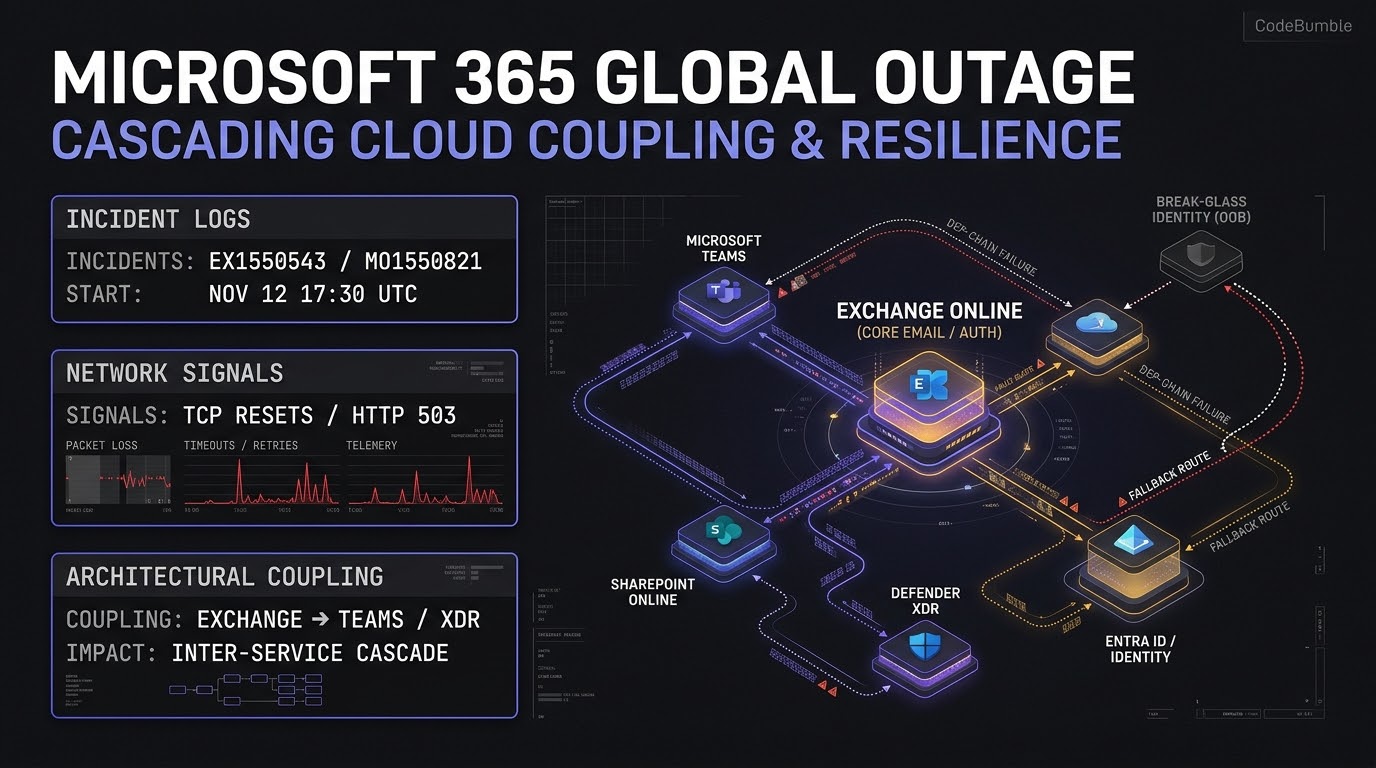
Executive Summary
Beginning on November 12, 2026, and extending into November 13, 2026, Microsoft experienced a major global service disruption centered on Exchange Online (Incident EX1550543) and cascading across the broader Microsoft 365 ecosystem (Incident MO1550821). According to UC Today and SecurityWeek, Microsoft opened EX1550543 at 16:17 UTC on November 12, warned of global multi-region impact at 18:07 UTC, and escalated to MO1550821 at 18:26 UTC.
Independent active network probing by Cisco ThousandEyes observed global availability degradation starting around 17:30 UTC on November 12—characterized by TCP connection resets, connection refusals, response timeouts, HTTP 5xx server errors, and significant packet loss inside Microsoft's network. As of 03:00 UTC and 11:01 UTC on November 13, recovery remained uneven: Microsoft completed staged recovery actions in parts of Asia-Pacific and extended an email timeout window to 48 hours to protect queued mail, while Outlook and Exchange-dependent services continued experiencing intermittent instability.
Three architectural lessons stand out for systems engineers and platform architects:
- Capacity Collapse Under Normal Demand (Not a Cyberattack): Microsoft Executive Vice President Charles Lamanna and Microsoft's service advisories stated there was no indication of malicious activity. Overall inbound traffic did not surge; instead, a process responsible for establishing secure connections became overwhelmed, causing servers to fail automated health checks and drop out of rotation—forcing remaining healthy nodes into overload.
- The Recovery Paradox (Thundering Herd on Restart): When Microsoft engineers initially restarted failed servers, returning production traffic immediately overwhelmed them again, causing early fixes to fail until teams implemented a staged traffic-drain, restart, and controlled return-to-service cycle.
- Hidden Single-Ecosystem Coupling: While Microsoft Teams voice calls, meetings, and basic chats largely remained operational, every workflow coupled to the Exchange Online mailbox layer—including calendar scheduling, Teams channel creation, SharePoint/OneDrive integrations, Microsoft 365 Copilot, parts of Microsoft Defender XDR and Purview, and third-party AI connectors from OpenAI and Anthropic—suffered cascading degradation.
Incident Timeline and Network Telemetry
Cross-referencing Cisco ThousandEyes, SecurityWeek, UC Today, and RansomNews establishes the verified chronology of the disruption (note that Microsoft has not yet published its formal 48-hour preliminary or 5-day final Post-Incident Review as of November 13, 2026):
| Timestamp (UTC) | Source / System | Observed Event or Operational Action |
|---|---|---|
| Nov 12, 16:17 UTC | Microsoft Admin Center | Incident EX1550543 opened for Exchange Online access failures |
| Nov 12, 17:30 UTC | Cisco ThousandEyes | Global probing detects TCP resets, connection refusals, timeouts, and packet loss |
| Nov 12, 18:07–18:26 UTC | Microsoft 365 Status | Advisory warns users "in any region" affected; broader incident MO1550821 opened |
| Nov 12, ~18:30 UTC | Downdetector / Media | Outlook user reports surge past 120,000–140,000 at peak |
| Nov 12, ~20:00–22:00 UTC | Microsoft Engineering | Teams note failing automated health checks, elevated CPU, and network config rollback |
| Nov 13, 03:00 UTC | Cisco ThousandEyes | Widespread Outlook timeouts and internal packet loss persist globally |
| Nov 13, 06:56–09:03 UTC | Microsoft Engineering | Initial fixes show marginal stability; teams shift to staged traffic drain and restart |
| Nov 13, 11:01 UTC | Microsoft Status | Asia-Pacific recovery actions complete; 48-hour email timeout window active |
Technical Mechanics: Cascading Health-Check Failure and Coupled Dependencies
From a distributed systems engineering perspective, the November 12–13 outage illustrates two classic failure modes in hyperscale SaaS platforms: metastable overload via health-check ejection and synchronous dependency coupling.
+-----------------------------------------------------------------------------+
|         METASTABLE OVERLOAD & CASCADING DEPENDENCY ARCHITECTURE             |
+-----------------------------------------------------------------------------+
|                                                                             |
|  [ 1. TRIGGER & HEALTH-CHECK CASCADE ]                                      |
|   Network Config / Connection-Setup Process Overwhelmed                     |
|     ---> Elevated CPU & TLS/Secure-Connection Queue Saturation              |
|     ---> Automated Health Checks Fail ---> Load Balancers Eject Nodes       |
|     ---> Remaining Nodes Absorb 100% Traffic ---> Metastable Collapse       |
|                                                                             |
|  [ 2. THE RECOVERY PARADOX (THUNDERING HERD) ]                              |
|   Naive Server Restart ---> Node Returns to Pool ---> Unbounded Retry Flood |
|   ---> Immediate Re-Saturation ---> Staged Drain + Slow Ramp Required       |
|                                                                             |
|  [ 3. DOWNSTREAM ECOSYSTEM COUPLING ]                                       |
|   [ Exchange Online (EX1550543) ] <--- Core Dependency                      |
|      |-- Outlook Web / Desktop / Mobile (HTTP 503 / TCP Resets)             |
|      |-- Teams Calendar Invites, Channel Creation, Live Events              |
|      |-- SharePoint / OneDrive / Planner / To Do / Intune                   |
|      |-- Microsoft 365 Copilot & Third-Party AI Connectors (OpenAI/Anthropic)|
|      +-- Microsoft Defender XDR / Purview Alerting & Email-Based 2FA        |
+-----------------------------------------------------------------------------+
1. Metastable Capacity Collapse
When Microsoft noted that overall external traffic had not increased, yet remaining servers became overwhelmed, it described a textbook metastable failure. Once a subset of connection-handling servers fails automated health checks (triggered here by an overwhelmed secure-connection setup process and elevated CPU usage alongside a recent network configuration change), load balancers remove those instances from the active pool. The unchanged baseline traffic concentrates onto fewer surviving nodes, pushing them past their saturation knee and triggering a self-sustaining cascade.
2. Why Naive Restarts Fail (The Recovery Paradox)
Microsoft reported that early attempts to restart affected servers failed because instances immediately became unresponsive again upon receiving production traffic. In distributed systems, clients, mobile apps, and queued webhooks accumulate massive retry backlogs during an outage. Returning a restarted node straight into full load-balancer rotation exposes it to a burst of queued connection handshakes—re-triggering the exact secure-connection bottleneck before caches or worker pools warm up. Recovery requires traffic draining, circuit breaking, and gradual weighted ramp-up per region (as Microsoft initiated in Asia-Pacific by 11:01 UTC on November 13).
3. Correlated Failure Across Security and Identity
As ShieldWorkz and Wire highlight, relying on a single vendor ecosystem for both primary operations and incident response creates correlated failure:
- Admin & Runbook Lockout: When Exchange Online and SharePoint degrade, teams that store incident runbooks in SharePoint, coordinate on Teams, and read status alerts in the Microsoft 365 Admin Center lose their control plane simultaneously.
- Email-Based 2FA Lockouts: Organizations using email-delivered one-time passcodes (OTPs) for third-party SaaS apps found users locked out of unrelated business systems when mailboxes stalled.
- Shadow IT & Phishing Exposure: Employees improvising with personal Gmail or consumer messengers bypass DLP and audit logs, while threat actors (as warned by ING Bank in Australia) exploit outage confusion with fake "fix" phishing lures.
Evidence: Confidence Level and Attribution
Confidence Level: High on timeline, network symptoms (TCP resets, timeouts, HTTP 5xx, packet loss), and affected service scope; Partial on internal root cause pending Microsoft's formal Post-Incident Review (PIR).
- Verified Telemetry: Cisco ThousandEyes' active synthetic probing confirms packet loss and connection resets within Microsoft's edge/core network from 17:30 UTC on November 12 through at least 03:00 UTC on November 13.
- Attribution: Both Microsoft (via EVP Charles Lamanna and service health advisories) and government briefings (such as Australia's Home Affairs Minister Tony Burke) state there is no evidence of a cyberattack. Observed capacity loss under flat external demand contradicts a volumetric DDoS hypothesis.
- Unknowns: Microsoft has not yet publicly confirmed the exact software defect in the secure-connection process or whether the rolled-back network configuration change was the primary trigger or a secondary amplifier.
Hardening Playbook: Resilience Engineering and Out-of-Band Continuity
Systems architects and IT leaders should treat the November 12–13 outage as a live chaos-engineering audit of their cloud dependency graph. Execute the following steps to eliminate single-ecosystem coupling and prevent retry storms in your own services.
Step 1: Audit Out-of-Band (OOB) Incident Communication and Runbooks
Ensure your incident response plane does not share a fate with your primary productivity suite:
- Mirror Critical Runbooks: Store emergency contacts, DNS registrar credentials, and recovery playbooks in an independent repository or read-only offline/secondary cloud store outside Microsoft 365 / SharePoint.
- Establish OOB Comms: Maintain an independent messaging channel (separate cloud provider, identity provider, and domain) for executive and SOC crisis coordination.
Step 2: Eliminate Email-Based MFA Dependencies
Audit all internal and SaaS identity providers to remove email-delivered OTPs as a primary or fallback factor:
- Enforce FIDO2/WebAuthn hardware keys or TOTP authenticator apps so authentication survives a corporate mail outage.
- Maintain tested break-glass administrator accounts that do not depend on federated Exchange/cloud mail flows for password resets.
Step 3: Implement Circuit Breakers and Jittered Backoff in Graph/M365 Integrations
Applications, AI agents, and internal microservices polling Microsoft Graph or Exchange Web Services (EWS) can inadvertently amplify upstream outages through aggressive retries. Enforce bounded exponential backoff with full jitter and circuit breaking:
import random
import time
import urllib.request
import urllib.error

class CircuitBreakerOpenError(Exception):
    pass

class ResilientGraphClient:
    """Defensive HTTP client with circuit breaker and jittered backoff."""
    def __init__(self, failure_threshold=5, recovery_timeout=60):
        self.failure_threshold = failure_threshold
        self.recovery_timeout = recovery_timeout
        self.failures = 0
        self.opened_at = None

    def _check_circuit(self):
        if self.opened_at is not None:
            if time.monotonic() - self.opened_at < self.recovery_timeout:
                raise CircuitBreakerOpenError("Circuit open: skipping upstream call")
            # Half-open probe allowed after recovery_timeout
            self.opened_at = None
            self.failures = 0

    def get_with_backoff(self, url, headers, max_attempts=4, base_delay=1.0):
        self._check_circuit()
        for attempt in range(max_attempts):
            try:
                req = urllib.request.Request(url, headers=headers, method="GET")
                with urllib.request.urlopen(req, timeout=5.0) as resp:
                    self.failures = 0
                    return resp.read()
            except (urllib.error.HTTPError, urllib.error.URLError, TimeoutError) as exc:
                self.failures += 1
                if self.failures >= self.failure_threshold:
                    self.opened_at = time.monotonic()
                    raise CircuitBreakerOpenError(f"Circuit tripped after {self.failures} failures") from exc
                if attempt == max_attempts - 1:
                    raise
                # Full jitter backoff to prevent thundering herd on recovery
                sleep_s = random.uniform(0, min(30.0, base_delay * (2 ** attempt)))
                time.sleep(sleep_s)
Step 4: Verify Health Endpoints and External Synthetic Monitoring
Do not rely solely on a vendor's admin center—which may itself be unreachable during an outage—to detect degradation. Run independent synthetic checks and bookmark public status endpoints:
- Public Status Fallback: Monitor
status.cloud.microsoftand@MSFT365Statuswhenadmin.microsoft.comtimes out. - Automated Probe Check:
    # Verify TLS handshake and HTTP status against Outlook/Graph endpoints with strict timeouts
curl -sS -o /dev/null -w "dns:%{time_namelookup}s tls:%{time_appconnect}s ttfb:%{time_starttransfer}s code:%{http_code}\n" \
  --connect-timeout 5 --max-time 10 https://outlook.office365.com/
Step 5: Hunt for Outage-Themed Phishing and Shadow IT Leakage
Whenever a major cloud outage occurs, adversaries deploy fake "urgent patch" or "mailbox recovery" lures, and staff shift to unsanctioned channels:
- Mail Gateway Rule: Flag or quarantine inbound messages containing subjects referencing
EX1550543,MO1550821, or "Outlook outage fix" from external senders. - SIEM / Proxy Check: Monitor outbound traffic to consumer webmail or unapproved file-sharing domains during degraded periods and remind staff of approved OOB channels.
Step 6: Rollback and Post-Incident Verification Notes
- Do Not Reconfigure Mail Routing Mid-Outage: Avoid emergency MX record changes or client profile deletions during a provider-side capacity outage; Microsoft's 48-hour extended timeout window is designed to drain queued mail once capacity stabilizes.
- Post-Recovery Audit: Once
EX1550543andMO1550821close, verify queued mail delivery, reconcile missed Defender XDR/Purview alerts from the degradation window, and review DORA/NIS2 incident-reporting thresholds if regulated.
Frequently Asked Questions
1. Was the November 12–13, 2026 Microsoft 365 outage caused by a cyberattack?
No. Microsoft EVP Charles Lamanna and Microsoft's service health advisories stated there is no indication of malicious or cyber activity. Microsoft also confirmed overall traffic volume did not spike; instead, internal servers failed health checks and lost capacity.
2. What are Incident IDs EX1550543 and MO1550821?
EX1550543 tracks the core Exchange Online disruption (opened November 12 at 16:17 UTC), while MO1550821 tracks the broader cascading Microsoft 365 impact across Outlook, Teams scheduling, SharePoint, OneDrive, Copilot, and Defender XDR.
3. Why did Microsoft Teams calls keep working while calendar invites and Copilot failed?
Core Teams voice, video meetings, and group chats operate on separate media/messaging paths, whereas calendar scheduling, invites, channel creation, and work-data Copilot queries depend directly on the Exchange Online mailbox layer.
4. Should IT administrators delete Outlook profiles or change DNS MX records during the outage?
No. Because the failure is server-side inside Microsoft's infrastructure, resetting user passwords, reinstalling Outlook, or modifying MX records will not restore access and can disrupt queued mail delivery.
5. Why did early server restarts fail to restore Microsoft 365 immediately?
When failed servers were restarted and placed back into rotation, accumulated client retry traffic immediately overwhelmed their secure-connection handling again—a classic thundering-herd recovery paradox requiring staged traffic draining and controlled ramp-up.
Sources
- Cisco ThousandEyes: Microsoft 365 Outage Analysis: November 12, 2026 — Published November 12–13, 2026.
- SecurityWeek: Microsoft 365 Outage Disrupts Outlook, Exchange Online and Teams — Published November 12, 2026.
- UC Today: Microsoft 365 Outage: Teams Held While Outlook Stayed Down — Updated November 13, 2026.
- ShieldWorkz: Cascading failure in the Cloud Core: Investigative assessment of the November 2026 global Microsoft outage — Published November 12, 2026.
- RansomNews: Microsoft 365 outage: was it a cyberattack? What we know — Published November 13, 2026.
- Wire: Microsoft 365 Outage: When One Vendor Fails, Everything Fails — Published November 13, 2026.